1
3573160A00 DHD4000 UM2.qxd
09/02/2004
13:17
Page 10
Using your DVR
Using the Quick Guide
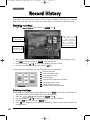
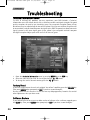
When you are watching TV you can find out what else is on other channels without interrupting
your viewing using the TV Quick Guide. This is the small banner that appears at the bottom of
the screen during channel changes or when you press an arrow key.
Shows the
current time
and date
Shows the
channel
name
Shows the
programme
duration
Shows the
programme
name and
start time
Shows short
details of the
programme
The box shows the channel condition:Green - Current, Yellow - Paused, Red - Recording
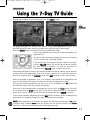
To change the view to show different times during the day use the
left and right arrows.
To see what’s on another channel use the up and down arrows.
If you see a programme you want to watch, press O K .
If the programme is on now the DVR will change to it immediately. If it is on later, the DVR will
automatically set a programme reminder for you.
L
10
N O T E : The 7 day programme guide receives it’s information overnight (about 3am) so if you
switch your DVR off overnight the Quick Guide will only show what is on Now or Next. We
recommend that you leave the DVR in standby overnight.