1
Courtesy of: DiscountCarStereo.com
3.
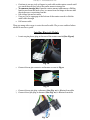
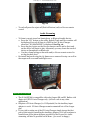
Connect the black 2-pin matching connector on short harness (See Fig 17
below) to the blue plug. Connect the 2-pin Molex connector to
microphone (See Fig. 18)
Fig. 18
Fig. 17
4.
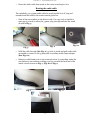
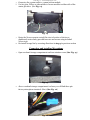
Find suitable location to mount microphone using included Velcro strip.
Angle microphone for best possible sound. (this may require test calls and
feedback)
Fig. 19
5.
Coil excess wire from microphone and hide above storage compartment.
Secure store compartment
Pairing and testing Phone
1.
2.
3.
4.
5.
6.
Turn ignition to “ON” or start vehicle
Enable Bluetooth on phone and allow searching for devices.
Select Novero from list
Wait for the kit to confirm pairing
See user manual (CD) included with kit for help using the control module.
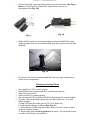
To make a phone call simply press the voice dial button for > 1 sec and
follow prompts:
a. Radio will mute the audio source (CD, AUX, Radio etc)
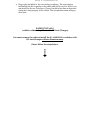
b. Radio display changes to Phone (See Fig. 20)
c. Adjust phone volume using the radio volume control or rotary control
on Novero remote control
d. Phone audio plays on all 4 speakers (in mono). Use the mode button
on radio to fade front/ rear speakers