1
Courtesy of: DiscountCarStereo.com
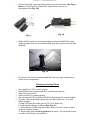
Fig. 20
7.
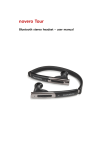
To end call press the reject call/End call button (red) on Novero remote
control
Audio Streaming
1.
2.
To listen to music stored on Smartphone or Bluetooth audio device:
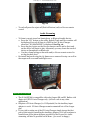
a. Press the “CD” button on the radio. Default Track and Disc number will
be displayed but only if there is a DISC in the CD Auto Changer
otherwise “NO MAGAZINE” is displayed. See Fig. 16.
b. Press the play button on the Novero remote control and to first track
on the device will begin to play. Alternately you may locate the track of
choice on Smartphone or Bluetooth
c. Use the volume setting on the radio and/or Novero remote control to
set the playback level
Re-install Amp rack using the (4) 8mm screws removed in step 1 as well as
the carpet rack cover and brake light cover.
Fig. 16
IMPORTANT NOTES:
1. The iP-JAGBT kit is compatible with select Jaguar XK and XJ Radios with
Alpine Ai-NET CD Auto Changer only. (will not work in any other
application)
2. Requires a CD Auto Changer (i.e. LNF4160AA) for the Auxiliary input
adapter to work. CD Auto Changer remain connected but will no longer
play
3. If you wish to retain use of the CD Auto Changer simply ignore the first
part of this tutorial (installing the Auxiliary Adapter). You will continue to
benefit from all the phone features provided by the Novero kit. Audio
streaming will also be possible but in Mono (you won’t be happy)