1
Performing a Mixdown:
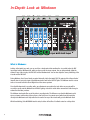
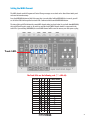
While the 2880 is idle, press the MIXDOWN button once. You should see the MIXDOWN LED light up solid. When
the MIXDOWN LED is lit solid, the 2880 is ready for normal MIXDOWN.
At this point you can either press RECORD to jump right into Mixing Down or you can press PLAY to rehearse the
Mixdown. It is up to you. If you don’t like the first Mixdown, you can always try again.
Pressing PLAY while in Mixdown mode is exactly like pressing PLAY when any of the other tracks are active, you will
not do anything to change the audio already on any of the tracks. You are simply listening back to what you have.
When you are ready, either from the Idle or Playback modes, press the RECORD button. Immediately the Mixdown
track will begin recording the audio that your 4 tracks are outputting. You do not have to start the loop from the
beginning when mixing down, you can start in the middle.
Once you are finished with the Mixdown, press either RECORD or PLAY to stop recording.
After the Mixdown:
When you complete a Mixdown track, it is usually a good idea to listen and see if you like it. If you need to fix
something, try it again. If you re-do a Mixdown, it is usually a good idea to move the Mixdown fader down to 0.
You can overdub onto the Mixdown track as many times as you like, the MIXDOWN fader will act like a feedback
control on a delay effect. This means you could go record 4 more tracks and mix the new tracks down onto the
MIXDOWN track. Your mixdown track would end up with 8 mixed tracks.
Using external cables, you could bounce the Mixdown track back to one or two of the recorded tracks. If you do this
remember to bring down the DRY OUT slider.
You could enter the Constant Tempo Mixdown mode and produce some flanging or pitch bend effects. See below
for more info.
To exit Mixdown mode, press the Mixdown button until its LED shuts off or press the TRACK SELECT button to cycle
through the 4 tracks.
What is Constant Tempo (CT) Mixdown:
During the Normal Mixdown, the Mixdown track records at the same tempo that the 4 tracks playback. Meaning all
tracks are locked in at the same speed at all times, just like on a multi-track tape recorder. This speed is set by the
TEMPO slider or the external MIDI Clock. You can move the TEMPO slider while recording a normal Mixdown track,
but when you play it back, you will not hear any changes in pitch.
Constant Tempo Mixdown mode locks the Mixdown track in at the tempo or speed you recorded the initial loop but
allows you to change the speed of the 4 Recorded tracks, using the TEMPO slider. This enables you to produce a
Mixdown track with subtle effects like Flanging or more drastic effects like pitch bending.
When you put the 2880 into Constant Tempo Mixdown mode, the TEMPO Slider becomes a tempo change percentage
control. The range is from -1 octave to +1 octave, with 0% change in the middle. When you push the TEMPO slider
to the top, the 4 recorded tracks will double their tempo, when it is pushed down to the bottom, the 4 Recorded
tracks will halve their tempo.
20