1
Pa ge 3
Q uillen Q uick Notes
From the Developer Zone
Add Clinical Item (ACI)
The ACI is your workplace for recording and ordering items that are added to the patient’s health
record, including medical history, past and present problems, new orders and prescriptions, and
orders with clinical content that are created based on specific problems.
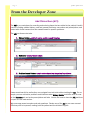
The ACI has three main tabs:
1. History Builder—add/edit active problems and histories
2. RxOrders—create/record orders
3. Problem-based Orders—create orders based on the patient’s problems
Users sometimes fail to realize they can navigate from tab to tab without exiting the ACI. For example, you can add active problems and histories under History Builder and then move on over
to the RxOrders tab and order prescriptions and labs. You do not have to close the ACI, and then
re-open it in the next section.
We encourage users to explore and ask questions. Review use of the ACI in your user manual.
Efficiency can be improved, making both the patient and the clinician happier.