1
Pololu USB AVR Programmer User's Guide
© 2001–2010 Pololu Corporation
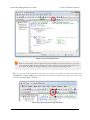
on the bottom of the robot. If there was a problem, please see Troubleshooting (Section 7) for help identifying and
fixing it.
3.b.1. Using Advanced Features of AVR Studio
This section provides a brief overview of the programming features of AVR Studio that were not covered in Section 3.b.
You will not typically need to use of these advanced features, but it is good to know about them for the rare occasions when
you will need them. Please see the Atmel’s AVR Studio documentation for more detailed descriptions of these features.
ISP Frequency
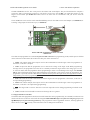
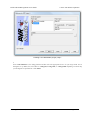
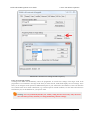
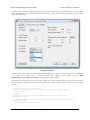
In the ISP window, under the Main tab, the Programming Mode and Target Settings section lets you set the frequency
of the clock used when programming the target device. The higher the ISP frequency, the faster the target AVR will be
programmed, but this frequency must be less than a quarter of the target AVR’s clock frequency. Click Read to read the
frequency from the programmer and click Write to write the selected frequency to the programmer. It is important to
note that the frequencies in the ISP Freq list are not correct when you are using the Pololu USB AVR programmer. See
Section 3.d for a list of the actual frequencies and more information about selecting the ISP frequency.
3. Getting Started in Windows
Page 20 of 40