1
Power
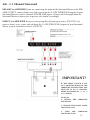
Connect the supplied 9V plug-pack to the DC Power input of your Surround Master and then plug
it into the electrical wall outlet.
Congratulations! You are now ready to experience surround sound at its finest.
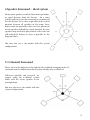
Switches
On the front panel there are two switches.
The left-hand switch is the POWER switch:
LEFT – Power off (pass-through mode)
NOTE: When the Surround Master is switched off the signal will pass through the unit
as if it was not there.
RIGHT – Power on.
The right hand switch is for MODE selection:
LEFT – TSS(Two Speaker Surround)
RIGHT - 4ch / 5.1ch
IMPORTANT NOTE!
If you change modes from 2 to 4 channels or the other way around, the unit must be turned off and
back on after 5 seconds, to allow the software to reset to the new mode.
10