1
3) Amplifier Settings
If you have a surround sound amplifier your amplifier may be set to a particular mode which will
negate the Surround Master experience. Ensure you have your amplifier set to a pass through mode
such as “Direct Mode”. Please refer to your amplifier manual for further instructions.
If you leave your amplifer set on Pro Logic II, Theatre or other surround sound enhancement modes you will cancel the Surround Master surround sound experience.
4) Connections
Cables
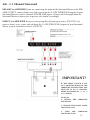
Three cables (RCA) are provided with your Surround Master. You will find these beneath the
cardboard insert within the Surround Master packaging. One is an input cable to connect your
Stereo Out signal to the Surround Master line input jacks. Two additional cables are provided
with three plugs on each end. These cables can be used to connect your Audio amplifiers with the
Surround Master.
These cables are included to ensure your Surround Master can be used immediately. You may want
to use higher quality cables as they may improve the quality of your system.
The Surround Master always accepts left/right stereo inputs for all modes. Connect these either
directly to your source (CD, DVD, TUNER or TV) line cable outputs OR to the pre-out of your
amplifier.
6