1
!
Ingoing traffic:
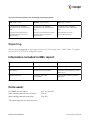
3manager agent will download the latest configuration when changed, and it will check MIB library to
always get the latest MIB information, when working with printers.
Check for new configuration:
Use latest MIB library:
Software update:
Checks for new configuration every
10 minute.
Online check is following the
frequency of the polling.
Checks for new version every 2
hours.
The 3manager snmp agent will contact http://service.3manager.net/AgentConfigService.svc
3manager web portal will not produce any ingoing traffic.
Outgoing traffic:
3manager agents sends XML reports after a configured frequency. All from every 15 minutes to daily.
Data are send as HTTP or encrypted HTTPS to service.3manager.net. This “traffic point” will route
data to either the hosted server or local hosted server.
E-mail alerts:
All e-mail alerts will be generated and sent from the 3manager web server and not from the client
installation site. The SNMP agent is not capable of sending any e-mail.
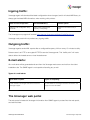
Types of e-mail alerts:
Agent failed to update:
Agent not responding:
E-mail created on 3manager web server and sent to
3manager support.
E-mail created on 3manager web server and sent to the
support contact at reseller.
The 3manager web portal
The web portal is hosted at 3manager. Information from SNMP agent is pushed into the web portal,
and archived here.
3manager documentation!
Visit 3manager Help Desk