1
Note: In many cases, it is sufficient to record one speaker position (but all microphone
positions required by the chosen impulse response format), and create a mono/omni
discrete impulse response. This will result in a less CPU-intensive impulse response in
the required format. See Recording a Mono to Omni 5 Channel Impulse Response.
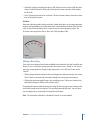
• One or more microphones to record the resulting audio from each speaker (or your
starter pistol) combined with its echo reflections. The number of microphones you will
need depends on the chosen impulse response format. As examples; if you are recording
a six channel surround impulse response, there are six microphone positions, so ideally
you would have six microphones; if you are recording a six channel B-Format encoded
impulse response—where only one microphone position and four tracks are
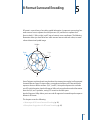
required—you would need fewer microphones, and so on. See B-Format Surround
Encoding for more information.
• An audio interface that offers enough outputs to send a broadband audio sine sweep
into each speaker (if using sine sweeps), and enough inputs to record the resulting
audio from each position.
Note: You may also need additional microphone pre-amplifiers if you find that your
microphones can’t capture a strong enough signal, or your audio interface doesn’t offer
enough mic pre-amp inputs.
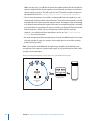
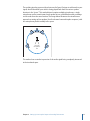
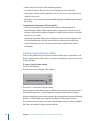
Example of speakers and microphones set up to capture a 5.1 multi-channel impulse response
L
Ls
10
C
Surround
microphone
tree
R
Rs
Audio interface
Chapter 2 Setting Up Your Impulse Response Recording Environment
Computer