1
or by several of the WorkBench tools. These tools are available from the menu or
toolbar buttons. A right-mouse click will also offer tools that are appropriate to a final
temperature file (file must be selected).
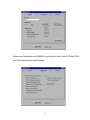
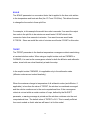
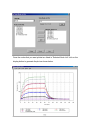
During a transient solution a temperature plot file is generated if the program
constant PLOT is set to a non-zero value in the CONTROL DATA block.
Temperature in the file can by plotted with the XY PLOT tool by selecting PLOT X-Y
toolbar button. Alternatively, the menu, or a right-mouse click will also offer tools that
are appropriate to a plot file.
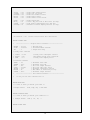
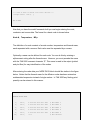
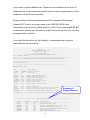
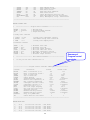
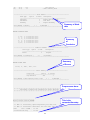
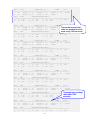
Your output file should look like the following. It is annotated here to help you
understand the various sections.
------------------------------------------------------------------------------TAK 2000
Thermal Analysis Kit 2000
Release 1.0, DEMO
K & K Associates
*** TO BE USED FOR EVALUATION PURPOSES ONLY ***
Serial Number: 265100
------------------------------------------------------------------------------Input File: C:\PROGRAM FILES\KK ASSOCIATES\TAK 2000 DEMO\SAMPLES\BAR.TAK
C-------------------------------------------------------------------------C TAK 2000 Version 1.0
C-------------------------------------------------------------------------HEADER OPTIONS DATA
UID
SOLRTN
Logic
= SI
$ Model Units
= FWDWRD $ Solution routine
= Off
$ User logic
QPrint
GPrint
CPrint
CSGDump
NCVPrint
HPrint
LPrint
=
=
=
=
=
=
=
On
Off
Off
Off
Off
Off
Off
$
$
$
$
$
$
$
Print
Print
Print
Print
Print
Print
Print
QDump
PlotQ
LodTmp
AutoDamp
=
=
=
=
Off
On
Off
On
$
$
$
$
Print network map
Create .PLQ plot file of heat rates (SS Only)
Load initial temperatures from .INI file
Automatic solution damping function (SS Only)
Dictionaries = Off
impressed heat rates
conductor values
nodal thermal masses
noal CSG values
NCV conductor status
heater status
thermal louver status
Summary of
Program Options
$ Print actual/relative data dictionaries
-------------------------------- Options Summary -------------------------------Option
Default
Current
Description
------------------------------------------------------------------------LOGIC
OFF
OFF
Compile/Link User Logic
AUTODAMP
ON
ON
Automatic Relaxation Factor, S.S. Only
QDUMP
OFF
OFF
Generate Network Heat Flow Map
LODTMP
OFF
OFF
Load Initial Temperatures From .INI File
CSGDUMP
OFF
OFF
Print nodal CSG data
QPRINT
OFF
ON
Print Impressed Heating Rates
23