1
International Journal of Computer Applications (0975 – 8887)
International Conference on Information and Communication Technologies (ICICT- 2014)
Touch screen controller is the key to this design. Currently there
are variety of microcontrollers are available in market.
Considering price, speed and flexibility and other factors, a high
cost-effective chip LPC2103 based on ARM7TDMI-S CPU of
Philips Semiconductors Pvt Ltd is used. LPC2103 includes an 8
analog to digital conversion channels with conversion time as
low as 2.44u Sec, which is key requirement to implement touch
screen controller, and also 32 general purpose input / output ports
along with, multiple serial interfaces including UARTs, I2C
buses, SPI and SSP.
Of all the kinds of touch screens available, resistive touch screens
are easy to interface, cost effective and they have fair sensitivity.
Resistive Touch screens are simple transducers. This touch
screen has a resistive layers in both X and Y directions.
According to the position of the touch, their X coordinate and Y
coordinate resistance changes. So, we have to measure the X and
Y coordinates resistance to get the position of the touch in terms
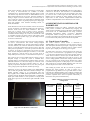
of X and Y coordinate position. Fig 2 gives the simple structure
of resistive Touch Screen.
To interface resistive Touch screen with a host microcontroller,
we need a microcontroller with inbuilt Analog-to-Digital
converter. ARM7TDMI-S CPU provides eight Analog-to-Digital
converter channels, out of this two channels are utilized for this
purpose. To read the position of the touch, we have to first read
touch position sequentially i.e. first read X position and then read
Y position. To do this, we connected X1 and Y2 pins of Touch
screen to ADC multiplexed GPIO pins of LP2103, i.e. P0.22 and
P0.23 respectively. And X2 and Y1 pins of Touch screen to
simple GPIO pins of LPC2103, i.e. P0.20 and P0.22 respectively.
TFT LCDs are class of Active Matrix displays, belong to type of
flat-panel display in which the screen is refreshed more
frequently than in conventional Passive Matrix display, and uses
individual transistors to control the charges on each cell in the
liquid-crystal layer. The silicon transistor matrix in a TFT is
typically composed of amorphous silicon (a-Si). They have good
color, good greyscale reproduction, and fast response [9].
Interfacing of TFT LCD display module with ARM7TDMI-S
CPU is done using Parallel 6800-series Interface technique. The
Parallel interface consists of 18 bi-directional data pins
D[17:0],𝑅/𝑊 , D/𝐶 , E and𝐶𝑆. 𝑅/𝑊 input HIGH indicates a read
operation from the Graphical Display Data Ram i.e. GDDRAM.
𝑅/𝑊 input LOW indicates a write operation to Display Data
RAM. The E input serves as data latch signal when 𝐶𝑆 is LOW
[6] [12].
The data lines DB0-DB7 and DB8-DB15 of TFT LCD module is
connected to P0.8-P0.15 and P0.24-P0.31 of ARM7TDMI-S
CPU respectively. Note that two bits are discarded, since 8-bits
per color are used. Control signal lines RS, WR, RD, CS and
RESET pins are interfaced to simple General purpose Input /
Output Ports of host controller. Implementation method and
workflow of implementation will be discussed in next section.
4. IMPLEMENTATION METHOD AND
WORKFLOW
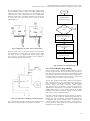
Implementation consists two phases, controlling and reading
touch position coordinates and simultaneously mapping the
Touch position coordinates to TFT LCD display. Implementation
work carried out on ARM7TDMI-S CPU using Crossware
Embedded Development Studio. Crossware’s Embedded
Development Studio leverages the features of windows to
provide a development environment that allows the programmer
to concentrate on the primary task of software development.
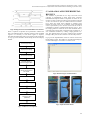
4.1. Touch Screen Controller
The 4-Wire Resistive Touch Screen is interfaced to
ARM7TDMI-S CPU as explained in previous section. Used two
ADC multiplexed General Purpose Input / output pins for reading
X and Y Touch position coordinates and two simple General
Purpose input / Output pins for driving power signals.
As stated earlier, first have to read X position of the Touch, for
that, pin X1 of Touch Screen is programmed as Logic HIGH
(+3.3volts) and Configured X2 as logic LOW (ground). Resistive
Touch Screen contains a resistive layer in both directions. So,
when we apply Logic HIGH and Logic LOW to its pins, it will
create a voltage gradient in X direction. Voltage on the X channel
will vary according to the Touch position. Measure this voltage
to determine the X position. For this purpose, Y2 is connected to
ADC input and Y1 is kept at HIGH impedance state. The value
of ADC output will be relative value of the Touch.
After reading X position, now have to read the Y position to
determine the Touch position. To read Y position Y2 is
programmed as Logic HIGH, Y2 as Logic LOW, and X1 as ADC
input and X2 as HIGH impedance state. TABLE 1 illustrates the
4-wire resistive touch screen interfacing configuration. The entire
procedure explained above must be repeated continuously to
determine Touch position instantaneously.
TABLE 1 Resistive Touch Screen Interfacing
Configuration
ARM7TDMI-S
Port Pins
Resistive
Touch
Screen
Pins
Pin
Assignment
for X-Position
Pin
Assignment
for YPosition
P0.20
Y1
No
Connection
+3.3volts
P0.21
X2
Ground
No
Connection
P0.22
Y2
ADC Input
Ground
P0.23
X1
+3.3volts
ADC Input
Fig2: Four-wire Resistive Touch Screen
38