Download User`s Guide
Transcript
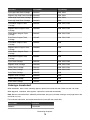
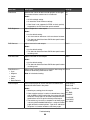
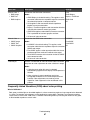
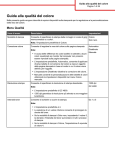
Menu item Description Settings Color Saver Reduces the amount of toner used for graphics and images. The amount of toner used for text is not reduced. On Off Notes: • Off is the default setting. • On overrides Toner Darkness settings. • Color Saver is not supported in PPDS, and only partially supported by the PCL emulation printer software. RGB Brightness Adjusts brightness in color outputs -6 to 6 Notes: • 0 is the default setting. • -6 is the maximum decrease. 6 is the maximum increase. • This does not affect files where CMYK color specifications are being used. RGB Contrast Adjusts contrast in color outputs 0 to 5 Notes: • 0 is the default setting. • This does not affect files where CMYK color specifications are being used. RGB Saturation Adjusts saturation in color outputs 0 to 5 Notes: • 0 is the default setting. • This does not affect files where CMYK color specifications are being used. Color Balance • • • • • Cyan Adjusts color in printed output by increasing or decreasing the -5 to 5 amount of toner being used for each color Magenta Note: 0 is the default setting. Yellow Black Reset Defaults Color Samples Prints sample pages for each of the RGB and CMYK color conversion tables used in the printer Notes: sRGB Display sRGB Vivid Display—True Black Vivid • Selecting any setting prints the sample. • Color samples consist of a series of colored boxes along Off—RGB with the RGB or CMYK combination that creates the color US CMYK observed. These pages can be used to help decide which Euro CMYK combinations to use to get the desired printed output. Vivid CMYK • The easiest way to access a complete list of these pages Off—CMYK is by using the Embedded Web Server, a series of resident pages located in network printers. Type the IP address of the printer in a browser window to see these pages. Troubleshooting 96