1
Control Moment Gyroscope - ECP Model750
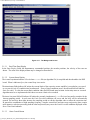
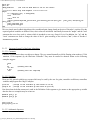
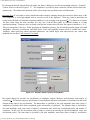
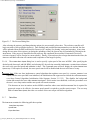
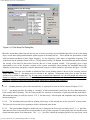
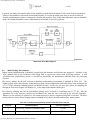
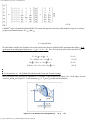
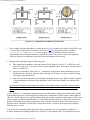
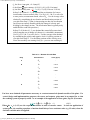
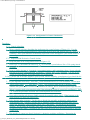
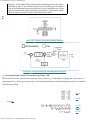
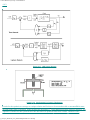
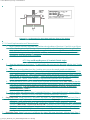
Figure 2.1-7. The Execute Dialog Box
After selecting the trajectory and data gathering options, the user normally
selects Run. The
real-time controller will
begin execution of the specified trajector(s)). Once finished, and provided the Sample
Data box was checked, the data
will be uploaded from the DSP board into
the Executive (PC memory) for plotting, saving and exporting. At any time
during the execution of the
trajectory or during the uploading of data, the process may be terminated by
clicking on the
Abort button. If the process is aborted before the trajectory has completed, the
associated Commanded Position(s)
(reference input(s)) will be fixed at its current value(s). Finally, if one trajectory has a longer
duration than the other, the
maneuver and data collection will continue until
completion of the longer trajectory.
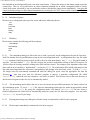
2.1.6.4 The Initialize
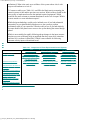
Rotor Speed dialog box is used to specify a spin speed of the rotor in
RPM. After specifying the
desired speed
(between 0 and 800 RPM), and selecting OK,
the real-time controller implements a routine that accelerates
the rotor to the
specified speed and maintains it there. The Command menu will now display the option Disable Rotor
Speed Loop. If this option is
selected, the rotor speed control will be disabled and the rotor will coast to
a stop. Important Note: If the user later implements
a control algorithm that regulates rotor speed (i.e. control_effort1
is an
output) and the rotor speed has been initialized, the initialization code
segment must include the statement m136=0.
(see Setup
Control Algorithm, Initialization Code Segment, Section 2.1.5.2.2) This disables the background
routine that
controls the rotor under Initialize Rotor Speed. If this routine is not disabled, it will take
precedence over
the user’s servo loop routine and the rotor speed will remain
constant. This becomes an issue in routines
such as MIMO controllers where some initial momentum bias is required for
gyroscopic torque to be effective, but motor speed control is required to
provide reactive torque. The user may
wish to Initialize Rotor Speed, then take over control of the
rotor torque with his/her algorithm.
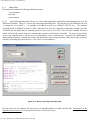
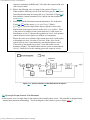
2.1.7 Data
Menu
The Data menu contains the following pull-down
options
Setup Data
Acquisition
Upload Data
Export
Raw Data
gyroscope_Model750_User_Manual.htm[9/28/2015 2:33:52 PM]