1
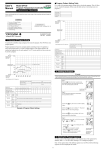
3.3 Setup Zone
In this zone, various measuring parameters can be set.
3.4 Data Zone
Horizontal
Indentation
diagonal
length
Setup Zone
Vertical
Data Zone
3.5 Process Zone
3.6 Operation Zone
Brightness
adjustment
Current
points
Mean
value
Rang
value
Conversion
Process Zone
Alarm
icon
Brightness: Adjust the brightness of Image Zone
for more clear.
Browse: Review the data measured.
Freeze: Take a snapshot of current image. Click it
Image
OK
Operation Zone
freeze
again will release freeze.
OK:
Click it to show a hardness value measured.
Or return to measurement in browsing and calibrating.
6
Browse