1
Application Operation
Therm-App Operation Manual
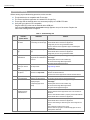
Adjusting Emissivity
Emissivity is a characteristic of the material being observed. Emissivity is the
ability of the material surface to emit energy by radiation. The emissivity value
(0 – 1) represents the ratio of energy radiated by the material being observed to
the energy radiated by a black body at the same temperature.
To adjust the emissivity:
Tap the Emissivity option on the Therm-App Settings screen.
Scroll to the correct emissivity ratio and tap the Set button.
Adjusting the Reflected Temperature
Reflected temperature represents the energy emitted by the surrounding
objects and reflected by the measured surface.
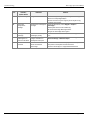
To adjust the reflected temperature:
Tap the Reflected Temperature option on the Therm-App Settings screen.
Scroll to the correct temperature and tap the Set button.
Adjusting the Temperature Truncation
Within every image frame, the temperature span is calculated and displayed
on the top of the thermography image. Use this parameter to define the
minimum number of pixels (defined by percentage) require to impact the
temperature span calculation. This setting prevents a small number of pixels
to reduce the temperature measuring resolution.
To adjust the truncation scale:
Tap the Temperature Truncation option on the Therm-App Settings screen.
Scroll to the correct temperature and tap the Set button.
Page 12 of 17