1
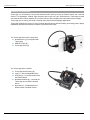
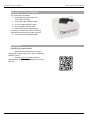
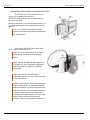
Installation Therm-App Operation Manual Connecting Therm-App to the Android Device Turn the Size knob (1) so the Android device slides (3) in the Attachment brackets (2). Attach Therm-App to the back of the mobile device by turning the size knob. Fasten the Size knob (1) and the Attachment bracket (2) to fit the Android device. Ensure that the device is firmly attached. Note: Do not fasten the size knob too tightly. Fastening the size knob too tightly could damage the Android device. Connect the USB-OTG cable to both ThermApp [1] and the mobile device (2). Note: If you use a cable with a 90 connector, attach the 90 connector to the Therm-App device. Note: Use only the USB-OTG cable supplied. In most cases, the micro USB cables supplied with mobile phones do not support the USB-OTG functionality. Note: Verify that the USB-OTG cable is connected properly to the Therm-App device and to the mobile device. Notes: For the first use of the Therm-App device with an Android device, an initialization process must be completed. This process may take a few minutes and must not be interrupted. Make sure you have a stable internet connection prior to connecting your mobile device to the Therm-App device. Perform download using internet connection with no environmental interference. Page 8 of 17