1
FEATURES AND FUNCTIONS
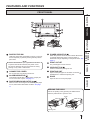
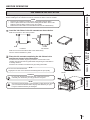
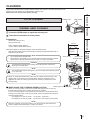
PAPER STRIP BIN
PAPER TRAY
1
Engage the upper hooks of the tray on the protrusions
on the top of the paper strip bin (1). Then, secure the
tray by engaging the lower hooks in the holes on both
sides of the bin (2).
2
PRECAUTIONS
Hook and pull up the paper strip bin to attach it firmly.
Hold and pull the handle on the lower part of paper strip
bin to remove.
1
FEATURES
2
NOTE
Remove the paper tray when printing in 13x18 (5x7”)
or 15x20 (6x8”) size.
PREPARATION
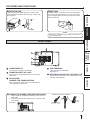
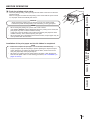
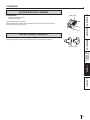
REAR PANEL
5
TROUBLESHOOTING
4
3
2
1
Use to switch the power ON and OFF.
POWER SOCKET (AC LINE)
Use to connect the provided power cord. Insert the
cord firmly.
FAN COVER /
HANDLE FOR TRANSPORTING
USB TERMINAL
Use to connect the USB cable.
See page 16.
SECURING HOLES FOR THE CABLE TIE
Use to secure the power cord or USB cable by using
the cable ties (supplied).
CONTENTS
OTHERS
POWER SWITCH
When carrying the printer, hold this handle and the
front upper part of the printer.
SECURING THE POWER CORD AND USB CABLE
1.Wrap a cable tie (supplied) around the power cord or the
USB cable.
2.Draw the tie through the securing hole on the rear panel
and secure it.
(Example)
Securing hole for the cable tie
8