1
MicroTAP System Controller
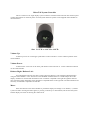
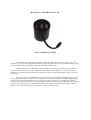
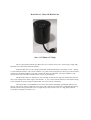
This is a small low cost single display system controller. The MicroTAP Controller has volume up and
volume down buttons on the front panel. All TAP system functions operate via the supplied remote handset as
described above.
Size: 3-1/2”W x 4-1/4”H x 4-1/4”D
Volume Up:
Volume up can be run via the upper push button on the Controller or via the volume up button on the
remote handset.
Volume Down:
Volume Down can be run via the lower push button on the Controller or via the volume down button
on the remote handset.
Balance Right / Balance Left:
Even though the Controller only has a single 2 digit level display it can still adjust right/left balance
using the remote handset < and > buttons. For user feedback of balance there are 2 small leds just above the
display. If balance is centered then both leds are off. As balance is adjusted to the right the rightmost led will
turn green then orange and finally red as the balance is adjusted further to the right side. The left led behaves the
same way as balanced is adjusted to the left side.
Mute:
If the mute button on the remote handset is pressed the display will change to two dashes ('--') and the
system will mute. Pressing the button again (or pressing a volume up or down button) will un-mute the system
and the display will return to showing the volume level.