1
Installation Instructions
Driver & Software Installation
1) Insert the included CD/DVD into your computers CD/DVD drive.
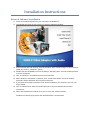
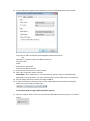
2) The CD/DVD will autorun and present you with the following window:
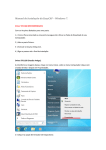
3) If the software does not autorun, click the windows “Start” button and go to “My Computer”
(2000, XP, Vista) or “Computer” (Win7)
4) Double click the CD/DVD drive icon that displays “EasyCAP_2021” and the window pictured
in step.2 will appear
5) Click “Install Driver” and follow the onscreen instuctions.
6) When the driver installation is complete, click “Install Video Studio” from the window
pictured in step.2 and follow the onscreen instructions
7) If you know you already have Direct X9 or above installed on your computer you can now
skip to step.9
8) Click “Install Directx 9” from the window pictured in step.2 and follow the onscreen
instructions.
9) When the installation is finished, click “Exit” to close the installer window.
Installation of the EasyCap drivers and ULead Software is now finished.