1
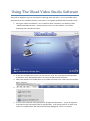
6. The video screen in the top left corner of the Video Studio software is the video preview
window. Whatever video source you use, a preview of the image should be visible in this
area. The bottom section of the window shows information about your current capture
settings.
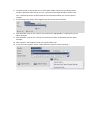
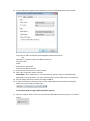
7. A few settings now need to be changed as per the section pictured below:
8. Click the down arrow on the “Source” line, and ensure “SMI Grabber” is selected as per the
above example.
9. Click the down arrow on the “Format” line and ensure “DVD” is selected as per the above
example.
10. Click “Options” which appears under the capture folder box.
11. In the menu that appears, select “Video and Audio Capture Property Settings…”