1
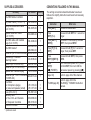
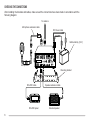
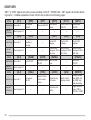
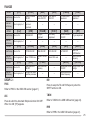
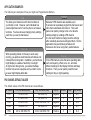
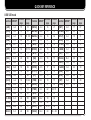
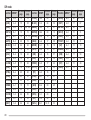
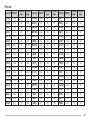
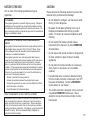
SUPPLIED ACCESSORIES
Accessory
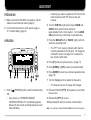
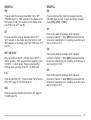
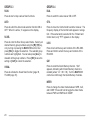
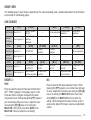
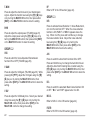
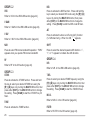
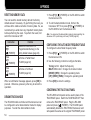
CONVENTIONS FOLLOWED IN THIS MANUAL
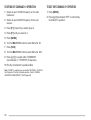
The writing conventions described below have been
followed to simplify instructions and avoid unnecessary
repetition.
Part Number
Quantity
–
1
E30-3406-XX
1
Instruction
What to do
E30-3407-XX
1
Press [KEY].
Press and release KEY.
E30-3408-XX
1
Press
[KEY] (1 s).
Press and hold KEY for 1 second or
longer.
E30-3409-XX
1
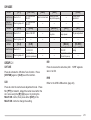
Press [KEY1],
[KEY2].
Press KEY1 momentarily, release
KEY1, then press KEY2.
J29-0663-XX
J29-0664-XX
Screw set (for RC-2000 bracket) N99-2014-XX
TS-2000(X)/ TS-B2000
A13-0635-XX
Mounting bracket
Spacers (for A13-0635-XX)
J30-0521-XX
Screw set (for A13-0635-XX)
N99-2024-XX
Speaker with cable and plug
T19-0116-XX
Screw set (for T19-0116-XX and
N99-2017-XX
A13-0635-XX)
Line filters:
For microphone (large)
L79-1419-XX
For panel and speaker (small)
L79-1417-XX
Fuse (25 A/ 32 V)
F05-2531-XX
Warranty card:
For the U.S.A. and Canada
B46-0469-XX
For European Countries
B46-0310-XX
Instruction manual
B62-1292-XX
1
1
1
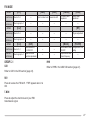
Press [F] (1 s),
[KEY].
Press and hold [F] for 1 second or
longer, then press KEY.
1
Press
[KEY1]+[KEY2].
Press and hold KEY1, then press
KEY2.
2
1
1
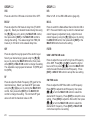
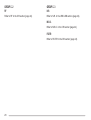
Press
[KEY]+
[ ] (POWER).
With transceiver power OFF, press
and hold KEY, then turn ON the
transceiver power by pressing [ ].
{page XX}
Refer to page XX of this manual.
RC-2000 Mobile Controller
DC power cable (7 m/ 23.1 ft)
Microphone extension cable
(5 m/ 16.5 ft)
Speaker extension cable
(5 m/ 16.5 ft)
RC-2000 cable with modular
plugs (5 m/ 16.5 ft)
RC-2000 bracket1
1
2 parts are used.
1
1
2
1
1
1
1
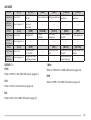
Refer to page XX in the
{TS-2000 page XX} TS-2000(X)/ TS-B2000 instruction
manual.