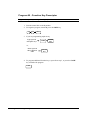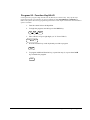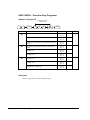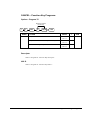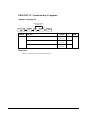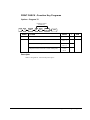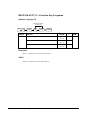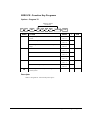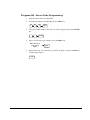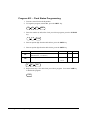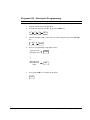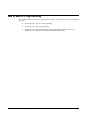
1
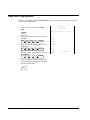
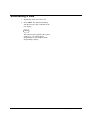
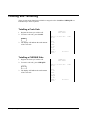
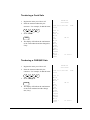
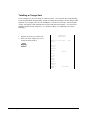
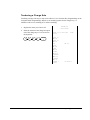
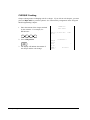
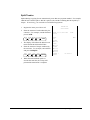
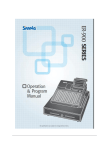
ER-380M
Operation and
Program Manual
All specificaitons are subject to change without notice
Precaution Statements
Follow these safety, servicing and ESD precautions to prevent damage and to protect against potential hazards such as
electrical shock.
1-1
Safety Precautions
1.
Be sure that all built-in protective devices are
replaced. Restore any missing protective shields.
2.
When reinstalling the chassis and its assemblies,
be sure to restore all protective devices, including
non-metallic control knobs and compartment
covers.
3.
Make sure there are no cabinet openings through
which people - particularly children - might insert
fingers and contact dangerous voltages.
Such openings include excessively wide cabinet
ventilation slots and improperly fitted covers and
drawers.
4.
5.
Design Alteration Warning:
Never alter or add to the mechanical or electrical
design of the SECR. Unauthorized alterations might
create a safety hazard. Also, any design changes
or additions will void the manufacturer’s warranty.
Components, parts and wiring that appear to have
overheated or that are otherwise damaged should
be replaced with parts that meet the original
specifications. Always determine the cause of
damage or over-heating and correct any potential
hazards.
CAUTION
Danger of explosion if battery is incorrectly replaced.
Replace only with the same or equivalent type
recommended by the manufacturer.
Dispose of used batteries according to the
manufacturer’s instructions.
6. Observe the original lead dress, especially near the
following areas: - sharp edges, and especially the
AC and high voltage supplies. Always inspect for
pinched, out-of-place, or frayed wiring. Do not
change the spacing between components and the
printed circuit board. Check the AC power cord for
damage. Make sure that leads and components do
not touch thermally hot parts.
7. Product Safety Notice:
Some electrical and mechanical parts have special
safety-related characteristics, which might not be
obvious from visual inspection. These safety
features and the protection they give might be lost
if the replacement component differs from the
original - even if the replacement is rated for a
higher voltage, wattage, etc.
Components that are critical for safety are
indicated in the circuit diagram by shading, ( )
or ( ). Use replacement components that have
the same ratings, especially for flame resistance
and dielectric strength specifications. A
replacement part that does not have the same
safety characteristics as the original might create
shock, fire or other hazards.
1-2
Servicing Precautions
WARNING: First read the-Safety Precautions-section of this manual. If some unforeseen circumstance creates a conflict
between the servicing and safety precautions, always follow the safety precautions.
WARNING: An electrolytic capacitor installed with the wrong polarity might explode.
1.
Servicing precautions are printed on the cabinet.
Follow them.
2.
Always unplug the units AC power cord from the
AC power source before attempting to:
(a) Remove or reinstall any component or assembly
(b) Disconnect an electrical plug or connector (c)
Connect a test component in parallel with an
electrolytic capacitor
3.
4.
Some components are raised above the printed
circuit board for safety. An insulation tube or tape
is sometimes used. The internal wiring is sometimes
clamped to prevent contact with thermally hot
components. Reinstall all such elements to their
original position.
After servicing, always check that the screws,
components and wiring have been correctly
reinstalled. Make sure that the portion around the
serviced part has not been damaged.
1-3
1.
2.
5.
Check the insulation between the blades of the AC
plug and accessible conductive parts (examples :
metal panels and input terminals).
6.
Insulation Checking Procedure:
Disconnect
the power cord from the AC source and turn the
power switch ON. Connect an insulation resistance
meter (500V) to the blades of AC plug.
The insulation resistance between each blade of the
AC plug and accessible conductive parts (see
above) should be greater than 1 megohm.
7.
Never defeat any of the B+ voltage interlocks. Do
not apply AC power to the unit (or any of its
assemblies) unless all solid -state heat sinks are
correctly installed.
8.
Always connect an instrument’s ground lead to the
instrument chassis ground before connecting the
positive lead; always remove the instrument’s
ground lead last.
Precautions for Electrostatically Sensitive Devices (ESDs)
Some semiconductor (solid state) devices are easily
damaged by static electricity. Such components are
called Electrostatically Sensitive Devices (ESDs);
examples include integrated circuits and some fieldeffect transistors. The following techniques will
reduce the occurrence of component damage caused
by static electricity.
Immediately before handling any semiconductor
components or assemblies, drain the electrostatic
charge from your body by touching a known earth
ground. Alternatively, wear a discharging wriststrap device. (Be sure to remove it prior to applying
power - this is an electric shock precaution.)
3.
After removing an ESD-equipped assembly, place it
on a conductive surface such as aluminum foil to
prevent accumulation of electrostatic charge.
4.
Do not use freon-propelled chemicals. These can
generate electrical charges that damage ESDs.
5.
Use only a grounded-tip soldering iron when
soldering or unsoldering ESDs.
6.
Use only an anti-static solder removal device. Many
solder removal devices are not rated as anti-static;
these can accumulate sufficient electrical charge to
damage ESDs.
7.
Do not remove a replacement ESD from its
protective package until you are ready to install it.
Most replacement ESDs are packaged with leads
that are electrically shorted together by conductive
foam, aluminum foil or other conductive materials.
8.
Immediately before removing the protective material
from the leads of a replacement ESD, touch the
protective material to the chassis or circuit
assembly into which the device will be installed.
9.
Minimize body motions when handling unpackaged
replacement ESDs. Motions such as brushing
clothes together, or lifting a foot from a carpeted
floor can generate enough static electricity to
damage an ESD.
Contents
Getting Started
1
About the ER-380.....................................................................................................................................1
Unpacking ..................................................................................................................................................2
Installing the Paper...................................................................................................................................2
Basic Features and Functions.................................................................................................................7
Standard Hardware....................................................................................................................7
Optional Hardware ....................................................................................................................7
Software Features......................................................................................................................7
Display........................................................................................................................................8
Control Lock.............................................................................................................................11
Keyboards................................................................................................................................12
Operating Instructions
13
Function Key Descriptions....................................................................................................................13
Clerk Sign-On/Sign-Off...........................................................................................................................18
Direct Sign-On .........................................................................................................................18
Coded Sign-On ........................................................................................................................18
Receipt On and Off..................................................................................................................................19
Training Mode.........................................................................................................................................20
Item Registrations ...................................................................................................................................21
Open Keyboard PLU Entry ....................................................................................................22
Preset Price Keyboard PLU....................................................................................................22
Keyboard PLU Repeat Entry .................................................................................................23
Keyboard PLU Multiplication ...............................................................................................24
Keyboard PLU Multiplication with Decimal Point .............................................................25
Split Pricing (Keyboard PLU) ................................................................................................26
Single Item Keyboard PLU.....................................................................................................27
Open Code Entry PLU ............................................................................................................28
Preset Price Code Entry PLU .................................................................................................28
Code Entry PLU Multiplication.............................................................................................29
Code Entry PLU Multiplication with Decimal Point...........................................................30
Split Pricing Code Entry PLU.................................................................................................30
Modifier Key............................................................................................................................31
Price Level Key........................................................................................................................32
Promotion .................................................................................................................................33
Waste ........................................................................................................................................34
Price Change Item....................................................................................................................35
Percent Key Operations .........................................................................................................................36
Preset Percent Discount on an Item.....................................................................................36
Enter a Percent Discount on an Item....................................................................................37
Percent on Sale Total..............................................................................................................37
Coupon on Sale (Vendor Coupon).......................................................................................38
Coupon on Item (Store Coupon)...........................................................................................39
Return Merchandise Registrations.......................................................................................................40
Voids and Corrections............................................................................................................................41
Error Correction (Void Last Item) ..........................................................................................41
ER380
Contents • i
Void Previous Item..................................................................................................................41
Cancel........................................................................................................................................43
Void Position Operations.......................................................................................................43
No Sale Operations .................................................................................................................................44
Open Drawer............................................................................................................................44
Non Add Number....................................................................................................................44
Received On Account Operations........................................................................................................45
Paid Out Operations................................................................................................................................46
Subtotalling a Sale...................................................................................................................................47
Totalling and Tendering.........................................................................................................................48
Totalling a Cash Sale ..............................................................................................................48
Totalling a CHEQUE Sale .......................................................................................................48
Tendering a Cash Sale ............................................................................................................49
Tendering a CHEQUE Sale.....................................................................................................49
Totalling a Charge Sale...........................................................................................................50
Tendering a Charge Sale ........................................................................................................51
CHEQUE Cashing....................................................................................................................52
Split Tender..............................................................................................................................53
Post Tender..............................................................................................................................54
Currency Conversion..............................................................................................................55
Not Found Key Operation .....................................................................................................56
Table Management and Clerk Interrupt Operations ..........................................................................57
Overview...................................................................................................................................57
Soft Check................................................................................................................................58
Hard Check...............................................................................................................................61
X Mode
63
Introduction .............................................................................................................................................63
X Reports..................................................................................................................................................64
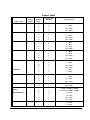
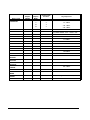
Running a Report – General Instructions............................................................................64
Report Table.............................................................................................................................65
Cash Declaration .....................................................................................................................................67
Service Mode Programming
68
Overview...................................................................................................................................................68
Ram Clear & Memory Allocation..........................................................................................................69
Clear Totals ..............................................................................................................................................71
Clear Grand Totals ...................................................................................................................................71
Clear PLU File...........................................................................................................................................72
Eprom Information...................................................................................................................................72
Memory Allocation.................................................................................................................................72
Load Default Keyboard ..........................................................................................................................72
Initial Clear................................................................................................................................................73
PC Online Mode ......................................................................................................................................73
Function Key Assignment Programming ............................................................................................74
Function Key Codes ...............................................................................................................75
RS232C Port Options ..............................................................................................................................76
Program Mode Programming
79
Default Programming ..............................................................................................................................79
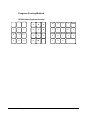
Descriptor Programming Methods .......................................................................................................79
Program Overlay Method.......................................................................................................80
Descriptor Code.......................................................................................................................81
Tax Programming.....................................................................................................................................82
Straight Percentage Tax Rate Programming ........................................................................82
ii • Contents
ER380
PLU Programming....................................................................................................................................84
Program 100 - PLU Status Programming ..............................................................................85
Program 150 - PLU Group Assignment ................................................................................88
Program 200 - PLU Price/HALO Programming....................................................................89
Program 250 - PLU Stock Amount Programming................................................................91
PLU Stock Programming By ADD / DEDUCT / OVERWRITE KEY................................92
Program 280 - PLU Minimum Stock Amount Programming ..............................................93
Program 300 - PLU Descriptor Programming.......................................................................94
Program 350 - PLU Link Programming..................................................................................95
Program 400 – PLU Delete Programming .............................................................................96
Program 450 - PLU MIX & MATCH Programming ............................................................97
Program 999 – ALL PLU Programming.................................................................................98
System Option Programming...............................................................................................................100
System Option Table ............................................................................................................101
Print Option Programming....................................................................................................................106
Print Option Table .................................................................................................................107
Function Key Programming.................................................................................................................112
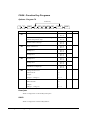
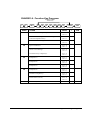
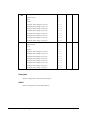
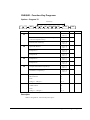
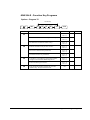
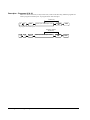
Program 70 - Function Key Options...................................................................................113
Program 80 - Function Key Descriptor...............................................................................114
Program 90 - Function Key HALO......................................................................................115
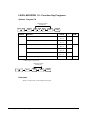
ADD CHECK - Function Key Programs ............................................................................116
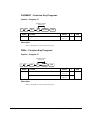
CANCEL - Function Key Programs ....................................................................................117
CASH - Function Key Programs .........................................................................................118
CHARGE1-8 - Function Key Programs ..............................................................................119
CHEQUE - Function Key Programs ....................................................................................121
CHEQUE CASHING - Function Key Programs .................................................................123
CHEQUE ENDORSEMENT - Function Key Programs ....................................................124
CHECK # - Function Key Programs ...................................................................................125
CURRENCY CONVERSION - Function Key Programs ...................................................126
ANALYSIS - Function Key Programs ................................................................................127
ERROR CORRECT - Function Key Programs ...................................................................128
F/S TEND - Function Key Programs ..................................................................................129
GUEST - Function Key Programs .......................................................................................130
PRICE LEVEL1-2 - Function Key Programs .......................................................................130
#/N0 SALE - Function Key Programs ................................................................................131
RETURN - Function Key Programs ....................................................................................133
LEVEL MODIFIER 1-5 - Function Key Programs .............................................................134
PAYMENT - Function Key Programs ................................................................................135
PBAL - Function Key Programs ..........................................................................................135
PROMOTION- Function Key Programs ............................................................................136
PRICE CHANGE - Function Key Programs .......................................................................137
PRICE INQUIRE - Function Key Programs .......................................................................138
STOCK INQUIRE - Function Key Programs .....................................................................139
PAID OUT1-3 - Function Key Programs ...........................................................................140
PRINT CHECK - Function Key Programs ..........................................................................141
RECD ON ACCT1-3 - Function Key Programs .................................................................142
SERVICE - Function Key Programs ....................................................................................143
SUBTOTAL - Function Key Programs ..............................................................................144
TAX EXEMPT - Function Key Programs ..........................................................................145
TIP - Function Key Programs ..............................................................................................146
VALIDATE - Function Key Programs ...............................................................................147
VOID - Function Key Programs ..........................................................................................148
WASTE - Function Key Programs .....................................................................................149
%1- %5 - Function Key Programs ......................................................................................150
Clerk Programming ................................................................................................................................152
Program 800 - Secret Code Programming...........................................................................153
Program 801 - Clerk Status Programming..........................................................................154
Program 810 - Descriptor Programming..............................................................................155
ER380
Contents • iii
Mix & Match Programming..................................................................................................................156
Program 600 - Trip Level Programming ..............................................................................157
Program 601 - Price Programming........................................................................................157
Program 610 - Mix & Match Descriptor Programming.....................................................158
Group Programming ..............................................................................................................................159
Miscellaneous Programming ...............................................................................................................161
Macro Key Sequence Programming...................................................................................161
Logo Descriptor Programming ............................................................................................162
NLU Code Number Programming........................................................................................169
Cash-In-Drawer Limit Programming....................................................................................170
Cheque Change Limit Programming ...................................................................................171
Date and Time Programming................................................................................................172
Machine Number Programming...........................................................................................173
Training Mode Password.....................................................................................................174
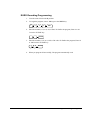
EURO Rounding Programming............................................................................................175
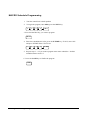
MACRO Schedule Programming ........................................................................................176
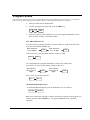
Program Scans .......................................................................................................................................177
iv • Contents
ER380
Getting Started
About the ER-380
•
The ER-380 features a 44-position keyboard with traditional raised keys. This
keyboard will accommodate up to 12 NLU keys and works best in retail stores, or
shops where it is not necessary to place a large number of preset item keys on the
keyboard.
ER-380 is an excellent low cost solution for a wide range of retail environments.
ER-380, with its superb thermal printing system, always provides the fastest in transaction
speeds.
ER380
Getting Started • 1
Unpacking
1. Unpack and unwrap the cash register.
2. Located in the packing are the following items:
•
1 Rolls of paper and paper spindle,
•
2 sets of control keys,
•
Operation and Program Manual,
3. Remove the cardboard protectors from the cash drawer.
4. Plug the register into a grounded outlet (three prong), insert a control key and turn
the key to the REG control lock position.
Installing the Paper
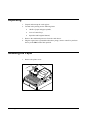
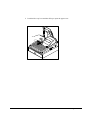
1. Remove the printer cover.
2 • Getting Started
ER380
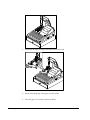
2. Push the blue cap lever and then lift up to open the paper cover.
ER380
Getting Started • 3
3. Ensure that the paper is being fed from the bottom of the roll.
4. Put the the leading edge of the paper over the printer
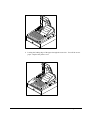
5. Close the paper cover slowly until it locks firmly
4 • Getting Started
ER380
6. Passing the leading edge of the paper through the cutter slot. Tear off the excess
paper. Replace the printer cover.
ER380
Getting Started • 5
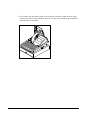
? If you wish to use the printer to print a sales journal or electronic journal, insert the paper
into the paper take-up spool. Wind the paper two or three turns around the spool shaft and
install the spool in the mount.
6 • Getting Started
ER380
Basic Features and Functions
Standard Hardware
•
Display
=> LCD: Adjustable 2 line, 16 character liquid crystal display and
ten position rear displays with a rear pop up display standard.
•
44 position keyboard.
•
1 station Thermal 32-column printer with drop-and-print mechanism.
•
Sturdy Metal Cash Drawer with removable 4 Bill 8 Coin drawer insert.
•
7-position control lock.
•
Standard cus tomer pole display.
•
Communications ports: RS232C.
Optional Hardware
•
Kitchen printer. / Bill Printer / Journal Printer
•
Bar code scanner.
•
PC Link
Software Features
ER380
•
Up to 2 price levels for each PLU.
•
Up to 5 PLU modifier keys.
•
5,000 (expandable) Price Look Ups (PLUs) for open or preset item registration.
For direct registrations, up to 12 PLUs are on the keyboard.
•
18 character programmable descriptors for PLUs and functions.
•
Up to 99 PLU Group totals.
•
Up to 99 clerks with separate report totals.
Getting Started • 7
Display
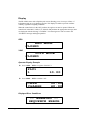
The ER-380M comes with a liquid crystal screen, allowing you to view up to 2 lines of
information with up to 16 characters per line. The display is backlit to provide excellent
visibility, regardless of lighting conditions.
When the control lock is in the OFF position, the register can not be opeated. When the
control lock in the REG, VOID, X, Z, PGM or SM positions the appropriate message, there
are displayed with the message “CLOSED”. You must sign on a clerk to remove the
“CLOSED” message and begin operation.
REG
REG MODE
CLOSED
VOID
VOID MODE
CLOSED
Operator Display Example
t Press 10.00 – PLU1 to register of the PLU1
PLU1
1
10.00
t Press 50.00 – PLU1 to tender a sale
CASH
CHANGE
50.00
40.00
Displayed Error Conditions
** WARNING **
SEQUENCE ERROR
8 • Getting Started
ER380
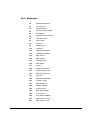
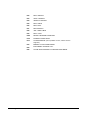
Error Messages
ER380
E0
SEQUENCE ERROR
E1
PLU NO DATA
E2
CLERK ERROR
E3
AMOUNT COUNT OVER
E4
EFT ERROR
E5
COMMUNICATION ERROR
E6
TIME AND DATE
E7
LIMIT OVER
E8
INACTIVE
E9
XMODE ONLY
E10
NONADD
E11
ADDCHECK ERROR
E12
CONDIMENT ERROR
E13
REQ. EAT IN
E14
REQ. STOCK
E15
REQ.DRAWER
E16
REQ.GUEST
E17
SCALE
E18
CLERK NOT MATCH
E19
COMPULSORY TARE
E20
REQ.DECLARATION
E21
OFF LINE
E22
REQ.ENDORSEMENT
E23
CONSOL OVER
E24
REQ.SUBTOTAL
E25
PROMO ERROR
E26
CHECK OPEN
E27
REQ. PASSWORD
E28
NO VOID PLU
E29
232C SETUP ERROR
E30
REQ.PRESET VALUE
E31
REQ. OPEN VALUE
Getting Started • 9
10 • Getting Started
E32
REQ. AMOUNT
E33
REQ. PAYMENT
E34
INVALID FUNCTION
E35
REQ. TABLE
E36
REQ. PBAL
E37
REQ.CHECK #
E38
ONLY ONE TABLE
E39
REQ. VALID
PER
RECEIPT PRINTER PAPER END
PCO
PRINTER COVER OPEN
PFP
SYSTEM ERROR (If this problem occurs, call the service
engineer.)
E43
MEMORY ALLOCATION ERROR
E44
ELECTRONIC JOURNAL FULL
E45
CLOSE OPEN CHECKS TO FINALIZE TRAIN MODE
ER380
Control Lock
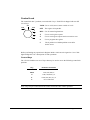
The control lock has 7 positions, accessed with 5 keys. Each ECR is shipped with two full
sets of keys.
OFF
VOID Use to void (correct) items outside of a sale.
VOID
REG
X
Z
P
OFF
The register is inoperable.
REG Use for normal registrations.
X
Use to read register reports.
Z
Use to read register reports and reset totals to zero.
P
Use to program the register.
S
The S position is a hidden position reserved for
dealer access.
Before performing any operations in Register Mode a clerk must be signed on. See “Clerk
Sign-On/Sign-Off” for a description of clerk operations.
Control Keys
The ER-380 includes two sets of keys that may be used to access the following control lock
positions.
Key
Positions Accessible
REG
OFF, REG
VOID
VOID, OFF, REG, X
Z
VOID, OFF, REG, X, Z
P
VOID, OFF, REG, X, Z, P
C
ALL POSITIONS
Note: Keys may be removed from the control lock in the OFF or REG positions.
ER380
Getting Started • 11
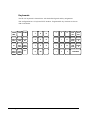
Keyboards
The ER-380 keyboard is shown below with the default legends and key assignments.
This configuration has 12 keyboard NLU locations. Programmable key locations are shown
with a bold border.
PAPER
FEED
CLEAR
X/TIME
7
8
9
4
8
12
PAID
OUT
RECD
ACC
CANCEL RETURN CLERK
SALE
ITEM
NO.
4
5
6
3
7
11
CURRN
CONV
CHARG
E
SUB
TOTAL
CHEQU
E
%1
#/NO
SALE
PRICE
INQUIRE
1
2
3
2
6
10
PRICE
LEVEL1
PRICE
LEVEL2
PLU
0
00
.
1
5
9
12 • Getting Started
CASH/TEND
ER380
Operating Instructions
Function Key Descriptions
Keys are listed in alphabetical order. Some of the keys described below are not included on
the default keyboard. See “Function Key Assignment Programming to add or change
programmable keys.
Keyboard Legend
Description
#/NO SALE
Use as a non-add key to print up to an 8-digit numeric entry on the
receipt and journal. This entry will not add to any sales totals. The
#/NO SALE key is also used to open the cash drawer without making a
sale.
X/TIME
Use to multiply a quantity of items or calculate split pricing on PLU
entries.
00, 0-9, Decimal
Use to make numeric entries in REG, X, Z, VOID, or P positions. The
decimal key is used for decimal or scale multiplication, when setting or
entering fractional percentage discounts, or when programming
fractional tax rates. Do not use the decimal key when making amount
entries into PLUs.
ADD CHECK
Use to combine individual trays (in a cafeteria situation) that will be paid
together. Each tray subtotal can advance the consecutive number,
depending on programming.
CANCEL
Cancels a transaction without updating PLU, or function key totals. The
Cancel function may only be used prior to tendering. Once tendering
begins, the Cancel function may no longer be used. The CANCEL key
corrects the appropriate totals and counters and the Financial report
records total of transactions cancelled.
CASH
Calculates the sale total including tax, finalises the sale, and opens the
cash drawer. Change computation is allowed by entering an amount
before pressing the CASH key. The cash drawer will open only if the
amount tendered is equal to or greater than the total amount of the sale.
Post tendering is also available should a second change calculation be
necessary. Re-enter the tendered amount and press the CASH key to
show the new change computation.
Press the CASH key a second time to issue a buffered receipt (up to 200
lines) when the receipt on/off function is OFF.
ER380
Operating Instructions • 13
CHEQUE
Use to finalise cheque sales. Calculates the sale total including tax,
finalises the sale, and opens the cash drawer. Change computation is
allowed by entering an amount before pressing the CHEQUE key. The
cash drawer will open only if the amount tendered is equal to or greater
than the total amount of the sale. Change issued will be subtracted from
the appropriate in-drawer total.
CHEQUE CASHING
Use to exchange a cheque for cash. Cash-in-drawer and Cheque-indrawer totals are adjusted.
CHEQUE ENDORSEMENT
Use to print a cheque endorsement message on an optional slip printer
with a programmable endorsement message.
CHARGE(1-8)
Use to finalise charge sales. Calculates the sale total including tax,
finalises the sale, and opens the cash drawer. Change computation is
allowed by entering an amount before pressing the CHARGE key. The
cash drawer will open only if the amount tendered is equal to or greater
than the total amount of the sale. Change issued will be subtracted from
the appropriate in-drawer total.
CHECK #
The CHECK # key is used to begin a new, or access an existing balance
(hard check) or itemized bill (soft check.)
Check track numbers that are entered manually may be set at a fixed
length of one to nine digits. Check track numbers assigned
automatically will begin with #1.
Existing checks are accessed by entering the check track number and
pressing the CHECK # key.
CLEAR
Use to clear entries made into the 10 key numeric pad or X/TIME key
before they are printed. Also used to clear error conditions.
CLERK
The register will not operate in register mode unless a clerk has been
signed on. Clerk sign-on is accomplished by direct or secret code sign
on.
All entries made on the register will report to one of the 15 clerk totals.
When a clerk is signed on, all entries following will add to that clerk’s
total until another clerk is signed on. However, a clerk cannot be
changed in the middle of a transaction.
To sign a clerk off, thereby displaying the “CLOSED” message on the
display, enter 0 (zero), then press the CLERK key. This disables the
register until another clerk is signed on. The current clerk must first be
signed off before another clerk can sign on.
CONV (1 & 4)
The currency conversion function, allowed after subtotal, converts and
displays the new subtotal at a preprogrammed exchange rate. Tendering
is allowed after using the currency conversion function. Change is
calculated and issued in home currency. The amount of foreign
currency tendered is stored in a separate total on the Financial report,
but not added to the drawer total.
ANALYSIS 1/2/3
Sale analise 1,2,3 keys (Eat-in, Take-out and Drive-thru), are subtotal
functions. In areas that have different tax rules for eat-in and take out
sales, each key can be programmed to automatically charge or exempt
taxes. Sales may not be split between each key.
ERROR CORR
Use to correct the last entry. The ERROR CORR key corrects the
appropriate totals and counters.
F/S SHIFT
When pressed before a PLU entry, the F/S SHIFT key reverses the
preprogrammed food stamp status of the PLU. For example, an item not
14 • Operating Instructions
ER380
preprogrammed food stamp status of the PLU. For example, an item not
food stamp eligible can be made food stamp eligible.
F/S SUB
Displays the amount of the sale that is food stamp eligible.
F/S TEND
Use to tender food stamps for eligible sales.
GUEST #
Use to enter the count of guests served as part of a guest check.
MACRO (1-10)
Macro keys may be programmed to record, then later perform, up to 50
keystrokes. For example, a macro key could be set to tender (preset
tender) a common currency, such as £ 5 into the cash key.
RETURN ITEM
Used to return or refund merchandise. Returning an item will also return
any tax, which may have been applied.
MODIFIER 1-5
The Modifier key alters the next PLU registered, either by changing the
Code number of the PLU so that a different item is registered, or by
adding the modifier descriptor.
P/BAL
Use to enter the amount of an outstanding b alance.
PAID OUT
Use to record money taken from the register to pay invoices, etc. The
paid out amount subtracts from the cash-in-drawer total. Paid outs are
allowed outside of a sale only.
% Keys 1- 5
Up to five % keys may be placed on the keyboard. Each % key is set
with a specific function, such as item discount or surcharge, or sale
discount or surcharge. The percent rate may be entered or
preprogrammed, or the percent keys can be programmed with a negative,
open or preset price, thus acting as coupon keys.
A percentage key may also be set up to accept charge tip entries.
PLU
The PLU key is used to register price look ups by number entry. PLUs
can be programmed open or preset, and positive or negative.
PAYMENT
Use to Charge Posting Feature. This key can be enforced prior to
cashing off a check sale.
PRINT CHECK
Use to print a guest check. The check can be printed on an optional
(RS-232C) printer, or can be printed on the receipt printer. The PRINT
CHECK key can be set to automatically service the check.
PROMOTION
The PROMOTION key allows you to account for promotional items .
Pressing this key will remove an item's cost from the sale, but will
include the sale of the item in the item's sales counter.
RECD ACCT
The RECD ACCT (received on account) key is used to record media
loaned to the cash drawer, or payments received outside of a sale. The
cash drawer will open. The amount received adds to the cash-in-drawer
total.
SERVICE
Use to temporarily finalise Previous Balance or Table Tracking
transactions.
SUBTOTAL
Displays subtotal of sale including tax. Must be pressed prior to a sale
discount or sale surcharge.
TABLE #
Tracks the current balance for a guest check or table.
TAX EXEMPT
Press the TAX EXEMPT key to exempt tax 1, tax 2, tax 3, and/or tax 4
from the entire sale.
TAX (1-4) SHIFT
When pressed before a PLU entry, the tax shift keys reverse the tax
status of the PLU, i.e., a PLU with non-tax status would become taxable
ER380
Operating Instructions • 15
or a PLU with tax status would become non-taxable.
16 • Operating Instructions
ER380
TIP
The TIP key allows a gratuity to be added to a guest check before
payment. The tip amount is deducted from the Cash-in-Drawer amount
for the Clerk/Cashier closing the guest check.
The TIP key may be programmed as either a percentage or amount. If
programmed as a percentage, tax programming defines whether the
percentage is calculated on the net amount or the amount after taxes.
VOID
Use to correct an item entered earlier within a sale. The VOID key
corrects the appropriate totals and counters. To correct the last item,
use the ERROR CORR key. For void operations outside of a sale
(Transaction Void), use the VOID position on the control lock. The
Financial report records totals for each type of void separately.
VALID
Press the VALID key to print a one-line validation on a separate form or
piece of paper. Any item registration, discount or payment may be
validated. If validation is required after a particular function, the
message "SP" will appear on the front display.
WASTE
The WASTE key allows control of inventory by accounting for items,
which must be removed from stock due to spoilage, breakage or
mistakes. Press the WASTE key before entering wasted items, then
press the WASTE key again to finalise. The WASTE key may be under
manager control, requiring the control lock to be in the X position. The
WASTE operation is not allowed within a sale.
ER380
Operating Instructions • 17
Clerk Sign-On/Sign-Off
See "System Option Programming”, to review your clerk options:
•
System option #2 allows you to select direct or code entry sign on and/or staydown or pop-up operation.
Depending on how your machine has been programmed, sign-on will take place only at the
beginning of a shift (stay-down), or may have to be repeated for each transaction (pop-up). If
your machine has been programmed for stay-down clerks, the clerk currently signed on must
be signed off before another clerk may be signed on.
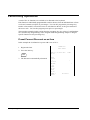
Direct Sign-On
There are two ways to sign on a clerk. One is to enter the clerk number and press
the clerk key and the other is to enter direct clerk no. key.
CLERK
Clerk # (1-10)
CLERK 1 ~ CLERK 10
There are two ways to sign the clerk off. One is to enter 0 (Zero) and press the clerk key and
the other is to enter 0 (zero) and press direct clerk no. key.
0
CLERK
0
CLERK 1 ~ CLERK 10
Coded Sign-On
To sign on a clerk, press the clerk key, enter the clerk code, then press the clerk key again.
CLERK
CLERK
Clerk Code (up to 6 digits)
To sign the clerk off, enter 0 (Zero) and press the clerk key.
0
CLERK
18 • Operating Instructions
ER380
Receipt On and Off
1. Turn the control lock to the X position.
2. To turn the receipt off, enter 9 9, press the SBTL key. Enter 1, press CASH.
9
9
SBTL
1
CASH
3. To turn the receipt on, enter 9 9, press the SBTL key. Enter 0, press CASH.
9
ER380
9
SBTL
0
CASH
Operating Instructions • 19
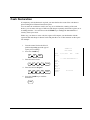
Training Mode
A training mode is available so that you can operate the cash register without updating totals
and counters. Note the following conditions:
•
The receipt and journal print the message "TRAINING MODE BEGIN" when
training mode is activated.
•
The receipt and journal print the message "TRAINING MODE END" when
training mode is exited.
•
The message "TRAINING MODE" prints on each receipt printed while training
mode is active.
•
The journal does not print during training mode.
To Enter Training Mode
There are two ways to enter the train mode. One is by training password and the other is
by training clerk. First, you must program a training password
1. Turn the control lock to the X position.
2. To begin the program, enter 199, press the SBTL key.
1
9
9
SBTL
3. Input Training Password # and press X/TIME key.
PASSWORD #
X/TIME
To Exit Training Mode
Note :- It is not possible to exit training mode with either open clerks or check balances
1. Turn the control lock to the X position.
2. To begin the program, enter 199, press the SBTL key.
1
9
9
SBTL
3. Input Training Password (Zero is the default code) and press X/TIME key.
0
20 • Operating Instructions
X/TIME
ER380
Item Registrations
All registrations on ER-380 are made into open or preset PLUs.
ER380
•
In place of traditional PLU keys, some PLUs are located directly on the
keyboard.
•
When more items or categories are needed than the number of PLUs available
on the keyboard, registrations through PLUs can be made by entering the PLU
code number and pressing the PLU key on the keyboard.
•
This system simplifies reporting by listing all items (regardless of how they are
entered) on the PLU report, while reporting for groups of items or categories is
available from the Group report.
Operating Instructions • 21
Open Keyboard PLU Entry
1. Enter an amount on the ten keypad. Do
not use the decimal key. For example,
for £2.99, enter:
2
9
THANK -YOU
CALL AGAIN
DATE 01/15/2003 WED
8:33
TIME
9
2. Press a PLU key. For example, press
PLU 1:
1
PLU1 T1
£2.99
TAX1
£0.18
TOTAL
£3.17
CASH
£3.17
CLERK 1
00001
No.000011
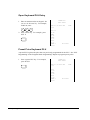
Preset Price Keyboard PLU
A preset PLU registers the price that was previously programmed for the PLU. See "PLU
Programming" in the "Program Mode Programming" chapter to program preset prices.
THANK -YOU
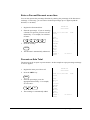
1. Press a preset PLU key. For example,
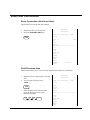
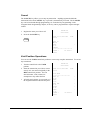
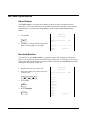
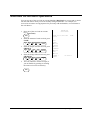
press PLU 5:
5
CALL AGAIN
DATE 01/15/2003 WED
8:33
TIME
PLU5
£1.29
TOTAL
£1.29
CASH
£1.29
CLERK 1
00001
22 • Operating Instructions
No.000011
ER380
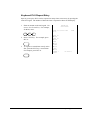
Keyboard PLU Repeat Entry
Open or preset price PLUs can be repeated as many times as necessary by pressing the
same PLU again. The number of times the item is repeated is shown on the display.
1. Enter an amount on the ten keypad. Do
not use the decimal key. For example,
for £ 2.99, enter:
2
9
THANK-YOU
CALL AGAIN
DATE 01/15/2003 WED
8:33
TIME
9
2. Press a PLU key. For example, press
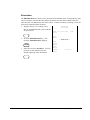
PLU 1:
PLU1 T1
£2.99
PLU1 T1
£2.99
TAX1
£0.36
1
3. To register a second item exactly as the
first, press the PLU key a second time.
For example, press PLU 1:
TOTAL
£6.34
CASH
£6.34
CLERK 1
00001
No.000011
1
ER380
Operating Instructions • 23
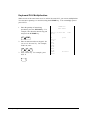
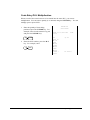
Keyboard PLU Multiplication
When several of the same items are to be sold of the same PLU, you can use multiplication.
You can enter a quantity (1 to 999.999) using the X/TIME key. You can multiply open or
preset PLUs.
1. Enter the quantity of items being
purchased, press the X/TIME key. For
example, enter 4 on the numeric key pad
and press the X/TIME key:
4
2. Enter an amount on the ten keypad. Do
not use the decimal key. For example,
for £1.99, enter:
9
DATE 01/15/2003 WED
08:33
4X
X/TIME
1
THANK -YOU
CALL AGAIN
9
3. Press a PLU key. For example, press
PLU 1:
TIME
@1.99
PLU1 T1
£7.96
TAX1
£0.48
TOTAL
£8.44
CASH
£8.44
CLERK
00001
No.000011
1
24 • Operating Instructions
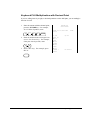
ER380
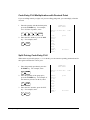
Keyboard PLU Multiplication with Decimal Point
If you are selling items by weight, or decimal quantities such as half-pints, you can multiply a
fraction of a unit.
1. Enter the amount with the decimal point,
press the X/TIME key. For example,
for 3.75 kilos of produce, enter:
3
.
7
5
THANK-YOU
CALL AGAIN
DATE 01/15/2003 WED
08:33
X/TIME
3.75X
2. Enter an amount on the ten keypad. Do
not use the decimal key. For example,
if the price is £.99 per kilo, enter:
9
TIME
9
3. Press a PLU key. For example, press
PLU 1:
@0.99
PLU1 T1
£3.71
TAX1
£0.22
TOTAL
£3.93
CASH
£3.93
CLERK 1
00001
No.000011
1
ER380
Operating Instructions • 25
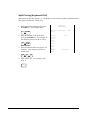
Split Pricing (Keyboard PLU)
When items are priced in groups, i.e. 3 for £1.00, you can enter the quantity purchased and let
the register calculate the correct price.
THANK -YOU
1. Enter the quantity purchased, press the
X/TIME key. For example, enter:
2
DATE 01/15/2003 WED
08:33
X/TIME
2. Enter the quantity of the group price,
press the X/TIME key. For example, if
the items are priced 3 for £1.00, enter:
3
X/TIME
0
2@3FOR
TIME
@1.00
PLU1 T1
£0.67
TAX1
£0.04
TOTAL
£0.71
3. Enter an amount on the ten keypad. For
example, if the items are priced 3 for
£1.00, enter:
1
CALL AGAIN
CASH
£0.71
CLERK 1
00001
No.000011
0
4. Press a PLU key. For example, press
PLU 1:
1
26 • Operating Instructions
ER380
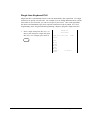
Single Item Keyboard PLU
Single item PLUs automatically total as a cash sale immediately after registration. Use single
item PLUs for speedy one-item sales. For example if you are selling admission tickets, and all
ticket sales are one item sales, you can use an open or preset PLU. After each registration,
the drawer will immediately open, and a separate transaction receipt is printed. See "PLU
Programming" in the "Program Mode Programming" chapter to program a single item PLU.
1. Press a single item preset PLU key. (or
enter a price and press a single item open
PLU key.) For example, press PLU 6:
6
THANK-YOU
CALL AGAIN
DATE 01/15/2003 WED
08:33
TIME
PLU6
£1.29
TOTAL
£1.29
CASH
£1.29
CLERK 1
00001
ER380
No.000011
Operating Instructions • 27
Open Code Entry PLU
If the PRESET status of a PLU is set to N (no), the PLU will operate as an open PLU. See
"PLU Programming" in the "Program Mode Programming" chapter to program PLU
descriptors and options.
THANK -YOU
1. Enter the PLU number; press the PLU
key. For example, enter:
2
DATE 01/15/2003 WED
08:33
PLU
2. Enter an amount on the ten keypad. Do
not use the decimal key. For example,
for £2.99, enter:
2
9
CALL AGAIN
9
3. Press the PLU key again.
TIME
PLU2 T1
£2.99
TAX1
£0.18
TOTAL
£3.17
CASH
£3.17
CLERK 1
00001
No.000011
PLU
Preset Price Code Entry PLU
THANK -YOU
1. Enter the PLU number; press the PLU
key. For example, enter:
1
PLU
CALL AGAIN
DATE 01/15/2003 WED
08:33
TIME
PLU1
£1.29
TOTAL
£1.29
CASH
£1.29
CLERK 1
00001
28 • Operating Instructions
No.000011
ER380
Code Entry PLU Multiplication
When several of the same items are to be entered into the same PLU, you can use
multiplication. You can enter a quantity (1 to 999.999) using the X/TIME key. You can
multiply open or preset PLUs.
1. Enter the quantity of items being
purchased, press the X/TIME key. For
example, enter 4 on the numeric key pad
and press the X/TIME key:
4
X/TIME
2. Enter the PLU number; press the PLU
key. For example, enter:
1
PLU
THANK-YOU
CALL AGAIN
DATE 01/15/2003 WED
08:33
4X
TIME
@1.99
PLU1 T1
£7.96
TAX1
£0.48
TOTAL
£8.44
CASH
£8.44
CLERK 1
00001
ER380
No.000011
Operating Instructions • 29
Code Entry PLU Multiplication with Decimal Point
If you are selling items by weight, or if you are selling yard goods, you can multiply a fraction
of a unit.
1. Enter the quantity with the decimal point,
press the X/TIME key. For example,
for 3.75 Kilos of produce, enter:
3
.
7
5
THANK -YOU
CALL AGAIN
DATE 01/15/2003 WED
08:33
X/TIME
3.75X
2. Enter the PLU number; press the PLU
key. For example, enter:
3
TIME
PLU
@2.99
PLU3 T1
£11.21
TAX1
£0.67
TOTAL
£11.88
CASH
£11.88
CLERK 1
00001
No.000011
Split Pricing Code Entry PLU
When items are priced in groups, i.e. 3 for £1.00, you can enter the quantity purchased and let
the register calculate the correct price.
THANK -YOU
1. Enter the quantity purchased, press the
X/TIME key. For example, enter:
2
X/TIME
2. Enter the quantity of the group price,
press the X/TIME key. For example, if
the items are priced 3 for £1.00, enter:
3
X/TIME
3. Enter the PLU number; press the PLU
key. For example, enter:
3
30 • Operating Instructions
CALL AGAIN
DATE 01/15/2003 WED
08:33
2@3FOR
TIME
@2.99
PLU3 T1
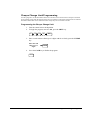
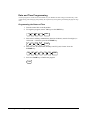
£1.99
TAX1
£0.12
TOTAL
£2.11
CASH
£2.11
CLERK 1
00001
No.000011
PLU
ER380
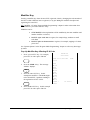
Modifier Key
Pressing a modifier key alters the next PLU registered, either by changing the code number of
the PLU so that a different item is registered, or by just adding the modifier descriptor and
registering the same PLU.
See "Modifier 1-5" in the "Program Mode Programming" chapter in order to determine how
the modifier key will affect the PLU entry.
Modifiers can be:
•
STAY DOWN so that registrations will be modified by the same modifier until
another modifier is selected,
•
POP UP after each item to register, for example large, medium or small
soft drink,
•
POP UP after each transaction to register, for example, toppings of various
pizza sizes.
See "System Options" in the "Program Mode Programming" chapter to select stay down/popup status .
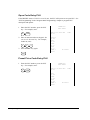
Pop-Up Modifier Key Affecting PLU Code
THANK-YOU
1. Press a preset PLU key. For example,
press PLU 1 with a price of £1.00.
1
2. Press the MOD 1 key. The message
"MOD1" displays.
CALL AGAIN
DATE 01/15/2003 WED
08:33
TIME
PLU1
£1.00
MOD1
#1001
£1.25
MOD
1
3. Press the same PLU key. In this
example the modifier 1 will add the digit 1
to the fourth PLU # position, resulting in
the registration of PLU #1001.
PLU2
£1.50
TOTAL
£3.75
CASH
£3.75
CLERK 1
00001
No.000011
1
4. Press another PLU key. In this example
press PLU 2 with a price of £1.50.
ER380
Operating Instructions • 31
Price Level Key
If you choose to use the price level feature, you must allocate memory for each level. See
"Memory Allocation" in the "Service Mode Programming" chapter. Note that the default
program selects one price level. You must also place price level keys on the keyboard. See
"Function Key Assignment" in the "Program Mode Programming" chapter.
If you use this feature, the same PLU can be given up to 2 different preset prices. Price
Level keys shift the price that is being registered. Levels can be:
•
STAY DOWN so that registrations will stay in the selected level until
another is selected,
•
POP UP after each item to register, for example large, medium or small
soft drink,
•
POP UP after each transaction to register, for example, toppings of various
pizza sizes.
See "System Options" in the "Program Mode Programming" chapter to set how the price level
keys operate.
Pop-Up Price Level Keys
1. Press a preset PLU key. For example,
press PLU 1 programmed with a price of
£1.00 for price level 1.
1
2. Press the LEVEL 2 key. The message
"LEVEL 2" displays.
LEVEL
2
3. Press the same PLU key. In this
example the PLU 1 key is programmed
with a price of £2.00 for price level 2.
THANK -YOU
CALL AGAIN
DATE 01/15/2003 WED
08:33
TIME
PLU1
£1.00
PLU1
£2.00
PLU2
£1.50
TOTAL
£4.50
CASH
£4.50
CLERK 1
00001
No.000011
1
4. Press another PLU key. In this example
press PLU 2 programmed to register
PLU #2 with price level 1. Note that the
level 1 price is registered.
32 • Operating Instructions
ER380
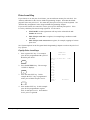
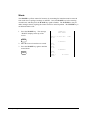
Promotion
The PROMOTION key allows you to account for Promotional items. Pressing this key will
remove an item's cost from the sale, and the Promotion item will not be added to the PLU
sales total, but it is added to the item sales counter. If stock (inventory) reporting is used, the
item will be subtracted from inventory.
1. Register an item. For example, press
PLU 1 programmed with a price of £1.00
for price level 1.
1
2. Press the PROMOTION key. The
message "PROMOTION" displays.
PROMO
3. Enter the item to be Promoted. You can
not enter an item that has not been
already registered in this transaction.
THANK-YOU
CALL AGAIN
DATE 01/15/2003 WED
08:33
TIME
PLU1
£1.00
***PROMOTION***
PLU1
TOTAL
£0.00
CASH
£0.00
CLERK 1
00001
No.000011
1
ER380
Operating Instructions • 33
Waste
The WASTE key allows control of inventory by accounting for items that must be removed
from stock due to spoilage, breakage or mistakes. Press the WASTE key before entering
wasted items, and then press the WASTE key again to finalise. The WASTE key may be
under manager control, requiring the control lock to be in the X position. The WASTE key is
not allowed within a sale.
1. Press the WASTE key. The message
"WASTE" displays at the top of the
screen.
THANK -YOU
CALL AGAIN
DATE 01/15/2003 WED
08:33
TIME
WASTE
***WASTE***
2. Enter the item or items that are wasted.
PLU1
£1.25
3. Press the WASTE key again to total the
wasted items:
PLU2
£1.50
***WASTE***
WASTE
TOTAL
£2.75
CLERK 1
00001
34 • Operating Instructions
No.000011
ER380
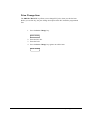
Price Change Item
The PRICE CHANGE key allows you to change PLU price when you sale the item.
Before you use this key, the price change item option of the PLU should be programmed
first.
1. Press the Price Change key.
PRICE CHANGE
2. Enter the PLU No.
3. Enter the Price.
4. Press the Price Change key again to to sale the item.
PRICE CHANGE
ER380
Operating Instructions • 35
Percent Key Operations
A total of five % functions are available to be allocated to the keyboard.
Each function is individually programmable to add or subtract, from an individual item or from
a sale total, amounts (coupons) or percentages. You can also program the percentage key
taxable or non-taxable, so that sales taxes are calculated on the net, or the gross amount of
the item or sale. You can also program preset prices or percentages.
The operation examples in this section show the percentage key in a variety of configurations.
See "Function Key Programming" in the "Program Mode Programming" chapter to assign a
specific function to each percentage key.
Preset Percent Discount on an Item
In this example the %1 function is preset with a rate of 10 %.
THANK -YOU
1. Register the item.
CALL AGAIN
2. Press the %1 key:
%1
3. The discount is automatically subtracted.
DATE 01/15/2003 WED
08:33
TIME
PLU2
£10.00
% 1
10.000%
-
AMOUNT
1.00
-
TOTAL
£9.00
CASH
£9.00
CLERK 1
00001
36 • Operating Instructions
No.000011
ER380
Enter a Percent Discount on an Item
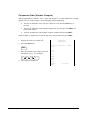
You can also operate the percentage functions by entering the percentage of the discount or
surcharge. If necessary, you can enter a fractional percentage up to 3 digits beyond the
decimal (i.e. 99.999%).
THANK-YOU
1. Register the discounted item.
CALL AGAIN
2. Enter the percentage. If you are entering
a fraction of a percent, you mus t use the
decimal key. For example, for one third
off enter:
DATE 01/15/2003 WED
08:33
TIME
PLU2
£10.00
3
3
.
3
3
3
3. Press the %1 key:
% 1
33.333%
-
AMOUNT
3.33
-
TOTAL
£6.67
%1
4. The discount is automatically subtracted.
CASH
£6.67
CLERK 1
00001
No.000011
Percent on Sale Total
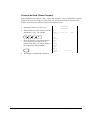
The percent can be an open or preset amount. In this example an open percentage surcharge
of 15% is applied.
THANK-YOU
1. Register the items you wish to sell.
CALL AGAIN
2. Press the SBTL key:
DATE 01/15/2003 WED
08:33
SBTL
3. Enter the percentage, press the
appropriate discount key. For example,
for 15% enter:
TIME
PLU2
£10.00
% 1
15.000%
AMOUNT
£1.50
1
5
%1
4. The surcharge is automatically added.
TOTAL
£11.50
CASH
£11.50
CLERK 1
00001
ER380
No.000011
Operating Instructions • 37
Coupon on Sale (Vendor Coupon)
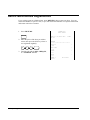
When programmed as "amount", "sale", "open" and "negative", a % key will perform a coupon
against a sale (or vendor coupon.) Also, depending upon programming:
•
You may be allowed to enter only one coupon in a sale, after the SBTL key is
pressed,
•
You may be allowed to enter multiple coupons, but you must press the SBTL key
before each coupon,
•
You may be allowed to enter multiple coupons, without first pressing SBTL.
In this example, a coupon may be entered only once, and you must first press SBTL.
THANK -YOU
1. Register the items you wish to sell.
CALL AGAIN
2. Press the SBTL key:
DATE 01/15/2003 WED
08:33
SBTL
3. Enter the amount of the coupon, press the
appropriate % key. For example:
PLU2
10.00
%1
2.00
%1
TOTAL
£8.00
4. The coupon is subtracted.
CASH
£8.00
2
0
0
CLERK 1
00001
38 • Operating Instructions
TIME
-
No.000011
ER380
Coupon on Item (Store Coupon)
When programmed as "amount", "item", "open" and "negative", a % key will perform a coupon
against an item (or store coupon.) In this case, you must press the PLU (or enter the PLU
number) of the PLU you wish the coupon to be subtracted from.
THANK-YOU
1. Register the items you wish to sell.
2. Enter the amount of the coupon, press the
appropriate % key. For example:
2
0
0
%1
3. Press the PLU key you wish to subtract
the coupon from (or enter the PLU
number of the PLU you wish to subtract
the coupon from and press PLU.)
CALL AGAIN
DATE 01/15/2003 WED
08:33
TIME
PLU1
£10.00
PLU1 C
2.00
-
TOTAL
£8.00
CASH
£8.00
1
CLERK 1
00001
No.000011
4. The coupon is automatically subtracted.
ER380
Operating Instructions • 39
Return Merchandise Registrations
If you wish to return or refund an item, press RETURN, then re-enter any item. You can
return merchandise as part of a sale, or you can return merchandise as a separate transaction
and return cash to the customer.
THANK -YOU
1. Press RETURN:
CALL AGAIN
RETURN
DATE 01/15/2003 WED
08:33
2. Enter the price of the item you wish to
return, then press the PLU key where it
was registered originally.
2
9
9
2
3. Total the sale with CASH , CHEQUE,
or a CHARGE function.
RETURN
*************************
PLU2 T1
2.99
-
TAX1 AMT
0.18
-
TOTAL
3.17
-
CASH
3.17
-
CLERK 1
00001
40 • Operating Instructions
TIME
No.000011
ER380
Voids and Corrections
Error Correction (Void Last Item)
This function corrects the last item entered.
THANK-YOU
1. Register the item you wish to sell.
CALL AGAIN
2. Press the ERROR CORR key:
DATE 01/15/2003 WED
08:33
ERROR
CORR
TIME
PLU1 T1
29
£2
PLU2
£1.29
ERR CORR ---------------------PLU2
1.29
-
TAX1 AMT
£0.14
TOTAL
£2.43
CASH
£2.43
CLERK 1
00001
No.000011
Void Previous Item
This function allows you to correct an item registered previously in a transaction.
THANK-YOU
1. Register an item. Then register a second
item.
2. To correct the first item, press
VOID:
CALL AGAIN
DATE 01/15/2003 WED
08:33
PLU2
£1.29
VOID
3. Enter the price of the first item, then
press the PLU key where it was
registered originally.
PLU1 T1
£2.29
VOID -------------------------PLU2
1.29
1
TIME
2
9
2
-
TAX1 AMT
£0.14
TOTAL
£2.43
CASH
ER380
Operating Instructions • 41
£2.43
CLERK 1
00001
42 • Operating Instructions
No.000011
ER380
Cancel
The CANCEL key allows you to stop any transaction. Anything registered within the
transaction before the CANCEL key is pressed is automatically corrected. The CANCEL
key can be inactivated through programming, see "Function Key Programming" in the
"Program Mode Programming" chapter, or the key can be programmed to require manager
control.
THANK-YOU
1. Register the items you wish to sell.
CALL AGAIN
2. Press the CANCEL key
DATE 01/15/2003 WED
08:33
TIME
CANCEL
PLU1 T1
£2.29
PLU2
0.50
-
CANCEL
*************************
CLERK 1
00001
No.000011
Void Position Operations
You can use the VOID control lock position to correct any complete transaction. To correct
any transaction:
THANK-YOU
1. Turn the control lock to the VOID
position.
2. Enter the transaction you wish to correct
exactly as it was entered originally in the
REG control lock position. You can
enter discounts, voids, returns, tax
exemptions or any other function.
3. All totals and counters are corrected as if
the original transaction did not take place.
CALL AGAIN
DATE 01/15/2003 WED
08:33
VOID MODE
**********************
PLU1 T1
2.29
-
PLU2
1.00
-
TAX1 AMT
0.14
-
TOTAL
3.43
-
CASH
3.43
-
CLERK 1
00001
ER380
TIME
No.000011
Operating Instructions • 43
No Sale Operations
Open Drawer
The #/NO SALE key will open the cash drawer when you have not already started a
transaction. The no sale func tion can be disabled or placed under manager control through
programming, see "Function Key Programming" in the "Program Mode Programming"
chapter.
THANK -YOU
1. Press #/NS:
CALL AGAIN
#/NS
DATE 01/15/2003 WED
08:33
2. The drawer will open and the receipt will
print as in the example on the right.
TIME
NO SALE ----------------------CLERK 1
00001
No.000011
Non Add Number
You can also use the #/NO SALE key to print any number (up to 9 digits) on the printer
paper. You can enter the number any time during a transaction. For example, if you wish to
record a checking account number, enter the number and press the #/NO SALE key before
totalling the sale with the cheque key.
THANK -YOU
1. Register the items you wish to sell.
2. Enter the number you wish to record, for
example enter:
1
2
3
3. Press #/NS:
#/NS
4. Press CHEQUE
CHEQUE
4
CALL AGAIN
DATE 01/15/2003 WED
08:33
PLU1 T1
£2.99
NON-ADD#
1234
TAX1 AMT
£0.18
TOTAL
£3.17
CHEQUE
£3.17
CLERK 1
00001
44 • Operating Instructions
TIME
No.000011
ER380
Received On Account Operations
You can use one of the received on account functions (RA1-RA3) to accept cash or checks
into the cash drawer when you are not actually selling merchandise. For example, use
received on account to accept payments for previously sold merchandise, or record loans to
the cash drawer.
THANK-YOU
1. Press one of the received on account
keys (RA1 -RA3)
RA1
DATE 01/15/2003 WED
08:33
2. Enter the amount of cash received, press
CASH.
1
0
0
0
CASH
3. Enter the cheque amount received, press
CHEQUE
1
0
0
0
CHEQUE
4. Enter the charge amount received, press
CHARGE1
1
CALL AGAIN
0
0
0
TIME
RA1
CASH
£10.00
CHEQUE
£10.00
CHARGE1
£10.00
RA1
£30.00
CLERK 1
00001
No.000011
CHARGE
1
5. You can continue to itemise receipts, or
you can finalise by pressing or selecting
the same received on account key.
RA1
ER380
Operating Instructions • 45
Paid Out Operations
You can use the paid out function(PO1-PO3) to track cash or checks paid out or to record
loans from the cash drawer.
THANK-YOU
1. Press one of the paid out keys(PO1PO3)
DATE 01/15/2003 WED
08:33
PO1
2. Enter the amount of cash paid out, press
CASH.
1
0
0
0
CASH
3. Enter the cheque amount paid out, press
CHEQUE.
1
0
0
0
CHEQUE
4. Enter the charge amount received, press
CHARGE1
1
CALL AGAIN
0
0
0
TIME
PO1
CASH
10.00
-
CHEQUE
10.00
-
CHARGE1
10.00
-
PO1
30.00
CLERK 1
00001
No.000011
CHARGE
1
5. You can continue to itemize paid outs, or
you can finalise by pressing or selecting
the same paid out key.
PO1
46 • Operating Instructions
ER380
Subtotalling a Sale
1. Register the items you wish to sell.
2. Press SBTL. The subtotal will display
with the message "Sub" indicated on the
rear display.
SBTL
The subtotal can be printed if the system
option is set. See "Print Option
Programming" in the "Program Mode
Programming" chapter.
ER380
Operating Instructions • 47
Totalling and Tendering
There are ten tender functions available to categorise sales. CASH and CHEQUE are
individual keys on the keyboard
Totalling a Cash Sale
THANK -YOU
1. Register the items you wish to sell.
CALL AGAIN
2. To total a cash sale, press CASH:
CASH
3. The display will indicate the total amount
of the cash sale.
DATE 01/15/2003 WED
08:33
TIME
PLU2
£7.96
TOTAL
£7.96
CASH
£7.96
CLERK 1
00001
No.000011
Totalling a CHEQUE Sale
THANK -YOU
1. Register the items you wish to sell.
CALL AGAIN
2. To total a cash sale, press CHEQUE:
CHEQUE
3. The display will indicate the total amount
of the cash sale.
DATE 01/15/2003 WED
08:33
TIME
PLU2
£7.96
TOTAL
£7.96
CHEQUE
£7.96
CLERK 1
00001
48 • Operating Instructions
No.000011
ER380
Tendering a Cash Sale
THANK-YOU
1. Register the items you wish to sell.
2. Enter the amount tendered by the
customer. For example, for £20.00 enter:
2
0
0
0
3. Press CASH:
CALL AGAIN
DATE 01/15/2003 WED
08:33
TIME
PLU1 T1
£2.99
PLU1 T1
£2.99
4X
CASH
4. The display will indicate the total amount
of the cash tendered and the change due,
if any.
£1.99
PLU2
£7.96
TAX1
£0.36
TOTAL
£14.30
CASH
£20.00
CHANGE
£5.70
CLERK 1
00001
No.000011
Tendering a CHEQUE Sale
THANK-YOU
1. Register the items you wish to sell.
2. Enter the amount tendered by the
customer. For example, for £20.00 enter:
2
0
0
0
3. Press CHEQUE:
CHEQUE
4. The display will indicate the total amount
of the check tendered and the change
due, if any.
CALL AGAIN
DATE 01/15/2003 WED
08:33
TIME
PLU1 T1
£2.99
PLU1 T1
£2.99
4X
£1.99
PLU2
£7.96
TAX1
£0.36
TOTAL
£14.30
CHEQUE
£20.00
CHANGE
£5.70
CLERK 1
00001
ER380
No.000011
Operating Instructions • 49
Totalling a Charge Sale
Use the charge keys to track charge or credit card sales. See "Function Key Programming"
in the "Program Mode Programming" chapter to change the descriptors for the charge tender
functions. For example, you can use CHARGE 1 to track Visa card sales. The descriptor
"VISA" will display on the function look up menu and print on the printer. You can also set
tendering options for the charge keys, i.e. whether to allow over tendering or to enforce
tendering.
THANK -YOU
1. Register the items you wish to sell.
2. Press one of the charge keys if it is
located on the keyboard:
CHARGE
1
CALL AGAIN
DATE 01/15/2003 WED
08:33
TIME
PLU1 T1
£2.99
PLU1 T1
£2.99
4X
£1.99
PLU2
£7.96
TAX1
£0.36
TOTAL
£14.30
CHARGE1
£14.30
CLERK 1
00001
50 • Operating Instructions
No.000011
ER380
Tendering a Charge Sale
Tendering a charge sale may or may not be allowed. See "Function Key Programming" in the
"Program Mode Programming" chapter to set tendering options for the charge keys, i.e.
whether to allow over tendering or to enforce tendering.
THANK-YOU
1. Register the items you wish to sell.
2. Enter the amount of the charge and press
one of the charge keys if it is loc ated on
the keyboard:
2
0
0
0
CHARGE
1
CALL AGAIN
DATE 01/15/2003 WED
08:33
TIME
PLU1 T1
£2.99
PLU1 T1
£2.99
4X
£1.99
PLU2
£7.96
TAX1
£0.36
TOTAL
£14.30
CHARGE1
£20.00
CHANGE
£5.70
CLERK 1
00001
ER380
No.000011
Operating Instructions • 51
CHEQUE Cashing
Cheque cashing means exchanging cash for a cheque. If you wish to cash cheques, you must
place a CHQCASH key on the keyboard. See "Function Key Assignment" in the "Program
Mode Programming" chapter.
1. Enter the amount of the cheque tendered
by the customer. For example, for
£20.00 enter:
2
0
0
THANK -YOU
CALL AGAIN
DATE 01/15/2003 WED
08:33
0
***CHKCASH***
2. Press CHQCASH:
CHQ
CASH
3. The display will indicate the amount of
the cheque and the cash change.
52 • Operating Instructions
TIME
CHEQUE
£20.00
CASH
20.00
CLERK 1
00001
No.000011
ER380
Split Tender
Split tendering is paying for one transaction by more than one payment method. For example,
a £20.00 sale could be split so £10.00 is paid in cash, and the remaining £10.00 is paid by a
cheque. If necessary, you can make several different payments.
THANK-YOU
1. Register the items you wish to sell.
2. Enter the amount of cash tendered by the
customer. For example, enter £10.00 and
press CASH:
1
0
0
0
CASH
3. The display will indicate the £10.00 cash
tender and the £10.00 total still due.
4. Enter the amount of cheque tendered by
the customer. For example, enter £10.00
and press CHEQUE:
1
0
0
0
CHEQUE
CALL AGAIN
DATE 01/15/2003 WED
08:33
TIME
PLU2
00
£20
TOTAL
£20.00
CASH
£10.00
TOTAL
£10.00
CHEQUE
£10.00
CLERK 1
00001
No.000011
5. When the total tendered equals or
exceeds the total due, the receipt will
print and the transaction is complete.
ER380
Operating Instructions • 53
Post Tender
Post tendering means computing change after the sale has been totalled and the drawer is
open. This feature is useful when a customer changes the amount of the tender. Normally,
this function is not allowed. If you wish to allow post tendering, you must set the appropriate
system option.
THANK -YOU
1. Register the items you wish to sell.
CALL AGAIN
2. Press CASH:
DATE 01/15/2003 WED
08:33
TIME
CASH
3. The display will indicate the total of the
cash sale.
4. Enter the amount of the new tender,
Press CASH:
2
0
0
0
CASH
PLU1 T1
£2.00
TAX1
£0.12
CASH
£2.12
CLERK 1
00001
No.000011
5. The display will indicate the change due.
54 • Operating Instructions
ER380
Currency Conversion
If you normally accept currency from neighbouring nations, you can program to convert the
subtotal of a sale to the equivalent cost in the foreign currency. You can set up four separate
conversion functions for different foreign currencies. To do this, you need to program the
conversion factor. For example, if the pound (home currency) is worth approximately 63
euros (foreign currency), the conversion factor could be 0.632511.
See "Function Key Programming" in the "Program Mode Programming" chapter to set a
conversion factor.
THANK-YOU
1. Register the items you wish to sell.
2. Press the CONV1 key if it is located on
the keyboard:
CALL A GAIN
DATE 01/15/2003 WED
08:33
TIME
CONV1
PLU1 T1
£2.00
TAX1
£0.12
3. Enter the amount of the foreign currency
tender, Press CASH:
1
0
0
0
CASH
4. The display will indicate the amount of
foreign currency tendered and display
£5.17 change due. The change due is
computed in home currency!
ER380
TOTAL
£2.12
CONV 1
€2.90
CHANGE RATE
@1.3720
HOME AMT.
£10.00
CHANGE
£5.17
CLERK 1
00001
No.000011
Operating Instructions • 55
Not Found Key Operation
The 380M has the ability to create a PLU within a sale. If during a sale a PLU is sold that
does not exist an error tone will sound, follow the sequence below to create and sell the PLU.
1. If there is a PLU error tone during the item registration, Press NOT FOUND key.
NOT FOUND
2. Enter a price of the PLU up to eight digits, (or "0" for no price)and press X/TIME key.
Then the PLU code and price of the PLU will be automatically programmed and sold.
X/TIME
Descriptor
- Refer to “Program 80 – Function Key Descriptor”
56 • Operating Instructions
ER380
Table Management and Clerk Interrupt Operations
Overview
The ER-380 can employ a manual previous balance, hard check, or soft check system. (You
must select hard or soft check posting in memory allocation programming - the default
selection is soft.)
There are two methods in ER-380 to manage check track. One is table management
system and the other is clerk interrupt system. If you want to use clerk interrupt system.
First, Program as below.
To Enter Clerk Interrupt System (To Exit Table Management system )
1.Program Clerk Secret Code
2.Set system option #2 to a value of 1. See “System Option Programming”
3.Set system option #26 to a value of 1. See “System Option Programming”.
To Exit Clerk Interrupt System(To Enter Table Management system)
Set system option #26 to a value of 0. See “System Option Programming” .
ER380
Operating Instructions • 57
Soft Check
Opening a Soft Check
1. Enter the number of the guest check,
press the CHECK # key:
1
2
3
CHECK#
or, press the CHECK # key to
automatically assign a check:
CHECK#
2. If required, enter the table number and
press the TABLE key:
3
TABLE
3. If required, enter the number of guests
and press the GUEST key:
2
GUEST
4. Register the items you wish to sell.
Receipt Example:
THANK -YOU
CALL AGAIN
DATE 01/15/2003 WED
08:33
TIME
CHECK #
#123
PBAL
£0.00
TABLE
#3
GUEST
#2
CHICKEN
£7.00
STEAK
£10.00
SERVICE
£17.00
BFWD
£17.00
CLERK 1
00001
No.000011
5. To total the posting, press SERVICE:
SERVICE
Note: If a table number entry is required for all guest checks, and checks are assigned by
register, the check will be assigned by the register when the table # is entered.
58 • Operating Instructions
ER380
Adding to a Soft Check
1. Enter the number of the guest check,
press the CHECK # key:
1
2
3
CHECK#
or, if you entered a table number, enter
the table number and press the TABLE
key:
3
Receipt Example:
THANK-YOU
CALL AGAIN
DATE 01/15/2003 WED
08:33
TIME
CHECK #
#123
PBAL
£17.00
TABLE
#3
TABLE
2. Register the next items you wish to sell.
3. To total the posting, press SERVICE:
GARLIC BREAD
£2.00
SERVICE
£2.00
BFWD
£19.00
SERVICE
CLERK 1
00001
No.000012
Printing a Soft Check
1. Enter the number of the guest check,
press the CHECK # key:
Sample of soft check printed on the receipt:
THANK-YOU
1
2
3
CHECK#
or, if you entered a table number, enter
the table number and press the TABLE
key:
3
TABLE
2. Press PRINT CHECK to print the
complete check. If programmed to do so,
the PRINT CHECK key will
automatically service the check:
PRINT
CHECK
CALL AGAIN
DATE 01/15/2003 WED
08:33
TIME
CHECK #
#123
PBAL
£19.00
TABLE
#3
CHICKEN
£7.00
STEAK
£10.00
GARLIC BREAD
£2.00
SERVICE
£0.00
BFWD
£19.00
CHK # :
1
CLERK 1
00001
ER380
No.000012
Operating Instructions • 59
Paying a Soft Check
1. Enter the number of the guest check,
press the CHECK # key:
1
2
3
CHECK#
THANK -YOU
CALL AGAIN
DATE 01/15/2003 WED
08:33
or, if you entered a table number, enter
the table number and press the TABLE
key:
3
Sample of soft check printed on the receipt:
TIME
CHECK #
#123
PBAL
£19.00
TABLE
#3
TABLE
2. If necessary, add additional items. If you
wish to add a tip, press SBTL, then enter
the tip amount and press the TIP key:
TIP
£3.00
CHECKS PAID
£22.00
CASH
£25.00
SBTL
CHANGE
£3.00
CHK #
3
0
0
TIP
: 2
3. Pay the balance as you would normally
tender a transaction, with CASH,
CHEQUE, or one of the CHARGE
functions. If the tender is greater than
the balance due, change is displayed.
2
60 • Operating Instructions
5
0
0
CLERK 1
00001
No.000013
CASH
ER380
Hard Check
Opening a Hard Check
1. Enter the number of the guest check,
press the CHECK # key:
1
2
3
CHECK#
or, press the CHECK # key to
automatically assign a check:
CHECK#
2. If required, enter the table number and
press the TABLE key:
3
TABLE
3. If required, enter the number of guests
and press the GUEST key:
2
GUEST
4. Register the items you wish to sell.
Receipt Example:
THANK-YOU
CALL AGAIN
DATE 01/15/2003 WED
08:33
TIME
CHECK #
#123
PBAL
£0.00
TABLE
#3
GUEST
#2
CHICKEN
£7.00
STEAK
£10.00
SERVICE
£17.00
BFWD
£17.00
CLERK 1
00001
No.000011
5. Place a slip in an optional slip printer, the
check will print automatically when you
press SERVICE:
SERVICE
ER380
Operating Instructions • 61
Adding to a Hard Check
1. Enter the number of the guest check,
press the CHECK # key:
1
2
3
CHECK#
or, if you entered a table number, enter
the table number and press the TABLE
key:
3
TABLE
2. Register the next items you wish to sell.
3. To total the posting, press SERVICE:
SERVICE
Receipt Example:
THANK -YOU
CALL AGAIN
DATE 01/15/2003 WED
08:33
CHECK #
#123
PBAL
£17.00
TABLE
#3
GARLIC BREAD
£2.00
SERVICE
£2.00
BFWD
19.00
CLERK 1
00001
62 • Operating Instructions
TIME
No.000012
ER380
X Mode
Introduction
All Management Functions take place with the control lock in the X position. This way only
those with the correct key will have access to these functions. Some register operations may
be programmed to require the control lock in the X position in order to operate. All reports
require a key that will access the X or Z position.
ER380
X Mode • 63
X Reports
System reports are divided into two basic categories:
•
X reports, which read totals without resetting
•
Z reports, which read totals and reset them to zero
Most reports are available in both categories. Some reports, such as the Cash-in-Drawer
report and the From-To PLU report are available only as X reports.
Some reports also provide identical but separate period to date reports. These reports
maintain a separate set of totals, which may be allowed to accumulate over a period of days,
weeks, months, or even years. X2 reports read period to date totals without resetting, and Z2
reports read period to date totals and reset them to zero. Period to date totals are updated
each time a Z1 report is completed.
A complete list of available reports is presented in a chart on the following page.
An example is given for each of these reports in the pages that follow. Those reports which
may be optionally abbreviated through register programming are represented twice. They are
first shown with the option off, giving all totals, and again with the option turned on, showing
the abbreviated version of the same report.
Registers programmed with pop-up clerks must be signed on in the REG control lock position
prior to taking reports.
Running a Report – General Instructions
1. Refer to the “Report Table”.
2. Select a report type and the report mode.
3. Turn the control lock to the position indicated.
4. Enter the key sequence for the report you have selected.
64 • X Mode
ER380
Report Table
Report Type
Financial
Time
All PLU
All Clerk
Group
All STOCK
VOID
Daily Sales
Report
Number
1
2
3
4
5
6
7
8
Individual Clerk
Report
9
MIX AND MATCH
10
Open Table
ER380
11
Control Lock
Position
Key Sequence
X
1 – SBTL
Z
Z
1 – SBTL
X2
X
201 – SBTL
Z2
Z
201 – SBTL
X
X
2 – SBTL
Z
Z
2 – SBTL
X2
X
202 – SBTL
Z2
Z
202 – SBTL
X
X
3 – SBTL
Z
Z
3 – SBTL
X2
X
203 – SBTL
Z2
Z
203 – SBTL
X
X
4 – SBTL
Z
Z
4 – SBTL
X2
X
204 – SBTL
Z2
Z
204 – SBTL
X
X
5 – SBTL
Z
Z
5 – SBTL
X2
X
205 – SBTL
Z2
Z
205 – SBTL
X
X
6 – SBTL
Z
Z
6 – SBTL
X
X
7 – SBTL
Z
Z
7 – SBTL
X2
X
207 – SBTL
Z2
Z
207 – SBTL
X2
X
208 – SBTL
Z2
Z
208 – SBTL
X
X
9 – SBTL - # -CLERK - # -CLERK
X2
X
209 – SBTL - # -CLERK - # - CLERK
X
X
10 – SBTL
Z
Z
10 – SBTL
X2
X
210 – SBTL
Z2
Z
210 – SBTL
X
X
11 – SBTL
Z
Z
11 – SBTL
Report
Mode
X
X Mode • 65
Report Type
TRAIN
FINANCIAL
From/To PLU
Report
Number
12
13
From/To PLU
Control Lock
Position
Key Sequence
X
12 – SBTL
Z
Z
12 – SBTL
X2
X
212 – SBTL
Z2
Z
212 – SBTL
X
X
13-SBTL XXXX – PLU – XXXX – PLU
X2
X
213-SBTL XXXX – PLU – XXXX – PLU
14-SBTL XXXX –PLU – XXXX – PLU
Report
Mode
X
From/To STOCK
14
X
X
Minimum Stock
15
X
X
16 – SBTL
DRAWER TOTAL
111
X
X
111-SBTL
PRINT ALL EJ
300
X
X
300 -SBTL
PRINT EJ CASH
301
X
X
301 -SBTL
PRINT EJ CHECK
302
X
X
302 -SBTL
PRINT EJ MISC/T
303
X
X
303 -SBTL
PRINT EJ %
304
X
X
304 -SBTL
PRINT EJ RA/PO
305
X
X
305 -SBTL
PRINT EJ
RETURN
PRI NT EJ
EC/VOID
PRINT EJ
NO SALE
PRINT EJ
CANCEL
PRINT EJ TRAIN
306
X
X
306 -SBTL
307
X
X
307 -SBTL
308
X
X
308 -SBTL
309
X
X
309 –SBTL
311
X
X
311 - SBTL
PRINT VOID
MODE
PRINT EJ BY
CLERK
RESET EJ
312
X
X
312 - SBTL
401 – 15
X
X
401-415(depends on Max Clerk)-SBTL
399
Z
Z
399- SBTL
66 • X Mode
ER380
Cash Declaration
If compulsory cash declaration is required, you must declare the count of the cash drawer
prior to taking X or Z financial and clerk reports.
You can enter the cash drawer total in one step, or to facilitate the countin g of the cash
drawer, you can enter each type of bill/coin and cheques separately and let the register act as
an adding machine. You can also use the X/TIME key to multiply the denomination of
currency times your count.
Either way you choose to enter cash, the register will compare your declaration with the
expected cash and cheque in drawer totals and print the over or short amounts on the report.
For example:
1. Turn the control lock to the X or Z
position (depending upon the type of
report you are taking.)
THANK -YOU
CALL A GAIN
2. Press the CASH key.
9
0
DATE
08:33
SBTL
8
7
0
0
TIME
CASH
£98.76
6
CASH
0
CASH
£20.00
CASH
£118.76
4. Enter the total of cheques.
2
WED
*** CASH DECLARATION **
3. Enter the total of cash.
9
01/15/2003
CHEQUE
CLERK 1
00001
No.000011
5. Press the CASH key to total the
declaration.
CASH
ER380
X Mode • 67
Service Mode Programming
Overview
The following procedures are done from the Service Mode menu:
•
Clear all totals
•
Clear grand total
•
Clear PLU file
•
EPROM Information
•
Memory Allocation
•
Assignment of functions to keyboard locations
•
RS232C Port
68 • Service Mode Programming
ER380
Ram Clear & Memory Allocation
1. Turn the key to the S mode and power on the register whilst holding down the
CHEQUE key. Then press the top left, bottom left, top right and bottom
right keys to start the memory allocation procedure.
If you want to allocate memory by default value, Press CASH key only,
Alternatively:
Refer to the chart below . Enter the index number and press the X/TIME key.
X
X/TIME
X
MEMORY ITEM
1
2
3
4
5
6
7
8
9
PLU
CLERK
GROUP
CHECK#
SOFT CHECK LINE
CHECK TYPE : Hard(1), Soft(0)
PRICE LEVEL
MIX AND MATCH
ELECTRONIC JOURNAL
Note:- ***The number of clerks must be equal to or less than the number of check#
details entered in file 4.
2. Enter the Number to allocate for the Memory Item and Press CASH key.
See the example data table below
N
CASH
MEMORY ITEM
PLU
CLERK
GROUP
CHECK #
SOFT CHECK LINE
CHECK TYPE
PRICE LEVEL
MIX AND MATCH
ELECTRONIC JOURNAL
N
300 (Max.5000)
10 (Max. 99)
20 (Max. 99)
15 (Max. 500)
30 (Max. 100)
0(Soft Check), 1(Hard Check)
1 (Max. 2)
10 (Max. 99)
3000(Max. 15000)
Default Memory Allocation
3. If you want to finish memory allocation, Enter CASH key with no numeric key
input. And if you want to allocate another memory area, Repeat the file number
entry sequence.
ER380
Service Mode Programming • 69
CASH
70 • Service Mode Programming
ER380
Clear Totals
1.Turn the control lock to the S position.
2.To Reset Totals, enter 20, press the SBTL key.
2
0
SBTL
3. Press the X/TIME key to confirm.
X/TIME
4. Press CASH key to finalise
CASH
Clear Grand Totals
1.Turn the control lock to the S position.
2. To Reset Grand Totals, enter 30, press the SBTL key.
3
0
SBTL
3. Press the /TIME key to confirm.
X/TIME
4. Press CASH key to finalise
CASH
ER380
Service Mode Programming • 71
Clear PLU File
1.Turn the control lock to the S position.
2.To Reset PLU file, enter 40, press the SBTL key.
4
0
SBTL
3. Press the /TIME key to confirm.
X/TIME
4. Press the CASH key to finalise
CASH
Eprom Information
1.Turn the control lock to the S position.
2.To Scan Eprom Information, enter 50, press the SBTL key.
5
0
SBTL
Memory Allocation
1.Turn the control lock to the S position.
2.To Scan Eprom Information, enter 60, press the SBTL key.
6
0
SBTL
Load Default Keyboard
1.Turn the control lock to the S position.
2.Turn the power switch to the OFF position .
3.Press and hold the SUBTOTAL key. While continuing to hold the SUBTOTAL
key, turn the power switch to the ON position.
72 • Service Mode Programming
ER380
Initial Clear
1.Turn the control lock to the P position.
2.Turn the power switch to the OFF position .
3.Press and hold the CASH key. While continuing to hold the CASH key, turn the
power switch to the ON position.
PC Online Mode
In ER-380, There are no special commands to enter PC Online Mode.
When you want to enter PC Online mode, All you have to do is to set 232 Communication Option in Programming.
When PC sends commands to the ECR, the ECR will be automatically in Online Mode if connected.
ER380
Service Mode Programming • 73
Function Key Assignment Programming
Function keys may be relocated, inactivated or changed with this program. For example, you
may wish to place functions, such as PREVIOUS BALANCE and SERVICE that are not
placed on the default keyboard. Or perhaps, you may wish to remove a function, such as
CANCEL, for security reasons.
Please note the following limitations:
•
If you assign a duplicate of a function code, the duplicate will function exactly as
the original - you will not get separate totals and counters on reports for the
duplicated key.
•
You can reassign keys only in locations that are programmable. See "Keyboards",
where the key locations that may be programmed are identified.
To Assign a Function Key to a Location:
1. Turn the control lock to the S position.
2. Enter 70, press the SBTL key.
7
0
SBTL
3. Refer to Function Key Codes to find the code for the key you wish to assign,
press the location you wish to program. Repeat this step to assign another key.
Key
Location
Key Code
4. Press the CASH key to finalise key assignment program.
CASH
74 • Service Mode Programming
ER380
Function Key Codes
Code
Function
Code
Function
Code
Function
Code
Function
1
NLU 1
43
CHARGE 7
73
MACRO 9
103
VOID ITEM
12
NLU 12
44
CHARGE 8
74
MACRO 10
104
WASTE
15
Numeric 1
45
CHEQUE CASHING
75
MDSE RETURN
105
VALIDATION
16
Numeric 2
46
ENDORSE
76
MODIFIER 1
106
PAYMENT
17
Numeric 3
47
CHEQUE TEND
77
MODIFIER 2
107
RCPT ON/OFF
18
Numeric 4
48
CHECK #
78
MODIFIER 3
108
INACTIVE
19
Numeric 5
49
CLEAR (ESC)
79
MODIFIER 4
109
NON ADD
20
Numeric 6
50
CLERK #
80
MODIFIER 5
110
PRICE CHANGE
21
Numeric 7
51
CURR. CONV. 1
81
P/BAL
111
CLERK 1
22
Numeric 8
52
CURR. .CONV. 2
82
PAID OUT 1
112
CLERK 2
23
Numeric 9
53
CURR. CONV. 3
83
PAID OUT 2
113
CLERK 3
24
Numeric 0
54
CURR. CONV. 4
84
PAID OUT 3
114
CLERK 4
25
Numeric 00
55
ANALISE 2
85
PAPER FEED
115
CLERK 5
26
DECIMAL
56
ANALISE 1
86
PRINT CHECK
116
CLERK 6
27
#/NS
57
ERR CORRECT
87
PROMOTION
117
CLERK 7
28
%1
58
F/S SHIFT
88
REC ON ACCT 1
118
CLERK 8
29
%2
59
F/S SUB
89
REC ON ACCT 2
119
CLERK 9
30
%3
60
F/S TEND
90
REC ON ACCT 3
120
CLERK 10
31
%4
61
GUEST
91
SUBTOTAL
121
PRICE INQ
32
%5
62
PLU
92
SCALE
122
ADD STOCK
33
QTY/TIME
63
PRICE LEVEL 1
93
SERVICE
123
DEDUCT STOCK
34
ADD CHECK
64
PRICE LEVEL 2
94
TABLE #
124
35
CANCEL
65
MACRO 1
95
TARE
125
OVERWRITE
STOCK
NOT FOUND
36
CASH
66
MACRO 2
96
ANALISE 3
126
STOCK INQUIRE
37
CHARGE 1
67
MACRO 3
97
TAX EXEMPT
127
CHARGE #
38
CHARGE 2
68
MACRO 4
98
TAX SHIFT 1
128
MACRO #
39
CHARGE 3
69
MACRO 5
99
TAX SHIFT 2
40
CHARGE 4
70
MACRO 6
100
TAX SHIFT 3
41
CHARGE 5
71
MACRO 7
101
TAX SHIFT 4
42
CHARGE 6
72
MACRO 8
102
TIP
ER380
Service Mode Programming • 75
RS232C Port Options
Turn the control lock to the S position
To program PORT1 enter 80 and press SBTL key.
Repeat for another
Index
8
0
SBTL
N1
XTIME
N2
CASH
CASH
N1
OPTION
N2
VALUE
1
Baud Rate
0
9600 BPS
1
1200 BPS
2
2400 BPS
3
4800 BPS
4
19200 BPS
0
NONE
1
ODD
2
EVEN
0
8 BITS
1
7 BITS
0
1 BIT
1
2 BIT
0
NONE
1
PC
2
Not Used
3
RJ PRINTER
4
RECEIPT PRINTER
6
SCANNER
7
COIN
8
EFT
9
POLE
2
3
4
5
Parity
Data Bits
Stop Bits
Device Function
6
Initial Feeding Line KP
0 - 20
7
End Feeding Line KP
0 - 20
8
Initial Feeding Line Slip
0 - 20
9
Print Line On Guest Check
0 - 50
Scale Type (Non UK)
76 • Service Mode Programming
0
NCI
ER380
ER380
N1
OPTION
10
Scale Type (Non UK)
N2
VALUE
0
NCI
1
CAS
Service Mode Programming • 77
Printer Type
11
12
13
Pole Display
EFT TYPE – (Non Uk)
14
EFT CONFIG BYTE (Non Uk)
15
EFT CURRENCY (Non Uk)
16
EFT PASSWORD (Non Uk)
78 • Service Mode Programming
0
NONE
1
SAMSUNG SRP-100
2
SRP-250
3
SRP-300
4
SRP-350
5
CITIZEN3550
6
CITIZEN810
7
CITIZEN230
8
EPSON TMT88-2
9
EPSON U200
10
EPSON U295
11
EPSON U300
12
EPSON U325
13
EPSON U375
14
STAR SP-200
15
STAR SP-298
16
STAR SP-300
17
STAR TSP-200
0
EPSON
1
ICD
0
EFT GLED
1
EFT INGE
2
EFT ZVT700
0 - 127
0
NONE
1
DM
2
EURO
0- 99999999
ER380
Program Mode Programming
Default Programming
•
All keyboard PLUs are non-taxable and open, without entry limits by default
status programming of "00000000".
•
All system options are set to 0 in default programming, unless otherwise noted.
Change only the options, which will deviate, from default programming. There is
no need to re-enter an option status of 0, since 0 is its original setting.
•
All programming (unless otherwise stated) is done with the control lock in the P
position. Each section details a specific area of register programming.
Descriptor Programming Methods
Descriptors are programmable for PLUs, function keys, groups, clerks and the logo/messages.
There is a method available to program descriptors the Descriptor Code Method.
ER380
Program Mode Programming • 79
Program Overlay Method
ER380 Alpha Keyboard Overlay
7
8
9
M
Q
U
X
SPACE
C
F
I
4
5
6
L
P
T
W
Z
B
E
H
1
2
3
K
O
S
V
Y
A
D
G
0
00
.
J
N
R
80 • Program Mode Programming
ER380
Descriptor Code
Descriptor Code Chart
CHAR
Ç
ü
é
â
ä
à
å
ç
ê
ë
CODE
001
002
003
004
005
006
007
008
009
010
CHAR
è
ï
î
ì
Ä
Å
É
æ
?
ô
020
CODE
011
012
013
014
015
016
017
018
019
CHAR
ö
ò
û
ù
ÿ
Ö
Ü
¢
£
¥
CODE
022
023
024
0250
026
027
028
029
030
CHAR
021
€
SPACE
!
"
#
$
%
&
'
(
CODE
031
032
033
034
035
036
037
038
039
040
CHAR
)
*
+
,
-
.
/
0
1
2
CODE
041
042
043
044
045
046
047
048
049
050
CHAR
CODE
3
051
4
052
5
053
6
054
7
055
8
056
9
057
:
058
;
059
<
060
CHAR
CODE
=
061
>
062
?
063
@
064
A
065
B
066
C
067
D
068
E
069
F
070
CHAR
CODE
G
071
H
072
I
073
J
074
K
075
L
076
M
077
N
078
O
079
P
080
CHAR
Q
R
S
T
U
V
W
X
Y
Z
CODE
081
082
083
084
085
086
087
088
089
090
a
b
c
d
CHAR
ER380
CODE
091
092
093
094
095
096
097
098
099
100
CHAR
CODE
e
101
f
102
g
103
h
104
I
105
j
106
k
107
l
108
m
109
n
110
CHAR
CODE
o
111
p
112
q
113
r
114
s
115
t
116
u
117
v
118
w
119
x
120
CHAR
CODE
y
121
z
122
BACK SPACE
123
Double
999
Program Mode Programming • 81
Tax Programming
The ER-380 has the capability to support four separate taxes.
Taxes can be calculated as either a straight percentage rate of between .001% and 99.999%, or a 60 break
point tax table. Each tax may be either an add-on tax (added to the cost of a taxable item), or a value added
tax (VAT) that is included in the price of the item.
Tax rate 4 may be set to function as the Canadian Goods & Services Tax (GST). Definitions for tax rates 1, 2,
3 & 4 are made as part of tax programming.
•
If you are entering a tax rate (add-on or VAT), see "Straight Percentage Tax
Rate Programming" to enter the percentage rate.
•
If you are entering a Canadian Goods and Services Tax (GST), use tax rate 4 for
the GST tax, and use tax rates 1, 2 and/or 3 for any other provincial tax or taxes.
See "Straight Percentage Tax Rate Programming" to enter the GST status and
percentage rate.
Important Note: After you have entered your tax program(s), test for accuracy by entering
several transactions of different amounts. Carefully check to make sure the tax charged by
the cash register matches the tax on the printed tax chart for your area. As a merchant, you
are responsible for accurate tax collection. If the cash register is not calculating tax
accurately, contact your dealer for assistance.
Descriptor
- Refer to “Program 80 – Function Key Descriptor”
Straight Percentage Tax Rate Programming
When tax requirements may be met using a straight percentage rate, use the following method to program a tax as a
straight percentage.
Programming Straight Percentage Tax Rates and Status
1. Turn the control lock to the P position.
2. If the tax is a percentage rate, with a decimal (0.000-99.999), it is not necessary
to enter preceding zeros. For example, for 6%, enter 06.000 or 6.000.
3. For the type of tax:
If the tax is a percentage added to the sale (normal add on tax),
enter:
0
If the tax is a percentage value added tax (VAT; calculated as part
of the sale), enter:
2
82 • Program Mode Programming
ER380
4. Enter 0 here for all taxes, unless you are programming tax 4 as a Canadian
GST. If tax 4 is a Canadian GST, enter the sum of the options below:
OPTION
VALUE
GST (tax 4) is taxable by rate 1?
Yes = 1
No = 0
GST (tax 4) is taxable by rate 2?
Yes = 2
No = 0
GST (tax 4) is taxable by rate 3?
Yes = 4
No = 0
=
SUM
5. Press the Tax Shift key for the tax you are programming.
6. Press the CASH key to end programming.
Tax Rate Programming Flowchart
TAX SHIFT
(1/2/3/4)
.
Tax Rate
You must enter decimal
ER380
Tax
type
CASH
GST
tax
Info
Program Mode Programming • 83
PLU Programming
All PLUs, whether they are registered by pressing a PLU key on the keyboard, or by entering the PLU number
and pressing the PLU key, have the same programming options. These options are set through separate
programs:
•
Program 100 – PLU Status Programming determines whether the PLU is open,
preset or inactive. Also selected here are tax, food stamp, scale, negative, single
item, hash, gallonage, compulsory number entry, compulsory validation,
compulsory condiment and print options.
•
Program 150 – PLU Group Assignment allows you to select up to two groups
where each PLUs sale will accumulate.
•
Program 200 - PLU Price/HALO Programming determines the PLU price if
the PLU is preset, or the high amount lock out (HALO) if the PLU is open.
•
Program 250 - PLU Stock Amount Programming and ADD STOCK function
key.
•
Program 300 - PLU Descriptor Programming allows you to set a unique, up to
18 character, descriptor for each PLU.
•
Program 350 - PLU Link Programming allow you to link a PLU to another
PLU, so that registration of the first PLU will automatically trigger registration
of the linked PLU.
•
Program 400 - PLU Delete Programming allows you to delete the PLU.
•
Program 450 - PLU Mix & Match Programming. Allows you to set promotion
offers.
•
Program 999 – Lead Thru PLU programming
84 • Program Mode Programming
ER380
Program 100 - PLU Status Programming
1. Turn the control lock to the P position.
2. To begin the program, enter 1 0 0, press the SBTL key.
1
0
0
SBTL
3. Select the PLU or PLUs you wish to program in one of the following ways:
•
Press a PLU key on the keyboard, or
PLU
•
Press the first PLU keys that are to receive the same status and Press the
last PLU keys, or
PLU
•
PLU
Enter up to 15 digit number of the PLU and press the PLU key, or
Enter the PLU#,
up to 15 digits
•
PLU
Enter the number of the first PLU in a range of PLUs that are to receive
the same setting; press the PLU key. Enter the last number in the range;
press the PLU key.
Enter the PLU#,
up to 15 digits
Enter the PLU#,
up to 15 digits
PLU
PLU
4. Refer to the "PLU Status Chart" to determine the values for N1 through N9.
(If an address offers more than one option, add the values for each option and
enter the sum. For example, if you wish the PLU to be taxable by rates 1 and
3, add the values for your choices, 1 + 4, and enter the sum "5" for address N5.)
Enter the values you have selected, press the X/TIME key. (You do not need
to enter preceeding zeros. For example, if you are only selecting a value for
N8, i.e. print price on guest check number 1, just enter 10.)
N1
N2
N3
N4
N5
N6
N7
N8
N9
X/TIME
5. To program additional PLUs, repeat from step 3, or press the CASH key to
finalise the program.
CASH
ER380
Program Mode Programming • 85
PLU Status Chart
Address
N1
N2
N3
N4
N5
N6
N7
Program Option
Value
PLU is preset?
Yes = 0
No = 1
PLU is override preset ?
Yes = 0
No = 2
PLU is taxable by rate 1?
Yes = 4
No = 0
PLU is taxable by rate 2?
Yes = 1
No = 0
PLU is taxable by rate 3?
Yes = 2
No = 0
PLU is taxable by rate 4?
Yes = 4
No = 0
PLU is food stamp eligible?
Yes = 1
No = 0
PLU is negative item?
Yes = 2
No = 0
PLU is hash?
Yes = 4
No = 0
PLU is single item?
Yes = 1
No = 0
Compulsory non-add number?
Yes = 2
No = 0
PLU is gallonage?
Yes = 4
No = 0
PLU is inventory?
Yes = 1
No = 0
PLU is inactive?
Yes = 2
No = 0
PLU is a condiment?
Yes = 2
No = 0
Compulsory condiment entry?
Yes = 4
No = 0
Print PLU on receipt?
Yes = 0
No = 1
=
Sum
Not Used
N8
N9
Print PLU on check?
Yes = 0
No = 4
Print item’s price on receipt?
Yes = 0
No = 1
Print item’s price on check?
Yes = 0
No = 2
PLU is disabled PROMO function?
Yes = 4
No = 0
Allow Discounts
Yes = 0
No = 1
PLU is preset override in MGR control?
Yes = 2
No = 0
PLU is price change Item
Yes = 4
No = 0
86 • Program Mode Programming
ER380
Program 150 - PLU Group Assignment
Each PLU may report to any three levels of groups. Group totals appear on reports, so that you can
track sales of different types of items. A group can also be used to designate items that are to print on
an optional kitchen printer.
Note: The PLU will report to group "0", if not programmed to report to groups 1-20.
1. Turn the control lock to the P position.
2. To begin the program, enter 1 5 0, press the SBTL key.
1
5
0
SBTL
3. Select the PLU or PLUs you wish to program in one of the following ways:
•
Press a PLU key on the keyboard, or
PLU
•
Press the first PLU keys that are to receive the same status and Press the
last PLU keys, or
PLU
•
PLU
Enter up to 15 digit number of the PLU and press the PLU key, or
Enter the PLU#,
up to 15 digits
•
PLU
Enter the number of the first PLU in a range of PLUs that are to receive
the same setting; press the PLU key. Enter the last number in the range;
press the PLU key.
Enter the PLU#,
up to 15 digits
PLU
Enter the PLU#,
up to 15 digits
PLU
4. Enter up to three 2-digit numbers representing the groups where you wish to
add the PLUs sales, i.e. enter 1 0 for group 10 or enter 0 4 for group four.
Press the X/TIME key.
X/TIME
st
3 Group
nd
2 Group
rd
1 Group
5. To program additional PLUs, repeat from step 3, or press the CASH key to
finalise the program.
CASH
ER380
Program Mode Programming • 87
Program 200 - PLU Price/HALO Programming
If a PLU is open, set the HALO (high amount lock out) here. If a PLU is preset set the preset price here.
If a PLU is set with gallonage status, enter the price per gallon here. (Enter price per gallon in tenths of
a penny, i.e. 1299 for £1.29 9/10 per gallon.)
1. Turn the control lock to the P position.
2. To begin the program, enter 2 0 0, press the SBTL key.
2
0
0
SBTL
3. Select the PLU or PLUs you wish to program in one of the following ways:
•
Press a PLU key on the keyboard, or
PLU
•
Press the first PLU keys that are to receive the same status and press the
last PLU keys, or
PLU
•
PLU
Enter up to 15 digit number of the PLU and press the PLU key, or
Enter the PLU#,
up to 15 digits
•
PLU
Enter the number of the first PLU in a range of PLUs that are to receive
the same setting; press the PLU key. Enter the last number in the range;
press the PLU key.
Enter the PLU#,
up to 15 digits
PLU
Enter the PLU#,
up to 15 digits
PLU
4. If the PLU is open, enter a HALO of up to 7 digits. If the PLU is preset, enter
a preset price.
X/TIME
Price/HALO
If the PLU Price Level is 2, Repeat this again.
X/TIME
Price/HALO
5. To program additional PLUs, repeat from step 3, or press the CASH key to
finalise the program.
CASH
88 • Program Mode Programming
ER380
Program 250 - PLU Stock Amount Programming
With this program, you can you can add stock to the PLU sales counters for PLUs you have designated
as stock keeping PLUs.
1. Turn the control lock to the P position.
2. To begin the program, enter 2 5 0, press the SBTL key.
2
5
0
SBTL
3. Select the PLU or PLUs you wish to program in one of the following ways:
•
Press a PLU key on the keyboard, or
PLU
•
Press the first PLU keys that are to receive the same status and Press the
last PLU keys, or
PLU
•
PLU
Enter up to 15 digit number of the PLU and press the PLU key, or
Enter the PLU#,
up to 15 digits
•
PLU
Enter the number of the first PLU in a range of PLUs that are to receive
the same setting; press the PLU key. Enter the last number in the range;
press the PLU key.
Enter the PLU#,
up to 15 digits
PLU
Enter the PLU#,
up to 15 digits
PLU
4. Enter the stock amount you wish to add (up to six digits), press the X/TIME
key.
X/TIME
Stock Amount
5. To program additional PLUs, repeat from step 3, or press the CASH key to
finalize the program.
CASH
ER380
Program Mode Programming • 89
PLU Stock Programming By ADD / DEDUCT / OVERWRITE KEY
There are three keys to program stock. ADD, DEDUCT,OVERWRITE.
1.Turn the control lock to the P position.
2.To begin the program, Press ADD STOCK, DEDUCT STOCK, OVERWRITE
STOCK, Keys on the Keyboard Location.
3. Select the PLU or PLUs you wish to program in one of the following ways:
•
Press a PLU key on the keyboard, or
PLU
•
Press the first PLU keys that are to receive the same status and Press the last
PLU keys, or
PLU
•
PLU
Enter up to 15 digit number of the PLU and press the PLU key, or
Enter the PLU#,
up to 15 digits
•
PLU
Enter the number of the first PLU in a range of PLUs that are to receive the same
setting; press the PLU key. Enter the last number in the range; press the PLU
key.
Enter the PLU#,
up to 15 digits
PLU
Enter the PLU#,
up to 15 digits
PLU
4. Press ADD STOCK, DEDUCT STOCK, REPLACE STOCK key.
5.Enter the stock amount you wish to add (up to six digits), press the X/TIME key.
X/TIME
Stock Amount
6.To program additional PLUs, repeat from step 3, or press the CASH key to finalise the
program.
CASH
90 • Program Mode Programming
ER380
Program 280 - PLU Minimum Stock Amount Programming
Turn the control lock to the P position.
1. To begin the program, enter 2 8 0, press the SBTL key.
2
8
0
SBTL
2. Select the PLU or PLUs you wish to program in one of the following ways:
•
Press a PLU key on the keyboard, or
PLU
•
Press the first PLU keys that are to receive the same status and press the
last PLU keys, or
PLU
•
PLU
Enter up to 15 digit number of the PLU and press the PLU key, or
Enter the PLU#,
up to 15 digits
•
PLU
Enter the number of the first PLU in a range of PLUs that are to receive
the same setting; press the PLU key. Enter the last number in the range;
press the PLU key.
Enter the PLU#,
up to 15 digits
PLU
Enter the PLU#,
up to 15 digits
PLU
3. Enter the stock amount you wish to add (up to 4 digits), press the X/TIME key.
X/TIME
Stock Amount
4. To program additional PLUs, repeat from step 3, or press the CASH key to
finalise the program.
.
ER380
CASH
Program Mode Programming • 91
Program 300 - PLU Descriptor Programming
Program descriptors by entering three digit alpha character codes.
1. Turn the control lock to the P position
2. To begin the program, enter 3 0 0, press the SBTL key.
3
0
0
SBTL
3. Select the PLU you wish to program in one of the following ways:
•
Press a PLU key on the keyboard, or
PLU
•
Enter up to 15 digit number of the PLU and press the PLU key, or
Enter the PLU#,
up to 15 digits
PLU
4. If you are programming using alpha overlay;
Type up to 18
descriptor keys
X/TIME
or,
Enter up to 18
three-character
codes
X/TIME
5. To program additional PLUs, repeat from step 3, or press the CASH key to
finalise the program.
CASH
92 • Program Mode Programming
ER380
Program 350 - PLU Link Programming
PLU link programming allows you to link a PLU to another PLU, so that registration of the first PLU will
automatically trigger registration of the linked PLU. For example, you may wish to link a bottle deposit
with the sale of beverages, or you may wish to register a group of items normally sold together.
1. Turn the control lock to the P position.
2. To begin the program, enter 3 5 0, press the SBTL key.
3
5
0
SBTL
3. Select the PLU you wish to program in one of the following ways:
•
Press a PLU key on the keyboard, or
PLU
•
Enter up to 15 digit number of the PLU and press the PLU key, or
Enter the PLU#,
up to 15 digits
PLU
4. Enter the number of the PLU you wish the PLU linked to; press the PLU key.
Or press the PLU key on the keyboard you wish the PLU linked to.
Enter the PLU#,
up to 15 digits
PLU
OR
PLU
If you want to unlink,
0
PLU
5. To program additional PLUs, repeat from step 3, or press the CASH key to
finalise the program.
CASH
ER380
Program Mode Programming • 93
Program 400 – PLU Delete Programming
NOTE: To delete a PLU, all totals for the PLU must be cleared from Z reports(including
Stock and PLU reports.)
1.
Turn the control lock to the P position.
2.
To begin the program, enter 4 0 0, press the SBTL key.
4
3.
0
0
SBTL
Select the PLU or PLUs you wish to program in one of the following ways:
•
Press a PLU key on the keyboard, or
PLU
•
Press the first PLU key to be deleted, then press the last PLU key to be
deleted, or
PLU
•
PLU
Enter up to 15 digit number of the PLU and press the PLU key, or
Enter the PLU#,
up to 15 digits
•
PLU
Enter the number of the first PLU in a range to be deleted and press the
PLU key, then enter the last number in the range, and press the PLU key.
Enter the PLU#,
up to 15 digits
PLU
Enter the PLU#,
up to 15 digits
PLU
4. Press X/TIME key.
X/TIME
5. To program additional PLUs, repeat from step 3, or press the CASH key to
finalise the program.
CASH
94 • Program Mode Programming
ER380
Program 450 - PLU MIX & MATCH Programming
1.
Turn the control lock to the P position.
2.
To begin the program, enter 4 5 0, press the SBTL key.
4
5
0
SBTL
3. Select the PLU you wish to be linked to the mix & match table:
•
Press a PLU key on the keyboard, or
PLU
•
Press the first PLU to be linked, then the PLU key, and the last PLU in the
range, or
PLU
•
PLU
Enter up to 15 digit number of the PLU and press the PLU key, or
Enter the PLU#,
up to 15 digits
•
PLU
Enter the number of the first PLU in the range, and press the PLU key,
then enter the last PLU number in the range and press the PLU key.
Enter the PLU#,
up to 15 digits
PLU
Enter the PLU#,
up to 15 digits
PLU
4. Enter the number of the Mix & Match Table then press the X/TIME key.
X/TIME
5. To program additional PLUs, repeat from step 3, or press the CASH key to
finalise the program.
CASH
ER380
Program Mode Programming • 95
Program 999 – ALL PLU Programming
1.
Turn the control lock to the P position.
2.
To begin the program, enter 999, press the SBTL key.
9
3.
9
9
SBTL
Enter the PLU you wish to program all.
•
Press a PLU key on the keyboard, or
PLU
Enter up to 15 digit number of the PLU and press the PLU key, or
Enter the PLU#,
up to 15 digits
PLU
4. Enter the PLU STATUS and press the X/TIME key.
N1
N2
N3
N4
N5
N6
N7
N8
N9
X/TIME
5. Enter the PLU GROUP LINKED and press the X/TIME key.
X/TIME
st
3 Group
nd
2 Group
rd
1 Group
6. Enter the PLU PRICE/HALO and press the X/TIME key.
X/TIME
Price/HALO
If the PLU Price Level is 2, Repeat this again.
X/TIME
Price/HALO
96 • Program Mode Programming
ER380
8. Enter the PLU DESCRIPTOR and press the X/TIME key.
Type up to 18
descriptor keys
X/TIME
or,
Enter up to 18
three-character
codes
X/TIME
9. Enter the PLU MIX AND MATCH LINK TABLE and press the X/TIME
key.
X/TIME
10. Press the CASH key to finalise the program.
CASH
ER380
Program Mode Programming • 97
System Option Programming
Refer to the “System Option Table” to review the system options. Read each option carefully to determine if you wish to
make any changes.
NOTE: Because after clearing memory all option settings are automatically set to 0, and
because your most likely option selections require a status setting of 0, you do not need to
program this section unless you wish to change the default status.
Programming a System Option:
1. Turn the control lock to the P position.
2. Enter 3 0, press the SBTL key.
3. Enter a system option address, press the X/TIME key.
4. Enter the number representing the status you have selected, or if there is more
than one decision to be made in an address, add the values representing your
choices for each decision and enter the sum. Press the SBTL key.
5. Repeat from step 3 for each system option that you wish to change.
6. Press the CASH key to end system option programming.
System Option Flowchart
Repeat for each
System Option
3
0
SBTL
X/TIME
Option #
98 • Program Mode Programming
SBTL
CASH
Status
ER380
System Option Table
Address
1
2
3
SYSTEM OPTION
VALUE
Beeper is active?
Yes = 0
No = 1
% will not affect net sale s?
Yes = 2
No = 0
Clerk sign on method
is:
direct entry
=
0
code entry
=
1
Clerks are:
pop-up
stay down
4
5
=
=
SUM
1
=
0
Enforce closed drawer for register operating?
Yes = 0
No = 1
Open drawer alarm is active?
Yes = 2
No = 0
The number of seconds before the open drawer
warning tone sounds
1-99
(default is 30 seconds).
6
7
8
9
Allow the post-tender function?
Yes = 0
No = 1
Drawer is opened on post tender?
Yes = 0
No = 2
Allow multiple receipts?
Yes = 0
No = 4
Cash declaration is compulsory before report may
be taken?
Yes = 1
No = 0
Allow negative balance sales in the X control
lock position only?
Yes = 2
No = 0
Allow zero balance sales in the X control lock
position only?
Yes = 1
No = 0
Consecutive number is reset after a financial
report?
Yes = 2
No = 0
Grand total is reset after a Z Financial report?
Yes = 1
No = 0
Cash drawer will open when reports are run?
Yes = 0
No = 2
Open drawer during training mode?
Yes = 0
No = 4
10
Decimal place : (0,1,2,3) default=2
11
Date format is:
DDMMYY =
0(default)
MMDDYY =
1
YYMMDD
ER380
0-3
=
2
Program Mode Programming • 99
12
13
14
Percentage and Tax
calculations will:
16
17
18
0(default)
always round up =
1
always round down =
2
Split price
round up at 0.005 =
0(default)
calculations will:
always round up =
1
always round down =
2
Analysis procedure compulsory before tendering
is allowed?
Hash is
15
round up at 0.005 =
Yes = 1
No = 0
non-add =
0
Normal =
2
Reset the Financial report Z counter after a Z1
Financial report?
Yes = 1
No = 0
Reset the Time report Z counter after a Z1 Time
report?
Yes = 2
No = 0
Reset the PLU report Z counter after a Z1 PLU
report?
Yes = 4
No = 0
Reset the Clerk report Z counter after a Z1 Clerk
report?
Yes = 1
No = 0
Reset the Group report Z counter after a Z1
Group report?
Yes = 2
No = 0
Reset the Daily sale report Z counter after a Z2
Daily sale report?
Yes = 1
No = 0
Paper sensor is enabled?
Yes = 0
No = 2
Split pricing is deactivated?
Yes = 4
No = 0
Multiple preset PLU by entering the quantity?
Yes = 1
No = 0
Not Used
19
The number of numeric digits: 0 is no limit
100 • Program Mode Programming
0-14
ER380
20
Allow direct multiply by more than one digit?
Tender
amount is:
21
22
24
25
26
validation
amount tendered
amount of sale
Yes = 0
No = 1
=
=
2
0
Display add price of linked item?
Yes = 1
No = 0
Allow sale when stock reaches “0”?
Yes = 0
No = 2
Allow Euro Rounding
Yes = 4
No = 0
Not used
Allow Z stock report?
Yes =2
No = 0
Electronic Journal enable ?
Yes = 1
No = 0
Prompt operator when Electronic Journal is full
Yes = 0
No = 2
Stop operation when Electronic Journal is full
Yes = 4
No = 0
Send only negative entries to Electronic Journal
Yes = 1
No = 0
Send reset report to Electronic Journal
Yes = 2
No = 0
Disable Cash Declaration?
Yes = 4
No = 0
Table Management
Clerk Interrupt
=
0
=
1
Overlay Descriptor not alpha code entry?
Yes = 0
No = 2
Do not totalise in void mode?
27
28
29
ER380
Disable level keys:
Price level is:
Modifier is:
Yes = 4
No = 0
Level1
=
1
Level2
=
2
Pop-up after item =
0
Pop-up after sale =
1
Stay-down
2
=
Pop-up after item =
0
Pop-up after sale =
1
Stay-down
2
=
Program Mode Programming • 101
30
Base Currency
Euro
Home
Print Euro Amount Total
1
0
Yes = 2
No = 0
Print Euro Input Amount
Yes = 4
No = 0
31
Print Euro Change
Yes = 1
No = 0
Don’t Print in Void Mode
Yes = 2
No = 0
Don’t Print Guest Check at Finalization
Yes = 4
No = 0
102 • Program Mode Programming
ER380
Print Option Programming
Refer to the “Print Option Table” to review the print options. Read each option carefully to determine if you wish to make
any changes.
NOTE: After clearing memory all option settings are automatically set to 0, and because your
most likely option selections require a status setting of 0, you do not need to program this
section unless you wish to change the default status.
Programming a Print Option:
1. Turn the control lock to the P position.
2. Enter 4 0, press the SBTL key.
3. Enter a print option address, press the X/TIME key.
4. Enter the number representing the status you have selected, or if there is more
than one decision to be made in an address, add the values representing your
choices for each decision and enter the sum. Press the SBTL key.
5. Repeat from step 3 for each print option that you wish to change.
6. Press the CASH key to end print option programming.
Print Option Flowchart
Repeat for each
Print Option
4
0
SBTL
X/TIME
Option #
SBTL
Status
System option is Overlay descriptor
method and Index is 8,14,15,16,17
ER380
CASH
X/TIME
Program Mode Programming • 103
Print Option Table
Address
1
2
3
4
5
6
7
PRINT OPTION
VALUE
Print media total on clerk report?
Yes = 1
No = 0
Print tax symbol?
Yes = 0
No = 2
Void/Return totals will print on the Financial report?
Yes = 0
No = 1
Audaction total will print on the Financial report?
Yes = 2
No = 0
Skip media totals with zero activity on the Financial
report?
Yes = 0
No = 1
Skip media totals with zero activity on the Clerk
report?
Yes = 0
No = 2
Print Clerk report at the end of the Financial report?
Yes = 4
No = 0
Print PLU sale item number?
Yes = 1
No = 0
Print PLU with zero totals on report?
Yes = 2
No = 0
Subtotal is printed when the SBTL key is pressed?
Yes = 4
No = 0
Print percentage of sales on the PLU report?
Yes = 1
No = 0
Print consecutive number counter on receipt?
Yes = 0
No = 2
Print date on receipt?
Yes = 0
No = 1
Print time on receipt?
Yes = 0
No = 2
Print machine number on receipt?
Yes = 0
No = 4
Print clerk name on receipt?
Yes = 0
No = 1
Print Z counter on reports?
Yes = 0
No = 2
Home Currency symbol (see note1 below)
9
Print receipt when sign on/off?
Yes = 1
No = 0
Print Grand total on the X Financial report?
Yes = 0
No = 2
Print Grand total on the Z Financial report?
Yes = 0
No = 4
Print Gross total on the X Financial report?
Yes = 0
No = 1
Print Gross total on the Z Financial report?
Yes = 0
No = 2
104 • Program Mode Programming
SUM
? defaul
t
8
10
=
ER380
Address
11
PRINT OPTION
VALUE
Print the subtotal without tax on the receipt?
Yes = 1
No = 0
Tax amount to print
on receipt is:
12
13
combine
itemize
=
0
Print the tax amount on receipt?
Yes = 0
No = 1
Print taxable totals?
Yes = 2
No = 0
Print the tax rate?
Yes = 4
No = 0
Print a breakdown of the VAT eligible sale?
Yes = 1
No = 0
Print training mode message on the receipt during
training mode operations?
Yes = 0
No = 2
Currency
Symbol:
(see note2 below)
=
Euro
CONV. #2
=
.
16
CONV. #3
=
.
17
CONV. #4
=
.
15
19
20
Print the KP order number on receipt.
Yes = 0
No = 1
Print the item’s price on the kitchen printer
requisition?
Yes = 2
No = 0
Print registrations in void mode on the kitchen
printer requisition?
Yes = 0
No = 1
Print registrations in training mode on the kitchen
printer requisition?
Yes = 2
No = 0
Combine like items on the kitchen printer?
Yes = 0
No = 1
Consolidation of like items on check track?
Yes = 0
No = 2
Chooses volume unit when
the PLU is gallonage.
gallons
litres
21
22
SUM
2
CONV. #1
14
ER380
=
=
=
=
0
4
Print p reamble message on receipt?
Yes = 0
No = 1
Print p ostamble message on receipt?
Yes = 0
No = 2
Print p reamble message on the guest check?
Yes = 4
No = 0
Print p ostamble message on the guest check?
Yes = 1
No = 0
Do not print pre/postamble message on the journal
receipt?
Yes = 0
No = 2
Program Mode Programming • 105
23
24
25
Print average items per customer on the Financial
report?
Yes = 0
No = 1
Print average sales per customer on the Financial
report?
Yes = 0
No = 2
Issue a second receipt for the same transaction?
Yes = 1
No = 0
Priority print by group on the kitchen printer?
Yes = 2
No = 0
Print the PLU number and descriptor on the receipt?
Yes = 4
No = 0
Not Print when polling reports?
Yes = 1
No = 0
Print PLU# on PLU report?
Yes = 2
No = 0
Grand total is:
net sale
=
gross sale
26
27
28
29
30
Print journal font
=
0
4
small
=
0
normal
=
1
Print journal reverse?
Yes = 2
No = 0
Receipt mode use?
Yes = 0
No = 4
Send order to the kitchen printer when the SBTL
key is pressed?
Yes = 1
No = 0
Print date on hard check?
Yes = 2
No = 0
Pre Print graphic logo on receipt?
Yes = 1
No = 0
Post Print graphic logo on receipt?
Yes = 2
No = 0
Pre Print graphic logo on the guest check?
Yes = 1
No = 0
Post Print graphic logo on the guest check?
Yes = 2
No = 0
Print pre- logo
Default
User
=
=
0
1
Not Used
31
Number of Pre-feeding lines on receipt.
0-5
32
Number of Post-feeding lines on receipt.
0-5
106 • Program Mode Programming
ER380
33
Reserved
Suppress bitmap in PGM and X/Z Mode
Yes = 0
No = 2
Suppress printing of last report date
Yes = 4
No = 0
34
Print Group Details on receipt
Yes = 1
No = 0
Two line print on KP
Yes = 2
No = 0
NOTE 1: Print Option# 8 - Users outside of the USA can designate a different currency
symbol. To select a different symbol enter three digit alpha character code s.
NOTE 2: Print Option# 14,15,16,17 - If you are using the currency conversion feature, you
can select the appropriate symbol for each foreign currency you are accepting. To select a
different symbol enter three digit alpha character codes.
ER380
Program Mode Programming • 107
Function Key Programming
Three programs are used to program function keys;
•
Program 70 - is used to set each keys individual options
•
Program 80 - is used to program a 18 character alpha numeric descriptor
•
Program 90 - is used to set a high amount limit (HALO)
In this chapter you will find:
•
General instructions for programs 70, 80 and 90.
•
Specific programming instructions for each function key.
108 • Program Mode Programming
ER380
Program 70 - Function Key Options
Use Program 70 to set options for function keys. Because of the differences inherent in function keys,
individual options will be different. See the specific instructions for each key in this chapter to find the
options for each key.
1. Turn the control lock to the P position.
2. To begin the program, enter 7 0, press the SBTL key.
7
0
SBTL
3. Enter the values for the option digit or digits. Depending on the function key
you are programming, you may enter up to six digits N1 through N6.
Determine the values for N1 through N6 by referring to the specific function
key information that follows. (You do not need to enter preceding zeros.
4. For example, if the function key offers six digits, N1 through N6 and you are
only selecting a value for N6, just enter the value for N6.) Press the function
key you wish to program.
N1
N2
N3
N4
N5
N6
FUNCTION
KEY
5. To program additional function keys, repeat from step 3, or press the CASH
key to finalise the program.
CASH
ER380
Program Mode Programming • 109
Program 80 - Function Key Descriptor
Program descriptors by entering three digit alpha character codes.
1. Turn the control lock to the P position.
2. To begin the program, enter 8 0, press the SBTL key.
8
0
SBTL
3. If you are programming alpha Overy
Type up to 18
descriptor keys
X/TIME
FUNCTION
KEY
or,
Enter up to 18
three-character
codes
FUNCTION
KEY
4. To program additional function keys, repeat from step 3, or press the CASH
key to finalise the program.
CASH
110 • Program Mode Programming
ER380
Program 90 - Function Key HALO
Use Program 90 to program a high amount lock out (HALO) for a function key. Only specific keys
require this program. For example, you can set a HALO for the CASH, CHEQUE or CHARGE keys.
Refer to the specific function key programming information in this chapter to determine when the HALO
option is available.
1. Turn the control lock to the P position.
2. To begin the program, enter 9 0, press the SBTL key.
9
0
SBTL
3. Enter a HALO of up to eight digits, (or "0" for no HALO).
Enter 1-8 digit
HALO
4. Press the function key on the keyboard you wish to program.
FUNCTION
KEY
5. To program additional function keys, repeat from step 2, or press the CASH
key to finalise the program.
CASH
ER380
Program Mode Programming • 111
ADD CHECK - Function Key Programs
Options - Program 70
Repeat for another
function key
7
0
Address
N1
N2
N3
SBTL
N1
N2
N3
ADD
CEHCK
CASH
OPTION
VALUE
Key is inactive?
Yes = 1
No = 0
Compulsory before tendering?
Yes = 2
No = 0
Advance the consecutive # when this function is
used?
Yes = 0
No = 4
Delete the pre/postamble when this function is
used?
Yes = 0
No = 1
Exempt tax 1?
Yes = 2
No = 0
Exempt tax 2?
Yes = 4
No = 0
Exempt tax 3?
Yes = 1
No = 0
Exempt tax 4?
Yes = 2
No = 0
Validation is compulsory?
Yes = 4
No = 0
=
SUM
Descriptor
-
Refer to “Program 80 – Function Key Descriptor”
112 • Program Mode Programming
ER380
CANCEL - Function Key Programs
Options - Program 70
Repeat for another
function key
7
0
Address
N1
SBTL
N1
CANCEL
CASH
OPTION
VALUE
Key is inactive?
Yes = 1
No = 0
Key in active in X control lock position only?
Yes = 2
No = 0
Validation is compulsory ?
Yes = 4
No = 0
=
SUM
Descriptor
- Refer to “Program 80 – Function Key Descriptor”
HALO
- Refer to “Program 90 – Function Key HALO ”
ER380
Program Mode Programming • 113
CASH - Function Key Programs
Options - Program 70
Repeat for another
function key
7
0
Address
N1
N2
N3
N4
N5
SBTL
N1
N2
N3
N4
N5
CASH
OPTION
VALUE
Amount tender is compulsory?
Yes = 1
No = 0
Allow over tendering and under tendering in X
control lock position only?
Yes = 2
No = 0
Disable under tendering?
Yes = 4
No = 0
Open cash drawer?
Yes = 0
No = 1
Exempt tax 1?
Yes = 2
No = 0
Exempt tax 2?
Yes = 4
No = 0
Exempt tax 3?
Yes = 1
No = 0
Exempt tax 4?
Yes = 2
No = 0
Validation is compulsory?
Yes = 4
No = 0
CASH
=
SUM
Change Deduct From
OWN TOTAL
0
Cheque
1
Charge 1 ~ Charge 8 =
2~9
Tender Total to
OWN TOTAL
0
Cheque
1
Charge 1 ~ Charge 8 =
2~9
Descriptor
- Refer to “Program 80 – Function Key Descriptor”
HALO
- Refer to “Program 90 – Function Key HALO”
114 • Program Mode Programming
ER380
CHARGE1-8 - Function Key Programs
Repeat for another
function key
7
0
Address
N1
N2
N3
N4
N5
SBTL
N1
N2
N3
N4
N5
N6
N7
OPTION
VALUE
Amount tender is compulsory?
Yes = 1
No = 0
Allow over tendering and under tendering in X
control lock position only?
Yes = 2
No = 0
Disable under tendering?
Yes = 4
No = 0
Open cash drawer?
Yes = 0
No = 1
Allow over tendering?
Yes = 2
No = 0
Non-add # entry compulsory?
Yes = 4
No = 0
Exempt tax 1?
Yes = 1
No = 0
Exempt tax 2?
Yes = 2
No = 0
Exempt tax 3?
Yes = 4
No = 0
Exempt tax 4?
Yes = 1
No = 0
Validation compulsory?
Yes = 2
No = 0
Send to EFT? (not Uk)
Yes = 4
No = 0
EFT PORT (not UK)
CHQUE
CASH
=
SUM
0-1
Continued………
ER380
Program Mode Programming • 115
N6
N7
Change Deduct From
OWN TOTAL
0
Cash
1
Cheque
2
If Charge1, From Charge 2,3,4,5,6,7,8
3~9
if Charge2, From Charge 1,3,4,5,6,7,8
3~9
if Charge3, From Charge 1,2,4,5,6,7,8
3~9
if Charge4, From Charge 1,2,3,5,6,7,8
3~9
if Charge5, From Charge 1,2,3,4,6,7,8
3~9
if Charge6, From Charge1,2, 3,4,5,7,8
3~9
if Charge7, From Charge 1,2,3,4,5,6,8
3~9
if Charge8, From Charge 1,2,3,4,5,6,7
3~9
Tender Totaled To
OWN TOTAL
0
Cash
1
Cheque
2
If Charge1, From Charge 2,3,4,5,6,7,8
3~9
if Charge2, From Charge 1,3,4,5,6,7,8
3~9
if Charge3, From Charge 1,2,4,5,6,7,8
3~9
if Charge4, From Charge 1,2,3,5,6,7,8
3~9
if Charge5, From Charge 1,2,3,4,6,7,8
3~9
if Charge6, From Charge1,2, 3,4,5,7,8
3~9
if Charge7, From Charge 1,2,3,4,5,6,8
3~9
if Charge8, From Charge 1,2,3,4,5,6,7
3~9
Descriptor
- Refer to “Program 80 – Function Key Descriptor”
HALO
- Refer to “Program 90 – Function Key HALO”
116 • Program Mode Programming
ER380
CHEQUE - Function Key Programs
Options - Program 70
Repeat for another
function key
7
0
Address
N1
N2
N3
N4
N5
N6
SBTL
N1
N2
N3
N4
N5
N6
CHQUE
OPTION
VALUE
Amount tender is compulsory?
Yes = 1
No = 0
Allow over tendering and under tendering in X
control lock position only?
Yes = 2
No = 0
Disable under tendering?
Yes = 4
No = 0
Open cash drawer?
Yes = 0
No = 1
Exempt tax 1?
Yes = 2
No = 0
Exempt tax 2?
Yes = 4
No = 0
Exempt tax 3?
Yes = 1
No = 0
Exempt tax 4?
Yes = 2
No = 0
Cheque endorsement compulsory?
Yes = 1
No = 0
Validation is compulsory ?
Yes = 2
No = 0
CASH
=
SUM
Change Deduct From
OWN TOTAL
0
Cash
1
Charge 1 ~ Charge 8 =
2~9
Tender Total to
OWN TOTAL
0
Cash
1
Charge 1 ~ Charge 8 =
2~9
Descriptor
- Refer to “Program 80 – Function Key Descriptor”
ER380
Program Mode Programming • 117
HALO
- Refer to “Program 90 – Function Key HALO”
118 • Program Mode Programming
ER380
CHEQUE CASHING - Function Key Programs
Options - Program 70
Repeat for another
function key
7
0
Address
N1
SBTL
N1
CHEQUE
CASH
CASH
OPTION
VALUE
Key is inactive?
Yes = 1
No = 0
Key in active in X control lock position only?
Yes = 2
No = 0
Validation is compulsory ?
Yes = 4
No = 0
=
SUM
Descriptor
- Refer to “Program 80 – Function Key Descriptor”
HALO
- Refer to “Program 90 – Function Key HALO”
ER380
Program Mode Programming • 119
CHEQUE ENDORSEMENT - Function Key Programs
Options - Program 70
Repeat for another
function key
7
0
Address
N1
N2
SBTL
N1
N2
CHEQUE
ENDORSE
CASH
OPTION
VALUE
Key is inactive?
Yes = 1
No = 0
Print the amount of the cheque and endorsement
message?
Yes = 2
No = 0
Print date?
Yes = 0
No = 4
Print time?
Yes = 0
No = 1
Print clerk?
Yes = 0
No = 2
Print consecutive number?
Yes = 0
No = 4
=
SUM
Descriptor
- Refer to “Program 80 – Function Key Descriptor”
120 • Program Mode Programming
ER380
CHECK # - Function Key Programs
Options - Program 70
Repeat for another
function key
7
0
Address
N1
N2
N3
N4
SBTL
N1
N2
N3
N4
CHECK#
CASH
OPTION
VALUE
Key is inactive?
Yes = 1
No = 0
Before registering, begin a tracking number?
Yes = 2
No = 0
Opening clerk has exclusive access?
Yes = 4
No = 0
Check track # and balance will print on receipt?
Yes = 0
No = 1
Check track # and balance will print on remote?
Yes = 0
No = 2
Allow only one check per table?
Yes = 4
No = 0
Check# is automatically assigned by register?
Yes = 1
No = 0
PBAL key is used Drive thru recall key?
Yes = 2
No = 0
Length of Check(0-9)
=
SUM
0-9
Descriptor
- Refer to “Program 80 – Function Key Descriptor”
ER380
Program Mode Programming • 121
CURRENCY CONVERSION - Function Key Programs
Currency Conversion Rate - Program 90
1. Turn the control lock to the P position.
2. To begin the program, enter 9 0, press the SBTL key.
9
0
SBTL
3. Enter the exchange rate of up to 7 digits (do not enter the decimal point), then
enter a number from 0 to 7 to indicate the decimal position. See "Currency
Exchange Rate Programming Example s" below.
Exchange Rate
Decimal
Position
4. Press the function key on the keyboard you wish to program.
FUNCTION
KEY
5. To program additional function keys, repeat from step 2, or press the CASH
key to finalise the program.
CASH
Currency Exchange Rate Programming Examples
Note: Foreign currency exchange rates may be stated as “foreign currency in euros ”. Use
the rate stated in “Sterling in foreign currency” when you are programming this section.
The £1.00 is worth 63 Euros (foreign currency).
1
3
7
2
Exchange Rate
122 • Program Mode Programming
0
4
Decimal
Position
ER380
ANALYSIS - Function Key Programs
Options - Program 70
Repeat for another
function key
7
0
SBTL
N1
N2
DRIVE
THRU
CASH
Repeat for another
function key
7
0
SBTL
N1
N2
EAT IN
CASH
Repeat for another
function key
7
0
Address
N1
N2
SBTL
N1
N2
TAKE
OUT
CASH
OPTION
VALUE
Exempt tax 1?
Yes = 1
No = 0
Exempt tax 2?
Yes = 2
No = 0
Exempt tax 3?
Yes = 4
No = 0
Exempt tax 4?
Yes = 1
No = 0
Validation is compulsory ?
Yes = 2
No = 0
=
SUM
Descriptor
- Refer to “Program 80 – Function Key Descriptor”
ER380
Program Mode Programming • 123
ERROR CORRECT - Function Key Programs
Options - Program 70
Repeat for another
function key
7
0
Address
N1
SBTL
N1
ERROR
CORRECT
CASH
OPTION
VALUE
Key is inactive?
Yes = 1
No = 0
Key in active in X control lock position only?
Yes = 2
No = 0
Validation is compulsory?
Yes = 4
No = 0
=
SUM
=
SUM
Descriptor
- Refer to “Program 80 – Function Key Descriptor”
HALO
- Refer to “Program 90 – Function Key HALO”
F/S SUB - Function Key Programs
Options - Program 70
Repeat for another
function key
7
0
Address
N1
SBTL
N1
F/S
SUBTOTAL
CASH
OPTION
VALUE
Key is inactive?
Yes = 1
No = 0
Descriptor
- Refer to “Program 80 – Function Key Descriptor”
124 • Program Mode Programming
ER380
F/S TEND - Function Key Programs
Options - Program 7 0
Repeat for another
function key
7
0
Address
N1
N2
N3
SBTL
N1
N2
N3
F/S
TEND
CASH
OPTION
VALUE
Exempt tax 1?
Yes = 1
No = 0
Exempt tax 2?
Yes = 2
No = 0
Exempt tax 3?
Yes = 4
No = 0
Exempt tax 4?
Yes = 1
No = 0
The tender is allowed in any amount?
Yes = 2
No = 0
Food stamp change
Cash
=
is issued in
Food stamps
=
SUM
4
=
0
Open cash drawer?
Yes = 0
No = 1
Validation is compulsory ?
Yes = 2
No = 0
Descriptor
- Refer to “Program 80 – Function Key Descriptor”
HALO
- Refer to “Program 90 – Function Key HALO”
ER380
Program Mode Programming • 125
GUEST - Function Key Programs
Options - Program 70
Repeat for another
function key
7
0
SBTL
Address
N1
N1
GUEST
CASH
OPTION
VALUE
Guest # compulsory when you use guest check
operation?
Yes = 1
No = 0
Before registering, enter a guest number?
Yes = 2
No = 0
Print Guest # at the kitchen printer and Bill?
Yes = 4
No = 0
=
SUM
=
SUM
Descriptor
- Refer to “Program 80 – Function Key Descriptor”
PRICE LEVEL1-2 - Function Key Programs
Options - Program 70
Repeat for another
function key
7
0
Address
N1
SBTL
N1
LEVEL
CASH
OPTION
VALUE
Print level description at the KP?
Yes = 0
No = 1
Key is active in X control lock
Yes = 2
No = 0
Print descriptor on guest check
Yes = 0
No = 4
N2
Print descriptor on receipt
Yes = 0
No = 1
Descriptor
- Refer to “Program 80 – Function Key Descriptor”
126 • Program Mode Programming
ER380
#/N0 SALE - Function Key Programs
Options - Program 70
Repeat for another
function key
7
0
Address
N1
N2
N3
N4
ER380
SBTL
N1
N2
N3
N4
#/NS
CASH
OPTION
VALUE
No Sale is inactive?
Yes = 1
No = 0
No Sale active in X control lock position only?
Yes = 2
No = 0
No Sale inactive after non-add # entry?
Yes = 4
No = 0
Enforce non-add # entry at start of sale?
Yes = 1
No = 0
Print when a NO SALE is performed?
Yes = 0
No = 2
Non-add # entries are prohibited?
Yes = 4
No = 0
Compulsory non-add entry must match number
of digits set in the MAX DIGIT flag below?
Yes = 1
No = 0
Print non-add on guest check?
Yes = 2
No = 0
Enter maximum number of digits for non-add
number entry. Zero(0) means no limit.
=
SUM
0-8
Program Mode Programming • 127
Descriptor - Programs 80 & 81
Since two distinct functions, # entry and no sale, reside on the same key, different programs are
used to program each descriptor. To program the no sale descriptor:
Repeat for another
function key
8
0
SBTL
Enter up to 18 descriptor codes
FUNCTION
KEY
CASH
To program the # descriptor:
Repeat for another
function key
8
1
SBTL
128 • Program Mode Programming
Enter up to 18 descriptor codes
FUNCTION
KEY
CASH
ER380
RETURN - Function Key Programs
Options - Program 70
Repeat for another
function key
7
0
Address
N1
N2
SBTL
N1
RETURN
CASH
OPTION
VALUE
Key is inactive?
Yes = 1
No = 0
Key in active in X control lock position only?
Yes = 2
No = 0
Validation is compulsory ?
Yes = 4
No = 0
Add to Net Grand total on Financial/Clerk Report
Yes = 0
=
SUM
No = 1
Descriptor
- Refer to “Program 80 – Function Key Descriptor”
HALO
- Refer to “Program 90 – Function Key HALO”
ER380
Program Mode Programming • 129
LEVEL MODIFIER 1-5 - Function Key Programs
Options - Program 70
Repeat for another
function key
7
0
Address
N1
N2
SBTL
N1
N2
N3
MOD
OPTION
VALUE
Key in active in X control lock position only?
Yes = 1
No = 0
Affect to modify the PLU?
Yes = 2
No = 0
Print modifier descriptor on the guest check?
Yes = 0
No = 1
Print modifier descriptor on the receipt?
Yes = 0
No = 2
Print modifier descriptor on the KP?
N3
CASH
Value of affected digit(0-9)
=
SUM
Yes = 0
No = 4
0-9
* Affect Digit(1-14) of PLU#
Repeat for another
function key
9
0
SBTL
1-14
MOD
CASH
Descriptor
- Refer to “Program 80 – Function Key Descriptor”
130 • Program Mode Programming
ER380
PAYMENT - Function Key Programs
Options - Program 70
Repeat for another
function key
7
0
Address
N1
SBTL
N1
PAYMENT
CASH
OPTION
VALUE
Require to close check?
Yes = 1
No = 0
=
SUM
=
SUM
Descriptor
- Refer to “Program 80 – Function Key Descriptor”
PBAL - Function Key Programs
Options - Program 70
Repeat for another
function key
7
0
Address
N1
SBTL
N1
PREVIOUS
BALANCE
CASH
OPTION
VALUE
Previous balance may be entered at any time?
Yes = 1
No = 0
Previous balance required at the start of the sale?
Yes = 2
No = 0
Descriptor
- Refer to “Program 80 – Function Key Descriptor”
ER380
Program Mode Programming • 131
PROMOTION- Function Key Programs
Options - Program 70
Repeat for another
function key
7
0
Address
N1
N2
SBTL
N1
N2
PROMO
CASH
OPTION
VALUE
Key is inactive?
Yes = 1
No = 0
Key in active in X control lock position only?
Yes = 2
No = 0
Taxable by Tax 1
Yes = 4
No = 0
Taxable by Tax 2
Yes = 1
No = 0
Taxable by Tax 3
Yes = 2
No = 0
Taxable by Tax 4
Yes = 4
No = 0
=
SUM
Descriptor
- Refer to “Program 80 – Function Key Descriptor”
132 • Program Mode Programming
ER380
PRICE CHANGE - Function Key Programs
Options - Program 70
Repeat for another
function key
7
0
Address
N1
SBTL
N1
PRICE CHG
CASH
OPTION
VALUE
Key is inactive?
Yes = 1
No = 0
Key in active in X control lock position only?
Yes = 2
No = 0
=
SUM
Descriptor
- Refer to “Program 80 – Function Key Descriptor”
ER380
Program Mode Programming • 133
PRICE INQUIRE - Function Key Programs
Options - Program 70
Repeat for another
function key
7
0
Address
N1
SBTL
N1
PRICE INQ
CASH
OPTION
VALUE
Pop up
0
Stay Down
1
Key in active in X control lock position only?
=
SUM
Yes = 2
No = 0
Descriptor
-
Refer to “Program 80 – Function Key Descriptor”
134 • Program Mode Programming
ER380
STOCK INQUIRE - Function Key Programs
Options - Program 70
Repeat for another
function key
7
0
Address
N1
SBTL
N1
STOCK INQ
CASH
OPTION
VALUE
Pop up
0
Stay Down
1
Key in active in X control lock position only?
=
SUM
Yes = 2
No = 0
Descriptor
- Refer to “Program 80 – Function Key Descriptor”
ER380
Program Mode Programming • 135
PAID OUT1-3 - Function Key Programs
Options - Program 70
Repeat for another
function key
7
0
Address
N1
SBTL
N1
P/O
CASH
OPTION
VALUE
Key is inactive?
Yes = 1
No = 0
Key in active in X control lock position only?
Yes = 2
No = 0
Validation is compulsory?
Yes = 4
No = 0
=
SUM
Descriptor
- Refer to “Program 80 – Function Key Descriptor”
136 • Program Mode Programming
ER380
PRINT CHECK - Function Key Programs
Options - Program 70
Repeat for another
function key
7
0
SBTL
Address
N1
N2
PRINT
CHECK
CASH
OPTION
VALUE
N1
Print Check Port (0 – 1 )
N2
This key is to automatically check?
Yes = 0
No = 1
Print Check On Receipt
Yes = 0
=
SUM
0-1
No = 2
Skip Print Check consecutive count of bill prints
Yes=4
No=0
Descriptor
- Refer to “Program 80 – Function Key Descriptor”
ER380
Program Mode Programming • 137
RECD ON ACCT1-3 - Function Key Programs
Options - Program 70
Repeat for another
function key
7
0
Address
N1
SBTL
N1
R/A
CASH
OPTION
VALUE
Key is inactive?
Yes = 1
No = 0
Key in active in X control lock position only?
Yes = 2
No = 0
Validation is compulsory?
Yes = 4
No = 0
=
SUM
Descriptor
- Refer to “Program 80 – Function Key Descriptor”
HALO
- Refer to “Program 90 – Function Key HALO”
138 • Program Mode Programming
ER380
SERVICE - Function Key Programs
Options - Program 70
Repeat for another
function key
7
0
Address
N1
N2
N3
N4
SBTL
N1
N2
N3
N4
SERVICE
CASH
OPTION
VALUE
Compulsory non-add number before this key is
used?
Yes = 1
No = 0
Print on receipt?
Yes = 0
No = 2
Allow negative balance in X control lock position
only?
Yes = 4
No = 0
Calculate tax 1?
Yes = 0
No = 1
Calculate tax 2?
Yes = 0
No = 2
Calculate tax 3?
Yes = 0
No = 4
Calculate tax 4?
Yes = 0
No = 1
Validation is compulsory ?
Yes = 2
No = 0
Enter the port number if you are using a hard
check system.
=
SUM
0-1
Descriptor
- Refer to “Program 80 – Function Key Descriptor”
ER380
Program Mode Programming • 139
SUBTOTAL - Function Key Programs
Options - Program 70
Repeat for another
function key
7
0
Address
N1
SBTL
N1
SUBTOTAL
CASH
OPTION
VALUE
Key is inactive?
Yes = 1
No = 0
=
SUM
=
SUM
Descriptor
- Refer to “Program 80 – Function Key Descriptor”
TABLE - Function Key Programs
Options - Program 70
Repeat for another
function key
7
0
Address
N1
SBTL
N1
TABLE #
CASH
OPTION
VALUE
Table number entry compulsory before opening a
new check?
Yes = 1
No = 0
Table number entry compulsory for all sales?
Yes = 2
No = 0
Print table# at the remote printer and guest
check?
Yes = 4
No = 0
Descriptor
- Refer to “Program 80 – Function Key Descriptor”
140 • Program Mode Programming
ER380
TAX EXEMPT - Function Key Programs
Options - Program 70
Repeat for another
function key
7
0
Address
N1
N2
SBTL
N1
N2
TAX
EXEMP
CASH
OPTION
VALUE
Exempt tax 1?
Yes = 1
No = 0
Exempt tax 2?
Yes = 2
No = 0
Exempt tax 3?
Yes = 4
No = 0
Exempt tax 4?
Yes = 1
No = 0
Compulsory non-add number before this key is
used?
Yes = 2
No = 0
Validation is compulsory ?
Yes = 4
No = 0
=
SUM
Descriptor
- Refer to “Program 80 – Function Key Descriptor”
ER380
Program Mode Programming • 141
TIP - Function Key Programs
Options - Program 70
Repeat for another
function key
7
0
Address
N1
N2
N3
N4
SBTL
N1
N2
N3
N4
TIP
OPTION
Type of tip is:
CASH
VALUE
Percentage =
1
Amount =
0
Key is inactive?
Yes = 1
No = 0
Key in active in X control lock position only?
Yes = 2
No = 0
Add tax rate 1?
Yes = 4
No = 0
Add tax rate 2?
Yes = 1
No = 0
Add tax rate 3?
Yes = 2
No = 0
Add tax rate 4?
Yes = 4
No = 0
Add the tip total to the NET and GROSS sales
total?
Yes = 1
No = 0
=
SUM
Descriptor
- Refer to “Program 80 – Function Key Descriptor”
142 • Program Mode Programming
ER380
VALIDATE - Function Key Programs
Options - Program 70
Repeat for another
function key
7
0
Address
N1
SBTL
N1
N2
VALID
CASH
OPTION
Enter output communication port.(0-1)
VALUE
=
SUM
0-1
Enter Zero if validation is no used.
N2
Key is inactive?
Yes = 1
No = 0
Allow multiple validation?
Yes = 2
No = 0
Descriptor
- Refer to “Program 80 – Function Key Descriptor”
ER380
Program Mode Programming • 143
VOID - Function Key Programs
Options - Program 70
Repeat for another
function key
7
0
Address
N1
SBTL
N1
VOID
CASH
OPTION
VALUE
Key is inactive?
Yes = 1
No = 0
Key in active in X control lock position only?
Yes = 2
No = 0
Validation is compuls ory?
Yes = 4
No = 0
=
SUM
Descriptor
- Refer to “Program 80 – Function Key Descriptor”
HALO
- Refer to “Program 90 – Function Key HALO”
144 • Program Mode Programming
ER380
WASTE - Function Key Programs
Options - Program 70
Repeat for another
function key
7
0
Address
N1
SBTL
N1
WASTE
CASH
OPTION
VALUE
Key is inactive?
Yes = 1
No = 0
Key in active in X control lock position only?
Yes = 2
No = 0
Validation is compulsory ?
Yes = 4
No = 0
=
SUM
Descriptor
- Refer to “Program 80 – Function Key Descriptor”
HALO
- Refer to “Program 90 – Function Key HALO”
ER380
Program Mode Programming • 145
%1- %5 - Function Key Programs
Options - Program 70
Repeat for another
function key
7
0
SBTL
Address
OPTION
N1
Apply an:
N1
N2
N3
N4
N5
Amount
=
Yes = 2
No = 0
% key is active in X control lock position only?
Yes = 4
No = 0
Open
% key is:
=
N5
N6
=
1
Sale
=
2
Item
=
0
Yes = 4
No = 0
% key is:
Positive
=
1
(Not allowed positive
item amount)
Negative
=
0
% amount taxable tax 1?
Yes = 2
No = 0
% amount taxable tax 2?
Yes = 1
No = 0
% amount taxable tax 3?
Yes = 2
No = 0
% amount taxable tax 4?
Yes = 4
No = 0
Reduce (or increase) the food stamp subtotal by
% entry?
Yes = 1
No = 0
Allow only one time subtotal entry?
Yes = 2
No = 0
Allow multiple amount coupons without pressing
subtotal?
Yes = 4
No = 0
Allow % key preset override active in X control
lock position only?
Yes = 1
No = 0
Validation is compulsory?
Yes = 2
No = 0
146 • Program Mode Programming
SUM
0
Allow % key override preset?
N4
=
0
Key is inactive?
% key is:
CASH
1
=
Preset
N3
%
VALUE
Percentage
N2
N6
ER380
Descriptor
-
Refer to “Program 80 – Function Key Descriptor”
HALO - Program 90
Repeat for another
function key
9
0
SBTL
Enter 5 digit rate or
amount (see note below)
%
CASH
Note: If key is amount , enter 5 digit HALO, or 0 for no HALO. If key is percentage enter
the percentage in a five-digit format, without the decimal (XX.XXX). For example: for 10%,
enter 10000; for 5.55%, enter 05550; for 99.999%, enter 99999.
ER380
Program Mode Programming • 147
Clerk Programming
Clerks have the following programming options. These options are set through separate programs:
•
Program 800 - Secret Code programming determines the code that is used for
clerk sign on if a code entry sign on method is selected in system option #2 (See
"System Option Programming")
•
Program 801 – Training Clerk Programming. This allows the setting of a
training clerk or alternative drawers.
•
Program 810 - Clerk Descriptor Programming allows you to set a unique, up to
18 character, descriptor for each clerk
148 • Program Mode Programming
ER380
Program 800 - Secret Code Programming
1. Turn the control lock to the P position.
2. To begin the program, enter 8 0 0, press the SBTL key.
8
0
0
SBTL
3. Enter the number (1-15) of the clerk you wish to program; press the X/TIME
key.
X/TIME
4. Enter a secret code (up to 6 digits); press the SBTL key.
Enter the secret
code, up to 6
digits
SBTL
5. Repeat from step 3 for each clerk you wish to program. Press the CASH key
to finalise the program.
CASH
ER380
Program Mode Programming • 149
Program 801 - Clerk Status Programming
1. Turn the control lock to the P position.
2. To begin the program, enter 8 0 1, press the SBTL key.
8
0
1
SBTL
3. Enter the number (1-15) of the clerk you wish to program; press the X/TIME
key.
X/TIME
4. Enter an option digit from the table below, press the SBTL key.
5. Enter an option digit from the table below, press the SBTL key.
Address
OPTION
N1
Drawer assignment
default drawer, 1: no drawer)
N2
Training Clerk
VALUE
(0:
=
SUM
0-1
Yes=1
No=0
N1
N2
SBTL
5. Repeat from step 3 for each clerk you wish to program. Press the CASH key
to finalise the program.
CASH
150 • Program Mode Programming
ER380
Program 810 - Descriptor Programming
Program descriptors by entering three digit alpha character codes.
1. Turn the control lock to the P position.
2. To begin the program, enter 8 1 0, press the SBTL key.
8
1
0
SBTL
3. Enter the number (1-15) of the clerk you wish to program; press the X/TIME
key.
X/TIME
4. If you are programming using alpha overlay;
Type up to 18
descriptor keys
X/TIME
or,
Enter up to 18
three-character
codes
SBTL
5. Press the CASH key to finalise the program.
CASH
ER380
Program Mode Programming • 151
Mix & Match Programming
Mix & Match Tables have the following programming options. These options are set through separate
programs:
•
Program 600 - Trip Level Programming
•
Program 601 - Price Programming
•
Program 610 - Mix & Match Descriptor Programming allows you to set a
unique, up to 18 character, descriptor for Mix & Match Table.
152 • Program Mode Programming
ER380
Program 600 - Trip Level Programming
1.
Turn the control lock to the P position.
2.
To begin the program, enter 6 0 0, press the SBTL key.
6
0
0
SBTL
3. Enter the number of the M&M table you wish to program; press the X/TIME
key.
X/TIME
4. Enter a level of up to 5 digits. (The Maximum Level you can enter is 50000) ;
press the SBTL key.
Enter the level up
to 5 digits
SBTL
5. Repeat from step 3 for each table you wish to program. Press the CASH key
to finalise the program.
CASH
Program 601 - Price Programming
1.
Turn the control lock to the P position.
2.
To begin the program, enter 6 0 1, press the SBTL key.
6
0
1
SBTL
3. Enter the number of the M&M table you wish to program; press the X/TIME
key.
X/TIME
4. Enter a price (up to 7 digits); press the SBTL key.
SBTL
Price/HALO
5. Repeat from step 3 for each table you wish to program. Press the CASH key
to finalise the program.
ER380
Program Mode Programming • 153
Program 610 - Mix & Match Descriptor Programming
Program descriptors by entering three digit alpha character codes.
1.
Turn the control lock to the P position.
2.
To begin the program, enter 6 1 0, press the SBTL key.
6
1
0
SBTL
3. Enter the number of the M&M table you wish to program; press the X/TIME
key.
X/TIME
4. If you are programming using alpha overlay;
Type up to 18
descriptor keys
X/TIME
or,
Enter up to 18
three-character
codes
SBTL
5. Press the CASH key to finalise the program.
CASH
154 • Program Mode Programming
ER380
Group Programming
Group totals are available to accumulate totals of individual PLUs that are assigned to each group. Each PLU
can be assigned to one, two or three different groups.
•
Use program 900 to assign a group status, i.e. a group can be set to not add to
the total of all groups, or a group can be used to designate like items for kitchen
printer assignment.
•
Use program 910 to assign a unique descriptor for each group, so that the group
may be easily understood on the group report.
Programming Group Status - Program 900
1. Turn the control lock to the P position.
2. To begin the program, enter 9 0 0, press the SBTL key.
9
0
0
SBTL
3. Enter the number of the group you wish to program; press the X/TIME key.
X/TIME
4. Enter an option digit from the table below, press the SBTL key.
Address
N1
N2
OPTION
VALUE
Group total is added to the total of all
group on the Group report?
Yes = 0
No = 1
Send to kitchen printer?
Yes = 2
No = 0
No Choice
0
KP PORT# : R(print a kitchen requisition)
1
KP PORT# : 1
2
Print RED on KP?
N3
N1
N2
N3
=
SUM
Yes = 1
No = 0
SBTL
5. To program additional groups, repeat from step 3, or press the CASH key to
finalise the program.
CASH
ER380
Program Mode Programming • 155
Programming Group Descriptors
1. Turn the control lock to the P position.
2. To begin the program, enter 9 1 0, press the SBTL key.
9
1
0
SBTL
3. Enter the number (1-20) of the group you wish to program; press the X/TIME
key.
X/TIME
4. If you are programming using alpha overlay;
Type up to 18
descriptor keys
X/TIME
or,
Enter up to 18
three-character
codes
SBTL
5. To program additional groups, repeat from step 3, or press the CASH key to
finalise the program.
CASH
156 • Program Mode Programming
ER380
Miscellaneous Programming
Macro Key Sequence Programming
Macros are special function keys that are used to execute a sequence of key depressions. For example,
a macro might be used to execute a string of reports or to automatically tender a preset amount. Up to
ten different macros may be placed on the keyboard. (See "Function Key Assignment Programming”
to place macros on the keyboard.)
To Program a Macro
1. Turn the control lock to the P position.
2. To begin the program, enter 1 5 0 0, press the SBTL key.
1
5
0
0
SBTL
3. Press the Macro key that you wish to program.
MACRO
4. First, you must change the Mode Key. Default Mode is PGM Mode.
Therefore, If you want to start in REG Mode, you must change Mode key to
REG Mode. Type up to 50 key stokes
Type up to 50 key strokes
5. Turn the control lock to the P position. P ress the same Macro key to end the
sequence
MACRO
6. Repeat from step 3 - 5 to program additional macros. Press the CASH key to
finalise the program.
CASH
To remove a Macro
If you wish to remove a key stroke from a macro, replace the current function with
the INACTIVE function.
ER380
Program Mode Programming • 157
Logo Descriptor Programming
Programming the Receipt/Check Endorsement Message
A preamble message of up to six lines can be printed at the top of each receipt; a postamble message of
up to six lines can be printed at the bottom of each receipt: an endorsement message of up to ten lines
can be printed when a check is endorsed on an optional slip printer. Each line can consist of up to 32
characters.
1. Turn the control lock to the P position.
2. To begin the program, enter 7 0 0, press the SBTL key.
7
0
0
SBTL
3. Refer to the chart below and enter the number that represents the line you wish
to program; press the X/TIME key.
X
X/TIME
X
1
2
3
4
5
6
7
8
9
10
11
Message Line
st
1 line of Preamble
2nd line of Preamble
3rd line of Preamble
4th line of Preamble
5th line of Preamble
6th line of Preamble
1st line of Postamble
2nd line of Postamble
3rd line of Postamble
4th line of Postamble
5th line of Postamble
X
Message Line
12
13
14
15
16
17
18
19
20
21
22
6th line of Postamble
1st line of Endorsement
2nd line of Endorsement
3rd line of Endorsement
4th line of Endorsement
5th line of Endorsement
6th line of Endorsement
7th line of Endorsement
8th line of Endorsement
9th line of Endorsement
10th line of Endorsement
4. If you are programming using alpha overlay;
Type up to 18
descriptor keys
X/TIME
or,
Enter up to 18
three-character
codes
SBTL
5. Press the CASH key to finalise the program.
CASH
158 • Program Mode Programming
ER380
Programming the Financial Report Message
The Financial Report selection allows you to reprogram the descriptors that appear with the Financial
Report totals and counters. For example, the first total on the financial report "+PLU TTL" represents
the total of all positive PLU entries. You might wish to re-label this total to say "FOOD SALES". You
can reprogram any of the Financial Report totals listed here with any 18-character descriptor. (See
“Financial Report Message”).
1. Turn the control lock to the P position.
2. To begin the program, enter 7 0 1, press the SBTL key.
7
0
1
SBTL
3. Refer to the chart below and enter the number that represents the line you wish
to program; press the X/TIME key.
X
X/TIME
4. If you are programming using alpha overlay;
Type up to 32
descriptor keys
X/TIME
or,
Enter up to 32
three-character
codes
SBTL
5. Press the CASH key to finalise the program.
CASH
ER380
Program Mode Programming • 159
Financial Report Message
160 • Program Mode Programming
ER380
X
1
2
3
4
5
6
7
8
9
10
11
12
13
14
15
16
17
18
19
20
21
22
23
24
25
26
27
28
29
30
31
ER380
Message Line
X
+PLU TTL
-PLU TTL
ADJST TTL
NONTAX
TAX1 SALES
TAX2 SALES
TAX3 SALES
TAX4 SALES
TAX1
TAX2
TAX3
TAX4
NET TAX 1
NET TAX 2
NET TAX 3
NET TAX 4
XMPT1 SALES
XMPT2 SALES
XMPT3 SALES
XMPT4 SALES
ANALYSIS 2
ANALYSIS 3
ANALYSIS 1
%1
%2
%3
%4
%5
NET SALE
CREDIT TAX1
CREDIT TAX2
32
33
34
35
36
37
38
39
40
41
42
43
44
45
46
47
48
49
50
51
52
53
54
55
56
57
58
59
60
61
62
Message Line
X
Message Line
CREDIT TAX3
CREDIT TAX4
FD/S CREDIT
RETURN
ERROR CORR
PREVIOUS VD
VOID MODE
CANCEL
GROSS SALES
CASH SALES
CHECK SALES
R/A 1
R/A 2
R/A 3
P/O 1
P/O 2
P/O 3
HASH TTL
AUDACTION
NOSALE
CASH-IN-D
CHECK-IN-D
FD/S-IN-D
CHG1-IN-D
CHG2-IN-D
CHG3-IN-D
CHG4-IN-D
CHG5-IN-D
CHG6-IN-D
CHG7-IN-D
CHG8-IN-D
6
3
6
4
6
5
6
6
7
6
8
6
9
7
0
7
1
7
2
7
3
7
4
7
5
7
6
7
7
8
7
9
8
0
8
81
2
8
38
4
8
85
6
8
78
8
99
0
9
1
9
2
CHG1 SALES
CHG2 SALES
CHG3 SALES
CHG4 SALES
CHG5 SALES
CHG6 SALES
CHG7 SALES
CHG8 SALES
FOREIGN 1
FOREIGN 2
FOREIGN 3
FOREIGN 4
DRWR TTL
PROMO
WASTE
TIP
TRAIN TTL
BAL FORWARD
GUESTS
P/BAL
CHECKS PAID
SERVICE
MIX&MATCH
PLU LEVEL1 TTL
PLU LEVEL2 TTL
MOD 1 TTL
MOD 2 TTL
MOD 3 TTL
MOD 4 TTL
MOD 5 TTL
Program Mode Programming • 161
Programming the Clerk Report Message
The Clerk Report selection allows you to reprogram the descriptors that appear with the Clerk Report
totals and counters. For example, the first total on the clerk report "NET SALES" might be re-labeled to
say "GROSS SALES". You can reprogram any of the Financial Report totals listed here with any 18character descriptor. (See “Clerk Report Message”).
1. Turn the control lock to the P position.
2. To begin the program, enter 7 1 0, press the SBTL key.
7
1
0
SBTL
3. Refer to the chart below and enter the number that represents the line you wish
to program; press the X/TIME key.
X
X/TIME
4. If you are programming using alpha overlay;
Type up to 18
descriptor keys
X/TIME
or,
Enter up to 18
three-character
codes
5.
SBTL
Press the CASH key to finalise the program.
CASH
162 • Program Mode Programming
ER380
Clerk Report Message
ER380
X
Message Line
X
Message Line
X
Message Line
1
NET SALE
25
CREDIT TAX3
49
CHG4 SALES
2
NONTAX
26
CREDIT TAX4
50
CHG5 SALES
3
TAX1 SALES
27
FD/S CREDIT
51
CHG6 SALES
4
TAX2 SALES
28
RETURN
52
CHG7 SALES
5
TAX3 SALES
29
ERROR CORR
53
CHG8 SALES
6
TAX4 SALES
30
PREVIOUS VD
54
FOREIGN 1
7
TAX1
31
VOID MODE
55
FOREIGN 2
8
TAX2
32
CANCEL
56
FOREIGN 3
9
TAX3
33
GROSS SALES
57
FOREIGN 4
10
TAX4
34
CASH SALES
58
DRWR TTL
11
XMPT1 SALES
35
SALES
59
PROMOTION
12
XMPT2 SALES
36
R/A 1
60
WASTE
13
XMPT3 SALES
37
R/A 2
61
TIP
14
XMPT4 SALES
38
R/A 3
62
TRAIN TTL
15
ANALYSIS 2
39
P/O 1
63
BAL FORWARD
16
ANALYSIS 3
40
P/O 2
64
GUESTS
17
ANALYSIS 1
41
P/O 3
65
P/BAL
18
%1
42
HASH TTL
66
CHECKS PAID
19
%2
43
CASH-IN-D
67
SERVICE
20
%3
44
CHEQUE-IN-D
68
NOSALE
21
%4
45
FD/S-IN-D
69
MIX&MATCH
22
%5
46
CHG1 SALES
70
PLU LEVEL 1 TTL
23
CREDIT TAX1
47
CHG2 SALES
71
PLU LEVEL 2 TTL
Program Mode Programming • 163
Programming the Macro Name
Up to ten function locations may be designated as Macro keys. You may wish to program a name for a
macro. For example if a macro executes a series of commands to produce daily reports, you can program
the descriptor “DAILY”, so the macro can easily be identified. Macro names can also be helpful when
looking at keyboard layout information with the PC communication utility.
1. Turn the control lock to the P position.
2. To begin the program, enter 7 1 1, press the SBTL key.
7
1
1
SBTL
3. Refer to the chart below and enter the number that represents the line you wish
to program; press the X/TIME key.
X
X/TIME
4. If you are programming using alpha overlay;
Type up to 18
descriptor keys
X/TIME
or,
Enter up to 18
three-character
codes
5.
SBTL
Press the CASH key to finalise the program.
164 • Program Mode Programming
ER380
NLU Code Number Programming
NLU are fixed keys on the keyboard (like traditional department keys) that access specific PLUs.
On the default keyboard, there are 12 NLU keys and the PLU# assigned to the NLU key is the same, i.e.
NLU key number one is PLU #1. However, with this program, you can assign any PLU number you wish
to any one of the 12 possible NLU keys.
Programming the NLU Code Number
1. Turn the control lock to the P position.
2. To begin the program, enter 1 0 0 0, press the SBTL key.
1
0
0
0
SBTL
3. Type the new PLU code number you wish to use for this NLU key, and Press
the NLU key on the keyboard you wish to program, and Press the NLU key
again.
NLU KEY
Same
Key
NLU Code
4. Press CASH to finalise the program
CASH
ER380
Program Mode Programming • 165
Cash-In-Drawer Limit Programming.
A Cash-In-Drawer limit can be programmed so that a warning appears on screen when the
limit is exceeded. Pressing the CLEAR key will remove the error. The operator should carry
out a Paid Out operation to reduce the Cash-in-drawer amount.
Programming the Drawer Limit
1. Turn the control lock to the P position.
2. To begin the program, enter 1 1 0 0, press the SBTL key.
1
1
0
0
SBTL
3. Enter a cash-in-drawer limit (up to 8 digits or 0 for no limit); press the X/TIME
key.
Enter the cash
limit, up to 8
digits
X/TIME
4. Press the CASH key to finalise the program.
CASH
166 • Program Mode Programming
ER380
Cheque Change Limit Programming
Use this program to set the maximum amount of cash that can be returned when a cheque is tendered
for an amount greater than the amount of the sale. For example, if the cheque change limit is £10.00 the
maximum amount that can be tendered into the cheque key on a £5.00 sale is £15.00.
Programming the Cheque Change Limit
1. Turn the control lock to the P position.
2. To begin the program, enter 1 2 0 0, press the SBTL key.
1
2
0
0
SBTL
3. Enter a cash-in-drawer limit (up to 8 digits or 0 for no limit); press the X/TIME
key.
Enter the cash
limit, up to 8
digits
X/TIME
4. Press the CASH key to finalise the program.
CASH
ER380
Program Mode Programming • 167
Date and Time Programming
Use this program to set the clock and calendar on your ER380. The date changes automatically. After
initial setting, time changing will probably be required only for beginning and ending daylight savings
time.
Programming the Date and Time
1. Turn the control lock to the P position.
2. To begin the program, enter 1 3 0 0, press the SBTL key.
1
3
0
0
SBTL
3. Enter time in military standard time (based on 24 hours), must be four digits (i.e.
1300 hours = 1:00 PM); press the X/TIME key.
H
H
M
M
X/TIME
4. Enter the date in MM(month) DD(day) and YY(year) format. Press the
X/TIME key:
M
M
D
D
Y
Y
X/TIME
5. Press the CASH key to finalise the program.
CASH
168 • Program Mode Programming
ER380
Machine Number Programming
The machine number is printed on the register receipt. Program a machine number so that any
receipt can be identified with the store or register where the transaction took place.
Programming the Machine Number
1. Turn the control lock to the P position.
2. To begin the program, enter 1 6 0 0, press the SBTL key.
1
6
0
0
SBTL
3. Enter a machine number (up to 5 digits); press the X/TIME key.
X/TIME
4. Press the CASH key to finalise the program.
CASH
ER380
Program Mode Programming • 169
Training Mode Password
If you wish to use training mode, you must program a password that you will use to enter
training mode. The password may be up to 4 digits long, however, if you choose to use a
password less that for digits, you must enter preceeding zeros to complete a 4 digit entry. For
example, if you program the password to be "77", you must type "0077" when entering training
Programming the Check Change Limit
1. Turn the control lock to the P position.
2. To begin the program, enter 18 0 0, press the SBTL key.
1
8
0
0
SBTL
3. Enter a 4-digit password and press the X/TIME key.
Enter the Password
up to 4 digits
X/TIME
4. Press the CASH key to finalise the program.
CASH
170 • Program Mode Programming
ER380
EURO Rounding Programming
1.
Turn the control lock to the P position.
2.
To begin the program, enter 1 9 0 0, press the SBTL key.
1
9
0
0
SBTL
2. Enter the number (1-9) or (1-99) of End. To finalize the program, Enter 9 or 99.
Press the X/TIME key.
X/TIME
3. Enter the number (1-10) or (1-100) of the value.To finalize the program, Enter 10
or 100.Press the X/TIME key.
X/TIME
4. When you program all successfully, The program automatically ends.
ER380
Program Mode Programming • 171
MACRO Schedule Programming
1.
Turn the control lock to the P position.
2.
To begin the program, enter 2000, press the SBTL key.
2
0
0
0
SBTL
3. Press the MACRO key you want to program.
MACRO
4. Enter the scheduled time value, press the X/TIME key. If 10:35, enter 1035
and press X/TIME.Enter 0 for No use.
1
0
3
5
X/TIME
5. Repeat steps 3 – 4 if you want to program more macro schedules. Default
scheduled macro count is 5.
6. Press the CASH key to finalise the program
CASH
172 • Program Mode Programming
ER380
Program Scans
Since much time and energy has been invested in the planning and programming of your ER-380 , it is advisable to
print a hard copy of the final program for future reference. This copy should be kept in a safe place.
1. Turn the control lock to the P position.
2. To print a program scan, enter 1 5, press the SBTL key.
1
5
SBTL
3. In this step, there are three different ways to scan program information. One is
PLU, the other is Macro, The third is Others.
PLU PROGRAM SCAN
To read one PLU program information, enter the number (1-1000) of the PLU and
press the same number and PLU key.
Enter the PLU#,
up to 15 digits
PLU
Enter the PLU#,
up to 15 digits
PLU
Press a PLU key on the keyboard and press same key again.
PLU 1
PLU 1
To read multiple PLU program information, enter the first number and
press PLU key. Press the last number and press PLU key.
Enter the first
PLU#, up to 15
digits
PLU
Enter the last
PLU#, up to 15
digits
PLU
Press a PLU key on the keyboard .
PLU 1
PLU 10
MACRO PROGRAM SCAN
To read MACRO information, press the MACRO key to be scanned,
MACRO#
MACRO#
Refer to the chart below and enter a digit to represent the segment of the program you
wish to print; press the X/TIME key. To program additional scan, repeat this
operation.
ER380
Program Mode Programming • 173
OTHERS PROGRAM SCAN
X
X/TIME
X
Program
0
1
2
3
4
5
6
7
8
9
10
Group
Tax
System option
Print option
Function keys
Clerk
Preamble message
Postamble message
Endorsement message
Financial Report message
Clerk Report message
X
11
12
13
14
15
16
17
18
19
20
Program
M acro Name
Drawer Limit
Cheque Change Limit
Time & Date
Tare Weight
Machine Number
Mix & Match
Scheduled Macro
Euro Rounding
All Function Keyboard Scan
4. Press the CASH key to finalise the program.
CASH
174 • Program Mode Programming
ER380
ER380
Program Mode Programming • 175