1
Command Line Interface
PrestoAdvancedAD101_AD301_CLI_000_UK
PRESTO Advanced
AD101
AD301
Reference:
PrestoAdvancedAD101_AD301_CLI_000_UK
Revision:
000
Date:
27/04/2012
Document history
Revision
000
Modifications
CREATION
Author
Date
LKE - ATH
27/04/2012
Descriptions and non-contractual illustrations in this document are given as an indication only.
M2M Design reserves the right to make any modification
1
Command Line Interface
PrestoAdvancedAD101_AD301_CLI_000_UK
Command Line Interface
Documentation
CLI (command line interface) is a user text-only interface to a computer's operating system or an
application in which the user responds to a visual prompt by typing in a command on a specified line and then
receives a response back from the system.
In other words, it is a method of instructing a computer to perform a given task by "entering" a command. The
system waits for the user to conclude the submitting of the text command by pressing the "Enter" or "Return"
key. A command-line interpreter then receives, parses, and executes the requested user command.
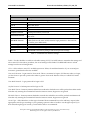
On router's Web interface, in Management menu, click on Command Line Interface tab to open the Command
Line Interface settings screen. Use this screen to configure CLI parameters (Figure 1).
Figure 1 – Command Line Interface
Descriptions and non-contractual illustrations in this document are given as an indication only.
M2M Design reserves the right to make any modification
2
Command Line Interface
PrestoAdvancedAD101_AD301_CLI_000_UK
Command Line Interface
Label
Description
CLI Settings
Enable
Enable or disable CLI
CLI on
Telnet, SSH, Serial
View Mode Username
Login name for View mode
View Mode Password
Password for View mode
Confirm Password
Confirm password for View mode
View Mode Timeout
Inactivity timeout for View mode in seconds. After timeout, user will be put in
Main mode.
Edit Mode Timeout
Inactivity timeout for Edit mode in seconds. Note that Username and Password
for Edit mode are the same as Web interface login parameters. After timeout,
user will be put in Main mode.
Console Type
Windows, other
Save
Click Save to save your changes back to the PRESTO Advanced Router.
Reload
Click Reload to discard any changes and reload previous settings.
Table 1 – Command Line Interface settings
Enable – Use this checkbox to enable or to disable starting of CLI. Use SAVE button to remember the settings and
also tu start CLI. After reboot procedure, last saved settings will be loaded. Use RELOAD button to reload
settings from last saved configuration.
CLI on – Select where to start CLI. Available options are Telnet, ssh and Serial interface. If you use serial port
converters, option Serial will not be available.
View mode Username - Login name for View mode. This is a username for login to CLI. Because when you login,
you don't have to provide a password in order to get into View mode. Because of this, it is called View mode
username.
View Mode Password – Login password for login to CLI.
Confirm Password - Confirm password for login to CLI.
View Mode Timeout - Inactivity timeout defined in seconds after which the user will be put back into Main mode.
Note that only entering the command will reset the timeout counter, keypresses are ignored.
Edit Mode Timeout - Inactivity timeout defined in seconds after which the user will be put back into Main mode.
Note that only entering the command will reset the timeout counter, keypresses are ignored.
Console Type – Select Windows or other type of terminal. Some commands have color and fancy output. Select
appropriate console type according to your operating system in order to be able to see the right output. If you
don't select the right type of console, you still will be able to use commands.
Descriptions and non-contractual illustrations in this document are given as an indication only.
M2M Design reserves the right to make any modification
3
Command Line Interface
PrestoAdvancedAD101_AD301_CLI_000_UK
Now use your telnet, ssh or serial console client software to connect to PRESTO Advanced router CLI.
If it is successfully started, you will see CLI the following prompt:
AD301 login:
At this point you need to enter username and password defined on Web interface in CLI Settings page – text
fields View mode username and View mode password.
Default parameters for CLI login are username: admin, password: admin.
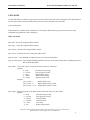
If you are successfully logged in, you'll see a screen as on picture XY.
---------------------------------------PRESTO Advanced Router Command Line Interface v0.7
---------------------------------------MAIN MODE
----------v - VIEW mode
e - EDIT mode
h - HELP
x – quit
choose mode>
From now on you can choose one of few CLI modes.
Choosing CLI modes
You can use v, e, h and x keys to select View, Edit, Help or Quit mode respectively.
Only two modes are important: View mode – a read only mode, designed to view router settings and Edit mode
- which is designed for a complete router configuration.
Descriptions and non-contractual illustrations in this document are given as an indication only.
M2M Design reserves the right to make any modification
4
Command Line Interface
PrestoAdvancedAD101_AD301_CLI_000_UK
Edit mode
Edit mode is designed to edit complete router settings.
You must enter correct username and password which are the same parameters as for the Web interface.
Once you are logged in, you can press TAB key twice to display available commands specific only for this mode.
Also, you can use this key to complete command names.
After a defined period of seconds of inactivity (command not entered), session will automatically exit from
current mode. It is very important for this mode that a valid timeout is defined, because only one session at the
same time is allowed.
For security reasons and in order to preserve router configuration integrity, one Edit mode can be started at the
same time. Also Edit mode is not available if the user is already logged in on Web interface.
Enter x key to quit from this mode and to return to Main mode.
View mode
View mode is designed only for informational purposes and parameters can't be changed in this mode.
You don't need to enter username and password for this mode because it is a read only mode.
You can press TAB key twice to display available commands specific only for this mode. Also, you can use this
key to complete command names.
After a defined period of seconds of inactivity (command not entered), session will automatically exit from
current mode.
View mode can be started more than once at the same time.
Enter x key to quit from this mode and to return to Main mode.
Help mode
Help mode gives you a brief description how CLI works and also a short description of each command specific
for previously choosed mode.
Press x key to quit from this mode and to return to Main mode.
Descriptions and non-contractual illustrations in this document are given as an indication only.
M2M Design reserves the right to make any modification
5
Command Line Interface
PrestoAdvancedAD101_AD301_CLI_000_UK
EDIT MODE
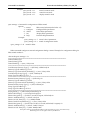
To enter Edit mode you need to type password for this mode. Password can be configured on the Web interface
CLI tab. Once when is entered in Edit mode, password can be changed with command:
passwd-edit-mode
In Edit mode are available all 64 commands of CLI interface. When tab key is pressed twice the list of the
commands in alphabetical order is displayed.
IPSEC commands
ipsec-start – Starts all configured IPSec tunnels
ipsec-stop - Stops all configured IPSec tunnels
ipsec-restart – Restarts all configured IPSec tunnels
ipsec-routes – Dispalys IP routes used by the IPSec tunnel
ipsec-sa-status - Lists ISAKMP and IPSec Security Associations information
ipsec-sa-status-detail - Lists detailed ISAKMP and IPSec Security Associations information, including interfaces,
IKE and ESP algorithms
ipsec-status - View of the status of each tunnel and its mode of connection
Options:
-h, --help
print this help message
-v, --version
print program version
-i, --ipsec
display IPSec status
-t, --tunnel
IPSec tunnel number
-m, --mode
display tunnel mode
Example:
ipsec_status -i
display IPSec status
ipsec_status -t 1
display IPSec tunnel 1 status
ipsec_status -t 1 -m
display IPSec tunnel 1 mode
ipsec-mode – Configures mode of the IPSec tunnel and list the status for each tunnel
Options:
-h, --help
print this help message
-v, --version
print program version
-t, --tunnel
tunnel number
-c, --connect
connnect mode
-w, --wait
wait mode
-l, --list
display tunnel mode
Descriptions and non-contractual illustrations in this document are given as an indication only.
M2M Design reserves the right to make any modification
6
Command Line Interface
PrestoAdvancedAD101_AD301_CLI_000_UK
Example:
ipsec_mode -t 1 -c
ipsec_mode -t 2 -w
ipsec_mode -t 3 -l
tunnel 1 connect mode
tunnel 2 wait mode
display tunnel 3 mode
ipsec-settings – Command for configuration of IPSec tunnel
Options:
-t --tunnel
IPSec tunnel selection(valid value 1-5)
-c --configure
Configure IPSec parameters
-d --delete
Delete IPSec parameters
-l --list
Display IPSec parameters
-h --help
Print this help information
Example:
ipsec_settings -t 1 –l tunnel 1 list of parameters
ipsec_settings -t 2 –c tunnel 2 configuration mode
ipsec_settings -t 3 –d
tunnel 3 delete
When command configure is entered configuration dialog is started. Example for configuration dialog for
IPSec tunnel number 3:
edit-mode>ipsec-settings -t 3 -c
=================================================================
Tunnel Number [3]:>
Tunnel Name []:>test
Tunnel Enable [], --> (true / false):>true
=================================================================
Local Security Gateway Type [], --> (0-IP Only, 1-SIM Card):>0
Gateway Type IP Address []:>1.1.1.1
Gateway Type Custom Peer ID Enable [], --> (true / false):>false
Local Security Group Type [], --> (0-IP, 1-Subnet):>0
Group Type IP Address []:>1.1.1.1
=================================================================
Remote Security Gateway Type [], --> (0-IP Only):>0
Gateway Type IP Address []:>2.2.2.2
Gateway Type Custom Peer ID Enable [], --> (true / false):>false
Remote Security Group Type [], --> (0-IP, 1-Subnet):>0
Group Type IP Address []:>
Group Type IP Address []:>2.2.2.2
=================================================================
Keying Mode [], --> (0-IKE with preshared key):>0
Phase 1 DH Group [], --> (1-Group2, 2-Group5):>1
Phase 1 Encryption [], --> (0-3des, 1-aes-128, 2-serpent, 3-blowfish):>0
Phase 1 Authentication [], --> (0-md5, 1-sha):>0
Phase 1 SA Life Time [sec], --> (1 - 86400):>86400
Phase 1 Perfect Forward Secrecy [], --> (true / false):>false
Phase 2 Encryption [], --> (0-null, 1-des, 2-3des, 3-aes-128, 4-blowfish, 5-serpent):>0
Phase 2 Authentication [], --> (0-null, 1-md5, 2-sha):>0
Phase 2 SA Life Time [sec], --> (3600 - 86400):>3600
Descriptions and non-contractual illustrations in this document are given as an indication only.
M2M Design reserves the right to make any modification
7
Command Line Interface
PrestoAdvancedAD101_AD301_CLI_000_UK
Preshared Key []:>ABCDE
=================================================================
Enable Failover [], --> (true / false):>true
Ping IP []:>1.1.1.1
Ping Interval [sec], --> (30 - 3600):>30
Packet Size [], --> (32 - 1300):>32
Advanced Ping Interval [sec], --> (1 - 60):>30
Advanced Ping Wait For A Response [sec], --> (1 - 60):>1
Maximum Number Of Failed Packets [%], --> (0 - 100):>40
Enable IKE Failover [], --> (true / false):>true
IKE SA Retry [], --> (0 - 100):>0
Restart PPP After IKE SA Retry Exceeds Specified Limit [], --> (true / false):>true
=================================================================
Compress(Support IP Payload Compression Protocol) [], --> (true / false):>false
Dead Peer Detection Enable [], --> (true / false):>false
NAT Traversal [], --> (true / false):>false
Send Initial Contact [], --> (true / false):>false
After finishing the configuration list of configured parameters is displayed:
Add New Tunnel
Tunnel Number = 3
Tunnel Name = test
Tunnel Enable = true
=================================================================
Local Group Setup
Local Security Gateway Type = IP Only
Gateway Type IP Address = 1.1.1.1
Gateway Type Custom Peer ID Enable = false
Local Security Group Type = IP
Group Type IP Address = 1.1.1.1
=================================================================
Remote Group Setup
Remote Security Gateway Type = IP Only
Gateway Type IP Address = 2.2.2.2
Gateway Type Custom Peer ID Enable= false
Remote Security Group Type = IP
Group Type IP Address = 2.2.2.2
=================================================================
IPSec Setup
Keying Mode = IKE with preshared key
Phase 1 DH Group = Group2
Phase 1 Encryption = 3des
Phase 1 Authentication = md5
Phase 1 SA Life Time = 86400sec
Phase 1 Perfect Forward Secrecy = false
Phase 2 Encryption = null
Phase 2 Authentication = null
Phase 2 SA LifeTime = 3600sec
Preshared Key = ABCDE
=================================================================
Descriptions and non-contractual illustrations in this document are given as an indication only.
M2M Design reserves the right to make any modification
8
Command Line Interface
PrestoAdvancedAD101_AD301_CLI_000_UK
IPSec Failover
Enable Tunnel Failover = true
Ping IP = 1.1.1.1
Ping Interval = 30sec
Packet Size = 32
Advanced Ping Interval = 30sec
Advanced Ping Wait For A Response = 1sec
Maximum Number Of Failed Packets = 40%
Enable IKE Failover = true
IKE SA Retry = 0
Restart PPP After IKE SA Retry Exceeds Specified Limit = true
=================================================================
Advanced Setup
Compress(Support IP Payload Compression Protocol) = false
Dead Peer Detection Enable = false
NAT Traversal = false
Send Initial Contact = false
To finalize the configuration it has to be saved.
Are you shure you want to save IPSec parameters? (yes/no):>yes
IPSec parameters file saved
Syslog commands
syslog_start - Starts logging of system messages
syslog_stop - Stops logging of system messages
syslog_tail
- Displays last n lines of the syslog
Options:
-h, --help
print this help message
-v, --version
print program version
-n, --number
number of lines to display
Example:
syslog_tail -n 0
displaysdata as the syslog grows
syslog_tail -n 10
displays last 10 syslog lines
syslog_start+tail - Displays complete system log in real time
syslog_start+view – Displays complete system log till the moment of starting the command
Configuration file and firmware commands
configuration_export - Export of the configuration file to FTP server
Options:
-h, --help
print this help message
-v, --version
print program version
-s, --server
IP address of the remote server
Descriptions and non-contractual illustrations in this document are given as an indication only.
M2M Design reserves the right to make any modification
9
Command Line Interface
PrestoAdvancedAD101_AD301_CLI_000_UK
-u, --username
-p, --password
username of the remote server
password of the remote server
Example:
configuration_export -s X.X.X.X -u <username> -p <password>
configuration_import – Import of configuration file from FTP server
Options:
-h, --help
print this help message
-v, --version
print program version
-f, --filename
configuration file name
-s, --server
IP address of the remote server
-u, --username
username of the remote server
-p, --password
password of the remote server
Example:
configuration_import -f <filename> -s X.X.X.X -u <username> -p <password>
upfirmware – Importing the firmware to the router from FTP server
Options:
-h, --help
print this help message
-v, --version
print program version
-f, --filename
configuration file name
-s, --server
IP address of the remote server
-u, --username
username of the remote server
-p, --password
password of the remote server
Example:
upfirmware -f <filename> -s X.X.X.X -u <username> -p <password>
SNMP commands
snmp-view – Displays SNMP configuration
snmp-conf - Enters SNMP configuration mode where parameters are changed using text editor
RIP commands
rip-ripd-conf
rip-quagga-conf
User guide for RIP configuration is in additional document “Quagga System Architecture”.
Interface configuration
interfaces-all – Lists all configured interfaces
Descriptions and non-contractual illustrations in this document are given as an indication only.
M2M Design reserves the right to make any modification
10
Command Line Interface
PrestoAdvancedAD101_AD301_CLI_000_UK
interfaces-up – Lists interfaces which are currently up
ppp-activity - Configures PPP interfaces and displays status of the PPP connection
Options:
--help
print this help message
--version
print program version
-t, --start
activate PPP connection
-p, --stop
deactivate PPP connection
-r, --restart
restart PPP connection
-c, --connection
display PPP status
-u, --uptime
display PPP uptime
-s, --simstatus
display SIM card status
-x, --switchover
swap active SIM card
-i, --simselection <n> SIM card selection
pppstats – Displays PPP statistics
Example:
pppstats ppp_0
0
1
2
both SIM cards are enabled
SIM card 1 is enabled
SIM card 2 is enabled
wan-settings – Configures WAN interface of the router
Options:
--simindex
-i
SIM index selection(valid value 1-2)
--configure -c
Configure WAN parameters
--list
-l
Display WAN parameters
--help
-h Print this help information
Example:
wansettings --simindex <N> --list
wansettings --simindex <N> --configure
When command configure is entered configuration dialog is started. Example for configuration dialog for SIM
card 1:
edit-mode>wan-settings -i 1 –c
SIM enabled [false]:>true
Provider name [NAME1]:>Provider1
Authentication [PAP]:>CHAP
Username [USERNAME1]:>username
Password [PASSWORD1]:>password
Dial string [ATD*99***1#]:>
Initial string [at+cgdcont=1,"IP","APN2"]:>at+cgdcont=1,"IP","APNname"
Number of retry [6]:>
Are you sure you want to save WAN parameters? (yes/no):>yes
WAN parameters saved
Descriptions and non-contractual illustrations in this document are given as an indication only.
M2M Design reserves the right to make any modification
11
Command Line Interface
PrestoAdvancedAD101_AD301_CLI_000_UK
Routing
route
– Lists active IP routes
ifconfig
– Lists active interfaces
ip
- Routes manipulation
Options:
[ OPTIONS ] OBJECT { COMMAND | help }
where
OBJECT := { link | addr | route | tunnel }
OPTIONS := { -f[amily] { inet | inet6 | link } | -o[neline] }
Example:
ip [ OPTIONS ] { address | link | route | tunnel } { COMMAND | help }
iptables-view
– Displays iptables file
iptables – Configures routes
Commands:
--append -A chain
Append to chain
--delete -D chain
Delete matching rule from chain
--delete -D chain rulenum Delete rule rulenum (1 = first) from chain
--insert -I chain [rulenum] Insert in chain as rulenum (default 1=first)
--replace -R chain rulenum Replace rule rulenum (1 = first) in chain
--list -L [chain]
List the rules in a chain or all chains
--flush -F [chain]
Delete all rules in chain or all chains
--zero -Z [chain]
Zero counters in chain or all chains
--new -N chain
Create a new user-defined chain
--delete-chain
-X [chain]
Delete a user-defined chain
--policy -P chain target Change policy on chain to target
--rename-chain
-E old-chain new-chain Change chain name, (moving any references)
Options:
--proto
-p [!] proto protocol: by number or name, eg. `tcp'
--source
-s [!] address[/mask] source specification
--destination -d [!] address[/mask] destination specification
--in-interface -i [!] input name[+]
network interface name ([+] for wildcard)
--jump
-j target
target for rule (may load target extension)
--match
-m match
extended match (may load extension)
--numeric -n
numeric output of addresses and ports
--out-interface -o [!] output name[+] network interface name ([+] for wildcard)
--table
-t table
table to manipulate (default: `filter')
--verbose -v
verbose mode
--line-numbers
print line numbers when listing
--exact
-x
expand numbers (display exact values)
[!] --fragment -f
match second or further fragments only
Descriptions and non-contractual illustrations in this document are given as an indication only.
M2M Design reserves the right to make any modification
12
Command Line Interface
PrestoAdvancedAD101_AD301_CLI_000_UK
--modprobe=<command>
try to insert modules using this command
--set-counters PKTS BYTES set the counter during insert/append
[!] --version -V
print package version.
Example:
iptables -[AD] chain rule-specification [options]
iptables -[RI] chain rulenum rule-specification [options]
iptables -D chain rulenum [options]
iptables -[LFZ] [chain] [options]
iptables -[NX] chain
iptables -E old-chain-name new-chain-name
iptables -P chain target [options]
iptables -h (print this help information)
netstat – Lists active network connections
Options:
-l display listening server sockets
-a display all sockets (default: connected)
-e display other/more information
-n don't resolve names
-r display routing table
-t tcp sockets
-u udp sockets
-w raw sockets
-x unix sockets
Example:
netstat [-laenrtuwx]
NTP & DNS server
ntpdate
– Displays date and time from the NTP server if configured
local_dns - Configures local DNS server
Options:
-h, --help
-v, --version
-a, --add
-s, --show
print this help message
print program version
add local DNS address
show current list of local DNS
Example:
local_dns -a X.X.X.X
local_dns -s
use this command to set local DNS with X.X.X.X address
use this command to read current list of local DNS
nslookup – Queries the nameserver for the IP address of the given HOST optionally using a specified DNS
server
Example:
Descriptions and non-contractual illustrations in this document are given as an indication only.
M2M Design reserves the right to make any modification
13
Command Line Interface
PrestoAdvancedAD101_AD301_CLI_000_UK
nslookup [HOST] [SERVER]
General purpose commands
help - Description of all CLI commands
show – Displays router information
Options:
-h, --help
print this help message
-v, --version
print program version
-f, --firmware
show firmware version
-d, --hardware
show hardware version
-s, --signal
show signal strength
-n, --homenetwork
show home network information
configuration_show
- Displays complete configuration file
factory_default
- Clears router configuration parameters to factory default
write
- Saves configuration changes
erase-firmware-memory
- Clears routers memory
passwd-edit-mode
- Defines password for edit mode (equal to Administrator password in web
interface)
date
- Displays current time and date
modem_info
- Displays description of wireless module
modem_state
- Displays status of wireless module
reboot
- Reboots the router
services
- Activates chosen service
Options: ipsec
rip/zebra
snmp
Actions: start, stop, restart, status
Example:
services ipsec status
cpu
- Displays CPU information, exit with ESC : q ENTER sequence
ps
- Displays current processes status
arping
- Ping hosts by ARP requests/replies
Descriptions and non-contractual illustrations in this document are given as an indication only.
M2M Design reserves the right to make any modification
14
Command Line Interface
PrestoAdvancedAD101_AD301_CLI_000_UK
Options:
-f
Quit on first ARP reply
-q
Be quiet
-b
Keep broadcasting, don't go unicast
-D
Duplicated address detection mode
-U
Unsolicited ARP mode, update your neighbors
-A
ARP answer mode, update your neighbors
-c count
Stop after sending count ARP request packets
-w timeout
Time to wait for ARP reply, in seconds
-I device
Outgoing interface name, default is eth0
-s sender
Set specific sender IP address
Example:
arping [-fqbDUA] [-c count] [-w timeout] [-I device] [-s sender] target
dmesg
ipcalc
killall
- Displays kernel messages
– Calculate IP network settings from a IP address
Options:
-b
--broadcast Display calculated broadcast address
-n
--network
Display calculated network address
-m
--netmask
Display default netmask for IP
-p
--prefix
Display the prefix for IP/NETMASK
-h
--hostname
Display first resolved host name
-s
--silent
Don't ever display error messages
Example:
ipcalc [OPTION]... <ADDRESS>[[/]<NETMASK>] [NETMASK]
– Send a signal (default is SIGTERM) to the specified process(es)
Options:
-l
List all signal names and numbers
-q
Do not complain if no processes were killed
Example:
killall [-q] [-signal] process-name [process-name ...]
uptime
– Displays system uptime
cal
– Displays current month
clear
– Clear current CLI page
free
– Displays memory status
hwclock
- Shows system clock
pidof
– Processes ID
traceroute
– Shows IP addresses of every hop to destination IP address
df
- Partition availability
ping
- Checks availability of IP address
Descriptions and non-contractual illustrations in this document are given as an indication only.
M2M Design reserves the right to make any modification
15
Command Line Interface
ping_extended
– General use ping command
x
- Exit
PrestoAdvancedAD101_AD301_CLI_000_UK
Descriptions and non-contractual illustrations in this document are given as an indication only.
M2M Design reserves the right to make any modification
16