1
to render and provide an interface for selection
and updating of graph objects. While using an
XML standard provides access to evolved
database technologies, it also forces reliance on
XML standards for selection and update (i.e. the
Web Consortium’s XPath and XUpdate). These
standards are intended for very general
applications and are thus unwieldy for the user
wishing to manipulate graph objects in a natural
way. The GraphDB system [14] was designed
from the start to hold and query graph
structures though it lacks visualization features
and thus depends on external drawing tools.
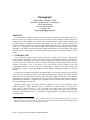
User
Input
UI
Interpreter
Analysis
Components
Interface to R
DBServer
Systems such as Visone [7] and the
commercial NetMiner [24] are powerful tools
SQL Database
that utilize a graphical user interface for access
to graphs. The Visone approach to object
selection is to allow users to pick nodes and
Fig 1: The basic Zoomgraph architecture
edges based on physical features (color, size,
shape, etc.) and perform transformations or
analyses based on the value of those features. Such an approach, however, assumes that the data is initially
partitioned in a way that the all attributes are directly convertible to a physical representation. The
NetMiner system provides slightly more sophistication by allowing additional features to be defined, but
limits the queries that may be applied to nodes to a simple Boolean scheme (e.g. node attribute 1 equals ‘x’
AND node attribute 2 equals ‘y’).
We believe the system most similar to Zoomgraph is a new plug-in [28] to the GGobi visualization
package. By tying into the R system (a public implementation of the S language), the system allows users to
control and analyze graphs interactively using the S language. While powerful, this system uses the firstclass objects of the S language (matrices, vectors, etc.) that naturally may be used to represent graphs, but
additional steps are often required by the user for simple operations. As we will show, the Zoomgraph
approach is to consider nodes and edges as first class objects and transform those into R matrices for
analysis if needed.
Zoomgraph is not an all-inclusive package. Frequently the tools mentioned above provide unique
features (more advanced layout algorithms, more efficient analysis algorithms, etc.) that Zoomgraph lacks.
Where appropriate we have built in facility to exchange data with these applications (currently, Pajek and
other simple comma separated formats). However, we believe that the approach we describe below,
combining a new language targeted specifically at graph objects and visualizing those structures, extends
the current state of the art.
2.2 Zoomable Graph Visualization
A zoomable interface is an attractive approach for presenting large graphs, as it enables a user to see
both the high-level structure of the entire graph as well as zoom in and navigate specific subsections in
detail. Other approaches for visualizing large networks incorporate “focus+context” techniques, which
allow the user to focus on some detail in the graph without losing the broader context. Examples of these
techniques include three-dimensional constructions such as a graph projected onto hyperbolic space [17],
DRAFT – PLEASE DO NOT DISTRIBUTE WITH PERMISSION