1
Chapter 3: Programming
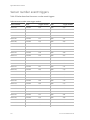
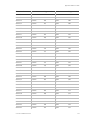
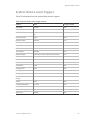
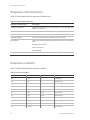
Shortcut: 06007
turned off, no report is sent.
Default: Off
Zone restorals
Shortcut: 06008
Default: Off
Two-trip
Shortcut: 06009
Default: Off
Touchpad panic report
format
Shortcut: 06010
Default: Off
When this setting is on, the panel reports a restoral to the central
monitoring station for wireless or hardwire zones in alarm before the
alarm is canceled.
Hardwired smoke detectors connected to panel or SnapCard hardwired
zones do not send restorals.
This setting works with the Alarm verify setting (see Alarm verify in
“Reporting - partition 1 to 6 settings” on page 62. If Alarm verify is on, the
panel waits for a second sensor trip before sending an alarm.
If two-trip is on and a second sensor trip does not occur within 4 minutes,
the panel sends an error report to the central monitoring station.
This setting determines how the panel formats touchpad panic alarm
reports to the central station. When this feature is turned on, touchpad
panic alarms report using the following three-digit codes:
• Auxiliary—597
• Police—598
• Fire—599
When turned off, touchpad panic alarms report using a three-digit code
from 500 to 515, with the last two digits identifying the touchpad device
number.
AC failure
Shortcut: 06011
Default: Off
When this setting is on, the panel reports to the central station at a
random time between 15 and 45 minutes after AC power to the panel is
lost. Making the report random helps prevent systems in an area affected
by a power outage from trying to report at the same time.
If this feature and the auxiliary power failure feature are both on, the
panel also monitors for and reports an AC failure for the SuperBus 2000 2amp power supply.
Receiver failure
Shortcut: 06012
Default: Off
60
When this setting is on, the panel reports a receiver failure under the
following conditions:
• No wireless sensor signals have been received for two hours.
• The receiver is being jammed with a constant signal.
Concord 4 Installation Manual