1
Quick Operation Guide of Network Video Recorder
TABLE OF CONTENTS
NVR Installation .............................................................................................................................................. 6
Hard Disk Installation ..................................................................................................................................... 6
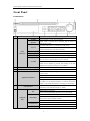
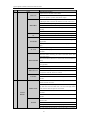
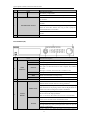
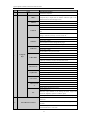
Front Panel ....................................................................................................................................................... 9
DS-8600NI-E8 ................................................................................................................................... 9
DS-7700NI-E4(/P) ........................................................................................................................... 11
DS-7600NI-E1/E2 Series ................................................................................................................. 13
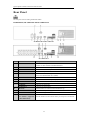
Rear Panel ...................................................................................................................................................... 14
DS-8600NI-E8, DS-7700NI-E4 and DS-7700NI-E4/P .................................................................... 14
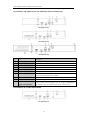
DS-7600NI-E1, DS-7600NI-E1/4N, DS-7600NI-E2 and DS-7600NI-E2/8N ................................. 15
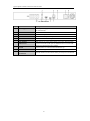
DS-7600NI-E1/4P and DS-7600NI-E2/8P ....................................................................................... 15
Peripheral Connections ................................................................................................................................. 17
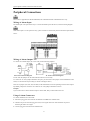
Wiring of Alarm Input .............................................................................................................................. 17
Wiring of Alarm Output ........................................................................................................................... 17
Using of Alarm Connectors ...................................................................................................................... 17
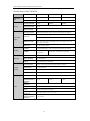
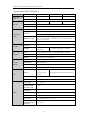
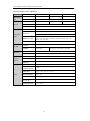
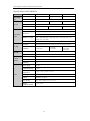
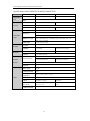
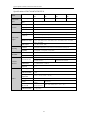
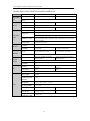
Specifications .................................................................................................................................................. 18
Specifications of DS-8600NI-E8 ............................................................................................................. 18
Specifications of DS-7700NI-E4 ............................................................................................................. 19
Specifications of DS-7700NI-E4/P .......................................................................................................... 20
Specifications of DS-7600NI-E2 ............................................................................................................. 21
Specifications of DS-7600NI-E1 ............................................................................................................. 22
Specifications of DS-7604NI-E1/N and DS-7608NI-E2/N ...................................................................... 23
Specifications of DS-7616&7632NI-E2/N............................................................................................... 24
Specifications of DS-7604NI-E1/P and DS-7608NI-E2/P ....................................................................... 25
Specifications of DS-7616&7632NI-E2/P ............................................................................................... 26
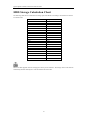
HDD Storage Calculation Chart ................................................................................................................... 27
Menu Operation ............................................................................................................................................. 28
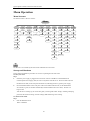
Menu Structure......................................................................................................................................... 28
Startup and Shutdown .............................................................................................................................. 28
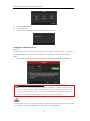
Setting the Admin Password .................................................................................................................... 29
Login and Logout ..................................................................................................................................... 30
User Login ....................................................................................................................................... 30
User Logout ..................................................................................................................................... 30
Live View ................................................................................................................................................. 31
Adding IP Cameras .................................................................................................................................. 31
Recording ................................................................................................................................................. 34
Instant Recording ............................................................................................................................. 34
All-day Recording ............................................................................................................................ 34
Playback ................................................................................................................................................... 34
Backup ..................................................................................................................................................... 36
VCA Detection ......................................................................................................................................... 37
VCA Search ............................................................................................................................................. 38
Accessing by Web Browser ............................................................................................................................ 39
Logging In................................................................................................................................................ 39
Live View ................................................................................................................................................. 40
Recording ................................................................................................................................................. 41
Playback ................................................................................................................................................... 43
1