1
Table of Contents
Getting Started
Explosive Environments....................................... 80
Installing the Battery and a
microSDHC Card
Specifications.................................................. 81
Notes................................................................ 82
Power off your phone before installing or replacing the
battery. You have the option to install a microSDHC
card of up to 32GB to expand your phone’s storage
capacity. The microSDHC card can be installed and
removed while the phone is turned on. Unmount the
microSDHC card before removing it.
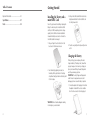
1. Place your finger in the slot at the bottom of the
back cover to lift and remove the cover.
3.Hold your microSDHC card with the metal contacts
facing down and slide it into the microSDHC card
slot until you hear a click.
4.Press the cover gently back into place until you hear
a click.
Charging the Battery
2.Insert the battery by aligning the contacts on
the battery with the gold contacts in the battery
compartment. Gently push down on the battery until
it clicks into place.
When you first get your new phone you’ll need to
charge the battery. If the battery is low, there will be
a pop-up message on the screen. As you charge your
phone, the screen will tell you the exact battery level
each time you wake up your phone.
WARNING! Use only ZTE-approved chargers and
cables. The use of unapproved accessories could
damage your phone or cause the battery to explode.
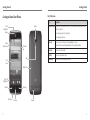
1.Connect the adapter to the charging port. Ensure that
the adapter is inserted with the correct orientation.
Do not force the connector into the charging port.
WARNING! Do not handle a damaged or leaking
Li-Ion battery as you can be burned.
4
5