Transcript
iCom Bluetooth Pairing Guides
Motorola
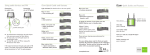
3. Prepare your iCom for pairing
Initiate the pairing process on your iCom by pressing the Bluetooth
pairing button for about 2 seconds until the Bluetooth indicator
flashes blue. Your iCom will remain in pairing mode for two minutes
or until the pairing is completed.
4. Pair iCom and mobile phone
On your mobile phone, still in the Bluetooth menu, select one of the
following (depending on the model):
[Add Audio Device]
Pairing and connecting iCom with your
Motorola mobile phone
or
[New Paired Device]
or
1. Charge and turn on both mobile phone and iCom.
Place them next to each other.
Look for Devices
or
2. Prepare your mobile phone for pairing
Add
Find the connectivity settings of your phone. With most Motorola
models one of the following navigation options applies.
Menu 컄 Connection 컄 Bluetooth link
(If you have not activated the Bluetooth functionality, you may be
asked if you wish to turn on Bluetooth. Doing so will start the search
process for Bluetooth devices.)
or
Your mobile phone should present a list of Bluetooth devices discovered.
Menu 컄 Bluetooth link 컄 Paired Devices 컄 Option
Select “iCom” from this list. Some phone models will ask Bond with
iCom? If the phone asks to bond with iCom, confirm with “yes”.
or
Enter passcode “0000” (four zeros).
Settings 컄 Connection 컄 Bluetooth Link 컄 Hands-free
iCom will be added to the Bluetooth devices list.
Control Panel 컄 Connections tab 컄 Bluetooth 컄 Devices tab
5. Connect iCom with mobile phone
Typically, iCom will be automatically connected after pairing.
On some phones you can configure automatic connection in the access
settings of the device details. Choosing so allows iCom to connect
automatically without confirmation. We recommend that you enable
this feature if available.
If you have difficulties navigating to the Bluetooth settings, please refer
to the mobile phone’s user manual or ask the mobile phone dealer.
0682
V1.00/2008-04/A+W © Phonak AG All rights reserved / page 1/1
or