1
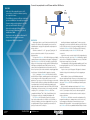
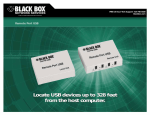
Connect four peripherals to one PC/server with the USB Director. Features » Add serial, USB, and parallel ports to a PC, server, laptop, or thin client without opening the computer’s chassis. » The USB Director gives your PC up to eight highspeed serial COM ports for multiple peripherals. » Connect a single serial peripheral to the USB port on your PC with the USB Solo. » All models comply with USB specifications. » All models support Windows 98, SE, Me, XP, and Windows 2000. » Single-port model also supports Windows CE. » Lower cost per port than serial boards. » Configurable COM port assignment. USB Director (IC135A) USB RS-232 PC/Server Point-of-Sale Device RS-232 Modems/ISDN 724-746-5500 Printer OVERVIEW Add peripheral devices to your PC via Universal Serial Bus (USB). It replaces all the different serial and parallel connectors with one standardized port. Just plug USB-compliant PCs and peripherals in and turn them on. USB devices can have “A” or “B” type ports. Typically, the “A” ports are used at the host and the “B” ports are used at the peripheral device. The Single-Port USB Director RS-232 (IC1000A) gives you reliability, superb performance, and operating-system support. Simply plug the Single-Port USB Director RS-232 into the USB port of a desktop PC, laptop, or thin client and gain one high-speed RS-232 DB9 serial port. Attaching personal digital assistants (PDAs), printers, bar-code scanners, and other peripheral devices has never been easier! The director is perfect for point-of-sale and mobile computing applications in which space is limited and flexible I/O expansion is required. The 2-, 4-, and 8-port USB Director RS-232s (IC1001A, IC135A, and IC1002A) are intelligent, stackable expansion modules designed for the enterprise user who requires reliability in mission-critical applications. They connect to a PC, thin client, laptop, or server via the Universal Serial Bus (USB) port, providing instant COM-port expansion for peripheral-device connectivity. Unmatched operating-system support and reliable performance make the USB Director RS-232 ideal for applications such as point-of-sale, kiosk connectivity, and mobile computing. The 2-, 4-, and 8-port USB Directors RS-232 are compatible with Windows® 98, SE, Me, XP, and Windows 2000. The single-port model is also compatible with Windows CE. The USB Director RS-232s feature a Type B USB connector that’s used to attach a cable to the USB port of a PC, USB hub, or USB switch. In addition, the units are equipped with one, two, four, or eight DB9 male RS-232 ports (depending on the model). Port pinning is like that of a PC‘s serial ports. 03/22/2010 #21092 RS-232 Installing the hardware is straightforward. To make connections, simply plug one end of the included USB cable into your PC’s USB port (or into a USB hub or switch, if necessary), and plug the cable’s other end into the USB Director RS-232. Then plug your RS-232 device(s), or their attached cables, into the USB Director RS-232’s serial connector(s). If you need to connect a single old-style RS-232 serial peripheral to the USB port on your PC, choose the USB Solo (IC138A-R3 for a DB25 male connector or IC199A-R3 for a DB9 male connector). The IC199AR3 also has an integral 3.2-foot (1-m) cable. To take advantage of USB’s plug-and-play capability, your PC must be running Windows® 2000 or XP. (These two versions of Windows have built-in USB drivers.) If you’re not sure if your PC supports USB, diagnostic software is included to help you find out whether you’ll need to upgrade your software. Driver installation is just as easy. CD-ROM-based wizards take you step-by-step through the process of setting them up in your Windows system. In fact, once you install the drivers, Windows will detect your USB Director RS-232‘s new COM ports and will begin to initialize them. After you install the hardware and software, the USB Director RS-232 operates without requiring further intervention on your part. On the 2-, 4-, and 8-port models, a tri-color indicator signals USB communications between the device and host as well as serial port activity on the device. The USB Director RS-232 also comes with a configuration utility program that enables you to manage various resources on the unit, such as mapping of each physical communications port to your Windows COM port numbers. You can reassign the physical ports on the USB Director RS-232 to any available Windows COM port number blackbox.com 2 of 4 BLACK BOX ®