1
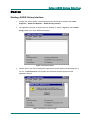
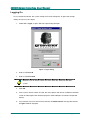
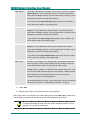
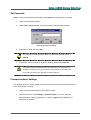
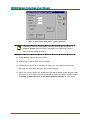
JANUS Galaxy Interface User Manual Logging On To use the panel interface, the system settings have to be configured. To get to the settings dialog, the user must first log on. 1. Select File • Logon, or press F2. The Logon dialog will open. Figure 5. Logon dialog 2. Enter a valid User ID. 3. Enter a valid Password. Both the User ID and Password must exist within the JANUS for Windows system. 4. Click OK. 5. If the User ID and Password are valid, the menu options will now be available in the Main screen and the logon event will be displayed in JANUS Reports and written to Operator Activity. 6. If an incorrect User ID or Password is entered, an Interface Error message like the one in Figure 6 will be displayed. 14 PM009R01 Grosvenor Technology Ltd. 2002