1
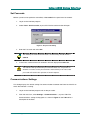
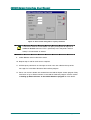
JANUS Galaxy Interface User Manual Figure 30. Reset confirmation request 3. Click Yes to continue with the reset. 4. If the reset command is successful the Reset Status will display a Panel reset acknowledged message as shown below. Figure 31. Panel rest acknowledged An unsuccessful reset panel command may result in a Panel did not reply message if communication to JANUS Comms is lost. A Request rejected message is displayed if an incorrect passcode has been set. Alternatively, a Request Aborted message will be displayed if an alarm is received from the panel during a panel reset. In this instance the operator should repeat the Reset Panel command. 5. Click on Close to return to the Main Window. 6. The reset panel command is added to the top of the Messages list in the Main Window of the interface program, and appended to the bottom of the Reports window in the JANUS Comms program. 7. To ensure that the relevant zone has been restored the zone must be queried. See Controlling Zones via the Interface for more details. 8. Alarms can also be handled via the JANUS Report Screen program if External Alarms have been defined in the JANUS Database program. See the Guide to using JANUS for Windows for more details. 38 PM009R01 Grosvenor Technology Ltd. 2002