1
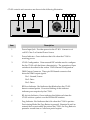
Item
Description
8
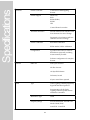
Prog Button. Recessed button used to put the CT-001 into and out of
Provisioning Mode. See section “Provisioning” for a more detailed
description of the provisioning process.
DMX Channel Configuration
There is no standard among fixture manufacturers for the mapping of color channels in a
fixture to DMX channels. The CT-001 must be configured to drive the appropriate data in each
DMX slot. It can drive data in up to eight DMX slots. The same data is repeated every eight
slots for the entire frame. The CT-001 supports fixtures that utilize the following information.
• Intensity only: Used for white light fixtures. Supports 256 intensity levels.
• RGB: Used for color-capable light fixtures. Supports 256 intensity levels on three color
channels (RGB).
• RGBA: Used for color-capable light fixtures. Supports 256 intensity levels on four
color channels (RGBA or RGBY).
• RGBW: Used for color-capable light fixtures. Supports 256 intensity levels on three
color channels (RGB) and one white color channel.
• HSI: Used for color-capable light fixtures. Supports 256 levels on three color control
channels (Hue, Saturation, Intensity).
In addition to intensity or color channel information the CT-001 can drive specific values in
particular slots for fixtures that need additional control information such as master intensity.
The CT-001 is configured in one of two ways: through DIP switches on the side of the unit or
via a utility program running on a computer that communicates with the CT-001 via the
LEDlink interface.
• DIP Switches: Allows configuring operation of a white-only fixture or a RGB colorcapable fixture that maps the color channels sequentially in the order R-G-B. The
RGB color-capable fixture may also have a separate master intensity channel.
• External Utility Program: Allows full configuration of the CT-001 including RGBA,
RGBW or HSI fixtures, arbitrary mapping of color channels and custom control
channel values. A description of this configuration method is beyond the scope of this
document. Please see the instructions that come with the utility program for the
control device that will be used with the CT-001.
5