1
Notes: 1- Several Access Groups may be attributed to the same Lift Program, but specific Access Group
may not be selected by different Lift Programs. Therefore, if different set of floors have to be defined on a
same lift (for different cardholders), several Access Groups will be created, even with the same parameters,
and will be attributed to different Lift Programs.
2- Lift process can be done on NTL controllers or TPL controllers from Rev.C.
4. COMMUNICATION MENU
This menu is dedicated to communication operation with controllers. For each option, the system will
prompt the user if he wants to communicate either with a specific reader or with all the readers of the
station.
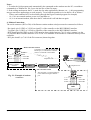
- Transfer Transactions: allows you to transfer the events (cardholder transactions and alarms) recorded in
the controller Events Buffer to the journal file at the PC.
At each transfer and for each controller read, the program builds, in the sub-directory ‘Backup’ of the QA8
folder, a backup ASCII file which contains all the events read. The name of the backup file is as follows:
J ssscc ddmmyy hhmmss.dat
Where:
sss=Station number, cc=Controller address, ddmmyy=Date, hhmmss=Time
Example: if controller address 02 has been read the 20th of February 2001 at 14:40 and 05 second, the
backup file name will be: J00102 20Feb2001 14.40.05.DAT
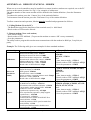
Each line of the file represents an event and has the format shown in Appendix A.2.
These ASCII backup files may be used by any other application programs.
-
General Download: allows you to download some or all the parameters in the database to the
controllers.
Note: If you ask to reset memory before download, the QA8 will suggest reading the stored transactions
prior to memory reset.
-
Get Time and Date: allows to read from a controller it’s time and date.
-
Send Time and Date: allows to send the PC time and date to controllers.
-
Send Command: All the commands recognized by the TPL3 and the NSL3 (and described in the “The
TPL 2 / TPL 3: Programming and User Manual”, publication No. 08UE002) can be sent to controllers
using this ‘Send Command’ option. Commands get exactly the same format as if they were typed-in
directly from the controller keypad, when the controller is in its ‘Program Mode’.
Warning: any programming performed through this option will not be recorded in the QA8 database !
However, the commands may be recorded in a file to be restored further on.
5. JOURNAL MENU
The journal contains the entire events (cardholders transactions and alarms) read from the controllers
through the ‘Transfer Transactions’ Utility.
This Journal Menu allows:
- To Display the journal and perform some queries and reports.
- To Save the journal in disk file
- To Restore a journal previously saved
- To erase the current journal.
QA8: User Manual
Document: ‘10ue800 QA8 User Manual.doc’ Issue 01.01.2003
Page 17/24