1
Using TransDock
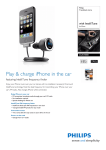
Detailed Instructions
1. Turn on your car stereo and set it to FM radio mode.
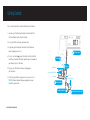
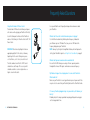
2. Assemble your TransDock by attaching the Flex Arm to both the Car
Power Adapter and the TransDock Cradle.
NOTE: For cars that do not need the additional length of the Flex Arm,
you may attach the TransDock Cradle directly to the Car Power Adapter.
5. To activate your TransDock’s IntelliTune feature, press the center
button on the TransDock Cradle. Your TransDock will display the word
“IntelliTune” as it searches for the optimal frequency. This should only take a
few seconds. Once the search is complete, the display will instruct you to
tune your radio to the frequency found by IntelliTune.
3. Insert your TransDock into your auto power outlet.
6. Match the FM station on your radio with the corresponding FM frequency
shown on your TransDock display. Click Play on your iPod to enjoy your
music over your car’s FM radio.
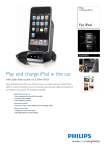
4. Gently slide your iPod onto your TransDock. Your iPod will now begin
charging if your car is on.
7. To control the overall volume of your music while using your TransDock, use
the car radio’s volume control, not the iPod volume.
NOTE: To ensure the best fit for your particular iPod, press the button on
the upper right side of the TransDock Cradle to extend or contract the circular adapter in the center of the TransDock Cradle. Release the button to lock
the adapter’s position.
NOTE: To simultaneously power another device, connect the detachable 12V
Power Socket into the TransDock. You may now power another device while
enjoying your iPod. See Using Your Detachable 12V Power Socket on page 11
for more information.
NOTE: For iPod touch users, you may attach the included iPod touch Support
Bracket, which allows you to position your iPod touch horizontally in the
TransDock Cradle. Insert the iPod touch Support Bracket into the center
adapter and position it on either side of the TransDock Cradle.
Turning Your TransDock On and Off
8 | DLO TRANSDOCK USER MANUAL
Your TransDock will turn on and off automatically with your car. To manually
turn your TransDock on or off while your car power is on, press and hold the
center button for approximately 5 seconds.
|9