1
Operating the CV4
The Proximity Effect
All cardioid or uni-directional microphones exhibit a phenomenon known as “proximity effect”. The proximity effect is
the increase in low frequency response a microphone exhibits as it is moved closer to the sound source. Vocalist tend
to love this effect since when they get really close to the mic they get the “FM radio”, big bass sound. A good vocalist
with good mic technique will use the proximity effect to adjust their tonal response in real time. The key to developing
the best mic technique is experimentation, along with awareness of the general principle that, when the pattern switch
is set to Cardioid, the closer your CV4 is to a signal source, the greater the bass response. The proximity effect’s bass
lift is caused by the amount of pressure present at the ports that are used to create the directional pattern. Since
omnidirectional microphones do not normally use these ports, they do not have proximity effect.
Stand Mounting the CV4
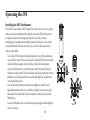
The CV4 can be mounted to any standard microphone stand using the included mic stand holder or the SM7 shockmount. If you are using a US standard 5/8-inch mic stand, remove the Euro adapter by unscrewing it from the mic holder.
Screw the holder to a solid mic stand, then line up the bottom threaded section of the CV4 to the holder and slowly
rotate the microphone clockwise until it screws on hand tight. Be careful not to cross thread the screws. You can loosen
the bottom thumbscrew on the holder to make left and right adjustments to the mic, and then re-tighten it once it’s in
place. Loosen the side thumbscrew to set the microphone angle and then tighten once it’s in place.
9