1
08.96
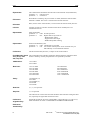
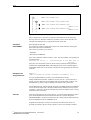
PCIN
MMC.001
·
MMC.001/USER.005
¼¶ · ·
MMC.001/USER.005/LOCAL.063
· ¼¶ · · ·
· · ¼¶ MMC.001/USER.005/LOCAL.063
/MPF1.013
· · ·
· · ¼¶ MMC.001/USER.005/LOCAL.063
/MPF2.013
· · ·
· · ·
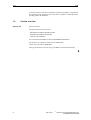
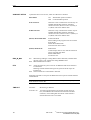
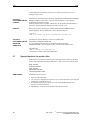
Fig. 3-1
Example of part-program in 4th level
Prior to expansion it is necessary to specify a main directory for the following
directory structure. With this method it is possible to store various data files for
example from different NCs in separate directories of the disk.
COLLECT
PC-FORMAT
Generating PC-format files.
It is possible to combine several files to form a PC format file after selecting the
menu item COLLECT PC-FORMAT.
There are two possible ways to do this:
- FILELIST
- KATALOG COMPLETE
First, enter a filename with the extension .COL. This file includes an assignment list
with the elements
Filename in the PC > path/filename in the MMC area of
the NC;
using this, a PC-format file in the NC which can be transferred can be generated
with the name TRANSFER.MMC. Individual files must not be copied through an
intermediate buffer, but can be directly transferred to the appropriate sub-directory
in the NC.
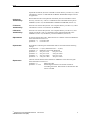
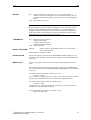
Example of an
assignment line:
MPF123 >
/MMC.001/USER.005/LOCAL.063/TEIL1.064/MPF123.013;
for a part program MPF123, which is to be transferred into the NC
catalog/USER/LOCAL/TEIL1 as MPF123. In this case, the > symbol ensures renaming. The NC directories are designated with the normal slash(/), and not with
the backslash (\); further, each line should be terminated with a semicolon.
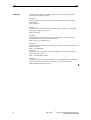
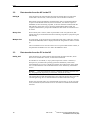
The last DIR.COL file, generated under the menu item DIRECTORY PC-FORMAT
can be selected as help. This is already modified when called-up for this purpose,
so that the > character is located at the beginning of the line and the line is correctly
terminated with a semicolon.
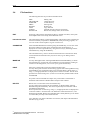
Transfer
After the assignment lines have been entered, you will be asked whether the data is
to be stored and linked with a PC-format file. This file, with the designation
TRANSFER.MMC, can then be transferred to the control using the function DATAOUT PC-FORMAT in the PC-FORMAT menu.
Programs and other files can only be transferred in the directories which are
generally accessible to the user for NC operator control. If an attempt is made to
© Siemens AG 1993 All Rights Reserved
SINUMERIK 800 PCIN (BN)
483 73 403
17