1
eNotate User Guide
Profile
The Profile option is used to establish your individual user information. The following fields are available
for the Profile page (you must complete the profile page in order to start a recorded game):
• First Name (required)
• Last Name (required)
• Title
• National Rating (this is the rating if your country uses a rating system other than FIDE)
• FIDE Rating
• National ID (this is the ID number given by your national federation if they use one)
• FIDE ID
• Federation
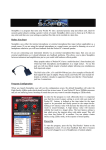
Use your devices’ on-screen keyboard to complete as many of the fields as possible. When you are done
tap the Save button in the lower left hand corner of the screen. You can use the arrow key at the bottom to
go back to the Main Menu page.
Your on-screen
keyboard may
look like this.
This is the save
button. Tap it
when you are
done entering
your profile.
Figure 4
This button lets
you go back to
the Main Menu
page.
5