1
MM V9 Donation Round Up User Manual
Document Revision: 1
Prompt On Tender Entry
If “Prompt For Donation On Tender Entry” is checked, then the cashier is prompted to ask the customer if they
want to make a donation each time the Tender button is clicked.
Otherwise the Make Donation button must be used to make a donation.
Donation Items
Add donation items to the screen by entering the ALU and clicking the Add button or by clicking the Select Items
button.
If Select Items is used a screen is displayed where items can be filtered and then selected.
To remove a donation item, select it and click the Remove button.
Receipts
Prepare a receipt as is normally done.
Prompt On Tender Entry
If “Prompt For Donation On Tender Entry” is checked in Setup, then the cashier is prompted to make a donation
when the tender button is clicked.
Make Donation Button
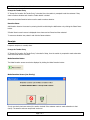
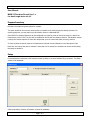
The Make Donation screen can also be displayed by clicking the Make Donation button:
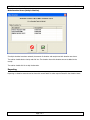
Make Donation Screen (One Charity)
If only one charity has been entered, the cashier is asked if the customer wants to make a donation to that
charity. The amount and new receipt total are shown.
Page 2 of 3