Download Interactive Visualization and Minimization of

Transcript
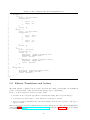
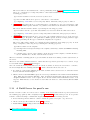
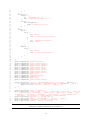
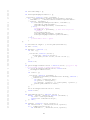
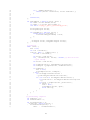
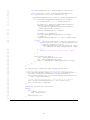
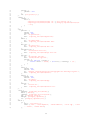
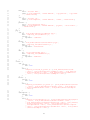
Listing 5.8: The configuration file editorConfiguration.js
1
2
3
4
5
6
7
8
9
10
11
12
13
14
15
16
17
18
19
20
21
22
23
24
25
26
27
28
29
30
31
32
33
34
35
36
37
38
39
40
41
42
43
44
45
46
47
48
angular . module ( ’ cp . ui ’) . value ( ’ editorConfiguration ’ , {
fileTypes : {
’ccs ’: {
editor : ’ace - text - editor ’ ,
translations : [
{
source : ’ccs ’ ,
target : ’lts ’ ,
},
],
actions : []
},
’ pseuco ’: {
editor : ’ace - text - editor ’ ,
translations : [
{
source : ’ pseuco ’ ,
target : ’ccs ’ ,
},
{
source : ’ccs ’ ,
target : ’lts ’ ,
}
],
actions : []
},
’lts ’: {
editor : ’lts - editor ’ ,
translations : [] ,
actions : [{
displayIcon : ’ glyphicon glyphicon - road ’ ,
displayName : ’ Random path ’ ,
action : ’ traceLts ’
}, {
displayIcon : ’ glyphicon glyphicon - export ’ ,
displayName : ’ Export LTS ’ ,
action : ’ exportLts ’
}]
}
},
fileActions : [
{
displayIcon : ’ glyphicon glyphicon - share ’ ,
displayName : ’ Share this file ’ ,
action : ’ shareFile ’
}
]
}) ;
5.8
Editors, Translations and Actions
The main features of pseuCo.com are pseuCo and CCS file editing, viewing LTS, the translations
pseuCo → CCS and CCS → LTS, and actions like tracing, export or file sharing.
In the code, these features are referenced by three terms:
1. An editor is the component responsible for viewing and editing data of a specific file type.
2. A translation provides a way to convert data from one file type to another.
3. An action describes anything a user can actively initiate. Actions can be specific to a file type or
apply to any file.
The interaction between editors, translations and actions is configured by the value editorConfiguration,
defined in repository /src/js/ui/editorConfiguration.js and shown in Listing 5.8. More specifically,
for each file type, it defines:
16