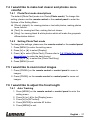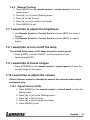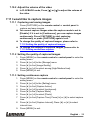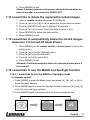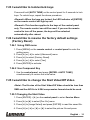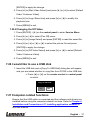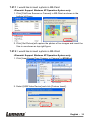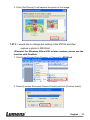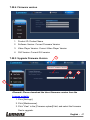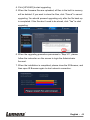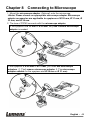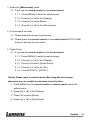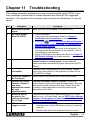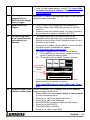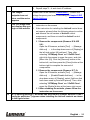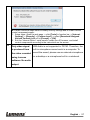
1
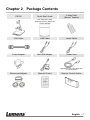
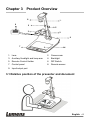
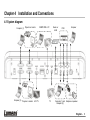
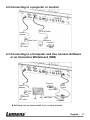
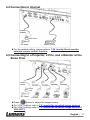
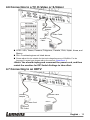
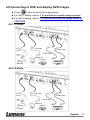
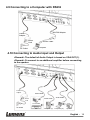
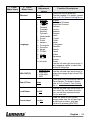
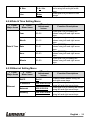
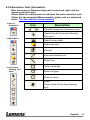
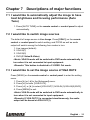
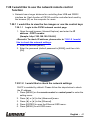
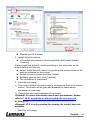
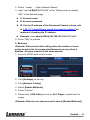
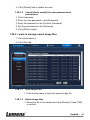
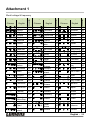
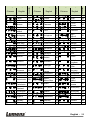
PS760 Document Camera User Manual [Important] To download the latest version of Quick Start Guide, multilingual user manual, software, or driver, etc., please visit Lumens™ http://www.Mylumens.com/goto.htm English - 0 Table of contents Copyright Information ....................................................................................... 4 Chapter 1 Safety Instructions ........................................................................ 5 Precautions .................................................................................................. 6 FCC Warning................................................................................................ 6 EN55022 (CE Radiation) Warning ............................................................... 6 Chapter 2 Package Contents ......................................................................... 7 Chapter 3 Product Overview ......................................................................... 8 3.1 Chapter 4 Relative position of the presenter and document ............................... 8 Installation and Connections ....................................................... 9 4.1 System diagram.................................................................................. 9 4.2 Connecting to a projector or monitor ................................................ 10 4.3 Connecting to a Computer and Use Lumens Software or an Interactive Whiteboard (IWB) ........................................................... 10 4.4 Connecting to Internet ...................................................................... 11 4.5 Connecting to a Projector, 2 PCs, and a Monitor at the Same Time 11 4.6 Connecting to a TV (C-Video or S-Video) ........................................ 12 4.7 Connecting to an HDTV ................................................................... 12 4.8 Connecting to DVD and display DVD images .................................. 13 4.9 Connecting to a Computer with RS232 ............................................ 14 4.10 Connecting to Audio Input and Output ............................................. 14 4.11 Installing application software........................................................... 15 Chapter 5 Start Using ................................................................................... 16 Chapter 6 Control Panel/Remote Control and Setting Menu ................... 17 6.1 Functions of control panel and remote control ................................. 17 6.2 Setting Menu .................................................................................... 19 English - 1 Chapter 7 7.1 Descriptions of major functions ................................................ 26 I would like to automatically adjust the image to have best brightness and focusing performance (Auto Tune) ............................................ 26 7.2 I would like to switch image sources ................................................ 26 7.3 I would like to set the image source of VGA OUT2 .......................... 26 7.4 I would like to make text clearer and photos more colorful .............. 27 7.5 I would like to zoom in/out images ................................................... 27 7.6 I would like to adjust the focal length................................................ 27 7.7 I would like to adjust the brightness ................................................. 28 7.8 I would like to turn on/off the lamp .................................................... 28 7.9 I would like to freeze images ............................................................ 28 7.10 I would like to adjust the volume ...................................................... 28 7.11 I would like to capture images .......................................................... 29 7.12 I would like to record videos ............................................................. 30 7.13 I would like to view captured/recorded images ................................ 30 7.14 I would like to delete the captured/recorded images ........................ 31 7.15 I would like to automatically delete the stored images whenever it is turned off (Auto Erase) ..................................................................... 31 7.16 I would like to use the MASK and Spotlight function ........................ 31 7.17 I would like to enlarge a part of the image (PAN) ............................. 32 7.18 I would like to play the slides (Slide Show) ...................................... 32 7.19 I would like to view the X-ray film ..................................................... 33 7.20 I would like to compare images (compare live images with stored images (PIP)) .................................................................................... 33 7.21 I would like to reduce the image noise (Projector Type) .................. 34 7.22 I would like to set the time for PS760 ............................................... 34 7.23 I would like to lock/unlock keys ........................................................ 36 7.24 I would like to resume the factory default settings (Factory Reset) . 36 7.25 I would like to change the Start Video/Off Video .............................. 36 English - 2 7.26 I would like to use a USB disk .......................................................... 37 7.27 Computer-related functions .............................................................. 37 7.28 I would like to use the network remote control function ................... 41 Chapter 8 Connecting to Microscope ......................................................... 49 Chapter 9 DIP Switch .................................................................................... 51 9.1 Connecting to a projector or monitor ................................................ 51 9.2 Connecting to a TV/DVD .................................................................. 52 Chapter 10 Packing the Machine ................................................................ 53 Chapter 11 Troubleshooting ........................................................................ 54 Attachment 1 .................................................................................................... 58 English - 3 Copyright Information Copyrights © Lumens Digital Optics Inc. All rights reserved. Lumens is a trademark that is currently being registered by Lumens Digital Optics Inc. Copying, reproducing or transmitting this file is not allowed if a license is not provided by Lumens Digital Optics Inc. unless copying this file is for the purpose of backup after purchasing this product. In order to keep improving the product, Lumens Digital Optics Inc. hereby reserves the right to make changes to product specifications without prior notice. The information in this file is subject to change without prior notice. To fully explain or describe how this product should be used, this manual may refer to names of other products or companies, nevertheless without any intention of infringement. Disclaimer of warranties: Lumens Digital Optics Inc. is neither responsible for any possible technological, editorial errors or omissions, nor responsible for any incidental or related damages arising from providing this file, using, or operating this product. English - 4 Chapter 1 Safety Instructions Always follow these safety instructions when setting up and using the Document Camera: 1. Do not place Document Camera in tilted position. 2. Do not place the Document Camera on an unstable trolley, stand or table. 3. Do not use the Document Camera near water or source of heat. 4. Use attachments only as recommended. 5. Use the type of power source indicated on the Document Camera. If you are not sure of the type of power available, consult your dealer or local electricity company for advice. 6. Place the Document Camera on a place that it can be unplugged easily. 7. Always take the following precautions when handling the plug. Failure to do so may result in sparks or fire. Ensure the plug is free of dust before inserting it into a socket. Ensure that the plug is inserted into the socket securely. 8. Do not overload wall sockets, extensions leads or multi-way plug boards as this may cause fire or electric shock. 9. Do not place the Document Camera where the cord can be stepped on as this may result in fraying or damage to the lead or the plug. 10. Unplug the projector from the wall socket before cleaning. Use a damp cloth for cleaning. Do not use liquid or aerosol cleaners. 11. Do not block the slots and openings in the projector case. They provide ventilation and prevent the Document Camera from overheating. Do not place the Document Camera on a sofa, rug or other soft surface or in a built-in installation unless proper ventilation is provided. 12. Never push objects of any kind through cabinet slots. Never allow liquid of any kind to spill into the Document Camera. 13. Except as specifically instructed in this User Manual, do not attempt to operate this product by yourself. Opening or removing covers may expose you to dangerous voltages and other hazards. Refer all servicing to licensed service personnel. 14. Unplug the Document Camera during thunderstorms or if it is not going to be used for an extended period. Do not place the Document Camera or remote control on top of heat-emitting equipment or heated objects such as a car, etc. 15. Unplug the Document Camera from the wall outlet and refer serving to licensed service personnel when the following situations happen: If the power cable or plug becomes damaged or frayed. If liquid is spilled into it or the Document Camera has been exposed to rain or water. <Note> Using an incorrect battery type in the remote control may result in breakdown. Follow relevant instructions on how to dispose of used batteries. English - 5 Precautions Warning: To reduce the risk of fire or electric shock, do not expose this appliance to rain or moisture. This Document Camera has a 3-wire AC line Plug. This is a safety feature to ensure that the plug will fit into the power outlet. Do not try to disable this safety feature. If the Document Camera will not be used for an extended time, unplug it from the power socket. Note Risk of Electric Shock DO do NOT OPEN Note: To reduce the risk of electric shock, not remove cover (or back). No user-serviceable parts inside. Refer servicing to licensed service Personnel only. This symbol indicates that This symbol indicates that this equipment may contain there are important operating dangerous voltage which and maintenance could cause electric shock. instructions in this User Manual with this unit. FCC Warning This equipment has been tested and found to comply with the limits for a Class A or B digital device, pursuant to Part 15 of FCC Rules. These limits are designed to provide reasonable protection against harmful interference in a residential installation. EN55022 (CE Radiation) Warning This product is intended for use in a commercial, industrial, or educational environment. It is not intended for residential use. This is a Class A product. In a domestic environment it may cause radio interference, in which case the user may be required to take adequate measures. The typical use is in a conference room, meeting room or auditorium. English - 6 Chapter 2 Package Contents PS760 Quick Start Guide 4-Step Card (Note to Teacher) (For download of other language versions, please visit Lumens website) VGA Cable USB Cable Audio Cable Power Adapter Mini-DIN Adapter Power Cord Appearance may vary depending on country/region Microscope Adapter Remote Control Remote Control Holder English - 7 Chapter 3 Product Overview 8 6 1. 2 5 3 3 9 7 4 1. Lens 2. Camera arm 3. Auxiliary floodlight and lamp arm 4. Backlight 5. Remote Control Holder 6. DIP Switch 7. Control panel 8. Remote sensor 9. Input/output port 3.1 Relative position of the presenter and document English - 8 Chapter 4 Installation and Connections 4.1 System diagram Computer (1) Projector or monitor Computer (2) Projector or monitor LCD TV COMPUTER or TV TV Router or HUB DVD Computer (1) and Computer (2) Computer Earphone or speaker English - 9 4.2 Connecting to a projector or monitor VGA Cable Power Adapter Power Cord Monitor or Projector AC Outlet 4.3 Connecting to a Computer and Use Lumens Software or an Interactive Whiteboard (IWB) Projector USB Cable Power Adapter VGA Cable Power Cord USB Cable AC Outlet Computer Software can be downloaded from Lumens website. English - 10 4.4 Connecting to Internet Power Adapter Power Cord Router or HUB AC Outlet For the related setting, please refer to 7.28 I would like to use the network remote control function. 4.5 Connecting to a Projector, 2 PCs, and a Monitor at the Same Time Power Adapter VGA Cable VGA Cable Power Cord VGA Cable VGA Cable (Default) AC Outlet Computer (1) Computer (2) Projector Monitor Press button to switch the image source. For VGA 1 setting, refer to 7.2 I would like to switch image sources. For VGA 2 setting, refer to 7.3 I would like to set the image source of VGA OUT2. English - 11 4.6 Connecting to a TV (C-Video or S-Video) DIP Switch Mini-DIN Adapter C-Video Cable S-Video Cable NTSC: USA, Taiwan, Panama, Philippines, Canada, Chile, Japan, Korea, and Mexico. PAL: Countries/regions not listed above. Please adjust it to be suitable for the local voltage frequency of 50/60Hz. For the frequency in actual use, please refer to the manual. (Attachment 1) <Note> You should unplug and reconnect the power cord, and then restart the machine for DIP Switch Settings to take effect. 4.7 Connecting to an HDTV HDMI Cable Power Adapter Power Cord HDTV AC Outlet English - 12 4.8 Connecting to DVD and display DVD images Press button to switch the image source. For VGA 1 setting, refer to 7.2 I would like to switch image sources. For VGA 2 setting, refer to 7.3 I would like to set the image source of VGA OUT2. 4.8.1 C-Video Power Adapter VGA Cable C-Video Cable Audio Cable Power Cord Monitor or Projector AC Outlet DVD 4.8.2 S-Video Power Adapter Power Cord VGA Cable S-Video Cable Audio Cable Monitor or Projector AC Outlet DVD English - 13 4.9 Connecting to a Computer with RS232 Mini-DIN Adapter Power Adapter Power Cord AC Outlet RS232 Cable Computer 4.10 Connecting to Audio Input and Output <Remark> The default of Audio Output is based on VGA OUT(1). <Remark> Or connect to an additional amplifier before connecting to the speaker. Power Adapter Audio Cable Audio Cable Power Cord Audio Cable TV or DVD AC Outlet Computer (1) Computer (2) Speaker English - 14 4.11 Installing application software The application software installed on the computer enables you to: Control the PS760. Capture and record images. Annotate the image, highlight important details and save it. Support the full screen function. <Note> Please refer to Podium View™ software user manual for installation steps and software operation. English - 15 Chapter 5 Start Using <Note>: Please adjust it to be suitable for the local voltage frequency of 50/60Hz. For the frequency in actual use, please refer to the manual. (Attachment 1) 1. Remove the lens cap. 2. Pull up the camera and the camera arm. The camera should aim at the center of the presenter. 3. Pull up the lamp arm to a proper position. 4. Place an object to be displayed under the camera. 5. Press [POWER] button to turn on the power. (Remark: Do not press [POWER] button until the red light stays lit) 6. Press [AUTO TUNE] button to optimize the image. You are ready to teach/present. <Note>: According to your request, you can adjust the camera head slightly to aim at the center of the documents when the anchor of lens was reached. When using the remote control, aim at the remote sensor on the DC190, and press the power button. Once PS760 is turned on, the LED indicator on the control panel will light up red. Please contact your dealer if the LED is not on. English - 16 Chapter 6 Control Panel/Remote Control and Setting Menu 6.1 Functions of control panel and remote control <Remark> The below functions are listed alphabetically. Name Function Descriptions Operation Turn on and off the Document Camera. Remote control/ Control panel ,,, Move up, down, left or right to select the needed function. Remote control/ Control panel AUTO TUNE Automatically adjust the image to have the best brightness and focusing performance. Remote control/ Control panel Press and hold the button on the control panel for 2 seconds to lock/unlock keys (for control panel only). BRT+/- Manually adjust the brightness of the image. Remote control/ Control panel CAPTURE Capture images to the USB disk (priority) or internal memory. Remote control/ Control panel DELETE Delete images from the USB disk (priority) or internal memory. Remote Control ENTER Enter/Activate functions. Remote control/ Control panel FREEZE Freeze the current image to temporarily stay on the screen. Press again to defreeze. Remote control/ Control panel LAMP Turn on/off the lamp. Control panel MASK Enter Mask/Spotlight mode. Remote Control MENU Activate the setting menu/exits the menu. Remote control/ Control panel English - 17 PAN Enable/Disable the Partial Enlarged mode. Remote Control PIP Image comparison (compares live images with captured image files). Remote Control PLAYBACK Read files stored in the USB disk (priority) or internal memory. Remote Control RECORD Record motion images. Press [RECORD] to record images to USB disk (priority) or internal memory, and then press [RECORD] again to stop recording. Remote Control SLIDE SHOW Show the photos or videos stored in the USB disk (priority) or internal memory in Slide mode. Remote Control VGA 1 Switch between different image sources of VGA 1. Remote control/ Control panel Visual Presenter/VGA IN(1)/VGA IN(2)/DVD. ZOOM +/- Increase or decrease the image size. Remote control/ Control panel English - 18 6.2 Setting Menu 6.2.1 Main Menu: <Remark> Press [Menu] on the remote control or control panel to enter the setting menu; The bold underlined values in the following table are defaults. st 1 Level Major Items rd 3 Level Adjustment values nd 2 Level Minor Items Function Descriptions Auto Tune Enter Automatically adjust the image to have the best brightness and focusing performance. Auto Focus Enter Automatically adjust the focal length of image. Focus 0~A~Max Use the left and right arrow keys to adjust focal length on an object. Brightness 0~A~Max Use the left and right arrow keys to adjust the brightness. Rotate 1. 2. 3. 4. Rotate the image by 0°/90°/180°/270°. Mode Normal/Slide/ Film/Microscope Use the left and right arrow keys to select the image mode. Photo/Text Photo/Text/Gray Use the left and right arrow keys to select Photo/ Text/ Gray mode. Display 0° 90° 180° 270° Mask Enter Night Vision On/Off Press [ENTER] to enter the MASK Mode. For details, please refer to 6.2.2 MASK Mode Setting Menu and 6.2.3 Spotlight Mode Setting Menu. Use the left and right arrow keys to select. The night vision mode suits with darker environment. English - 19 st 1 Level Major Items rd 3 Level Adjustment values nd 2 Level Minor Items Function Descriptions Slide Show Enter Press [ENTER] to show the photos or videos stored in the USB disk (priority) or internal memory in Slide mode. Playback Enter Press [ENTER] to enter the thumbnail mode of image. Delay 1. 2. 3. 4. 5. 6. 0.5 Sec 1 Sec 3 Sec 5 Sec 10 Sec Manual Use the left and right arrow keys to select the delay time. Select manual mode to switch images manually. Capture Mode Photo/Video Use the left and right arrow keys to select CAPTURE setting. Image Quality 1. 2. 3. Copy To USB Disk Yes/No Delete All Yes/No Format Yes/No Auto Erase On/Off Storage High Medium Low Use the left and right arrow keys to select the image quality for the captured images and recorded videos. Press [ENTER] to immediately copy the data in internal memory to the USB Disk. Use the left and right arrow keys to select, press [ENTER] to confirm the deletion of all images from the USB disk (priority) or internal memory. Use the left and right arrow keys to select, and then press [ENTER] to format the USB disk (priority) or internal memory. Use the left and right arrow keys to turn on/off the auto erase function. When “On” is selected, the stored images will automatically be deleted when the system is turned off. English - 20 st 1 Level Major Items rd 3 Level Adjustment values nd 2 Level Minor Items Capture Action 1. 2. 3. Capture Time Capture Interval Setting Advanced Single Continuous Capture Disable 1. 1 hr 2. 2 hr 3. 4 hr 4. 8 hr 5. 24 hr 6. 48 hr 7. 72 hr 1. 5 Sec 2. 10 Sec 3. 30 Sec 4. 1 min 5. 2 min 6. 5 min Function Descriptions Use the left and right arrow keys to select the capture mode. (Single/Continuous/Video/ Disable) <Note> The image cannot be captured when the capture mode is set to [VIDEO]. Use the left and right arrow keys to select the capture time. <Note> It only works when the capture mode is set to [continuous]. Use the left and right arrow keys to select the capture interval. <Note> It only works when the capture mode is set to [continuous]. Regardless of outside environment, the machine will adjust the brightness to the optimal condition. Use the left and right arrow keys to select. Regardless of outside light or color, the machine will adjust the color to the optimal condition; Press [ENTER] to activate. Auto Exposure On/Off White Balance Enter Volume 0~A~Max Use the left and right arrow keys to adjust the volume. Projector Type DLP/LCD Use the left and right arrow keys to select the projector type and reduce image noise. Digital Zoom On/Off Use the left and right arrow keys to turn on/off digital zoom. Key tone On/Off Use the left and right arrow keys to turn the key tone on and off. English - 21 st 1 Level Major Items rd 3 Level Adjustment values nd 2 Level Minor Items Ethernet Language Enter 1. 2. 3. 4. 5. 6. 7. 8. 9. 10. 11. 12. 13. 14. 15. English 繁體中文 简体中文 Deutsch Français Español Русский Nederlands Suomi Polski Italiano Português Svenska dansk ČESKY 16. العربية 17. 日本語 18. 한국의 19. ελληνικά VGA OUT(2) 1. 2. 3. 4. VGA OUT(1) VGA IN(1) VGA IN(2) DVD Date & Time Enter Lock Down On/Off Preset Load Yes/No Function Descriptions Press [ENTER] to show the Ethernet window. For details, please refer to 6.2.5 Ethernet Setting Menu. English Traditional Chinese Simplified Chinese German French Spanish Russian Dutch Finnish Polish Italian Portuguese Swedish Danish Czech Arabic Japanese Korean Greek Use the left and right arrow keys in the Language option to select the preferred language. Use the left and right arrow keys to select the images output from VGA OUT(2). Press [ENTER] to show the Date & Time window. For details, please refer to 6.2.4 Date & Time Setting Menu. Use the left and right arrow keys to turn on/off the lock down function. You can set the password when [On] is selected. Read the value of the current image mode.Use the left and right arrow keys to select, and then confirm by pressing [ENTER]. English - 22 st 1 Level Major Items nd 2 Level Minor Items rd 3 Level Adjustment values Preset Save Yes/No Factory Reset Yes/No Function Descriptions Store the value of the current image mode.Use the left and right arrow keys to select, and then confirm by pressing [ENTER]. Use the left and right arrow keys to select, and then confirm by pressing [ENTER] to restore the factory defaults. 6.2.2 MASK Mode Setting Menu rd st 1 Level Major Items Mask Mode nd 2 Level Minor Items 3 Level Adjustment values Transparency 0~4~6 Step Large/Medium/ Small V Size 0~A~Max H Size 0~A~Max Spotlight Enter Function Descriptions Adjust the transparency of the mask using left and right arrow keys. Select the step distance of the mask using left and right arrow keys. Adjust the vertical height of the mask using left and right arrow keys. Adjust the horizontal length of the mask using left and right arrow keys. Press [ENTER] to enter the Spotlight mode. 6.2.3 Spotlight Mode Setting Menu st 1 Level Major Items nd 2 Level Minor Items rd 3 Level Adjustment values Transparency 0~4~6 Step Large/Medium/ Small V Size 0~A~Max Spotlight Mode Function Descriptions Adjust the transparency of the border in the Spotlight mode using left and right arrow keys. Select the step distance of the spotlight zone using left and right arrow keys. Adjust the height of the spotlight zone using left and right arrow keys. English - 23 H Size 0~A~Max Live Enter Adjust the width of the spotlight zone using left and right arrow keys. Press [ENTER] to return to live image. 6.2.4 Date & Time Setting Menu st 1 Level Major Items rd 3 Level Adjustment values nd 2 Level Minor Items Year 00~36 Month 01~12 Date & Time Date 01~31 Hour 00~23 Minute 00~59 Function Descriptions Press [ENTER] to modify the values using left and right arrow keys. Press [ENTER] to modify the values using left and right arrow keys. Press [ENTER] to modify the values using left and right arrow keys. Press [ENTER] to modify the values using left and right arrow keys. Press [ENTER] to modify the values using left and right arrow keys. 6.2.5 Ethernet Setting Menu st 1 Level Major Items nd 2 Level Minor Items rd 3 Level Adjustment values DHCP On/Off IP Address 192.168.100.150 Netmask 255.255.255.0 Geteway 192.168.100.254 Ethernet Function Descriptions Enable/Disable DHCP using left and right arrow keys. Press [ENTER] to modify the values using left and right arrow keys. Press [ENTER] to modify the values using left and right arrow keys. Press [ENTER] to modify the values using left and right arrow keys. English - 24 6.2.6 Annotation Tools (Annotation) After the mouse or Wacom writing pad is connected, right click the mouse to start the tools. <Note> When the setting menu is activated, the tools cannot be used. <Note> For the supported Wacom models, please visit our download center “The table model Lumens supports.” Icon of Annotation Icon Description / Expand/Collapse the Annotation menu Open/Close the Free-hand Drawing Tool menu Main Menu Select the line width Select pen color Clear all Free-hand drawing tool Draw a line Free-hand Drawing Tool menu Draw a rectangle Draw a polygon Draw an ellipse Eraser (Clear marks of free-hand drawing tool) English - 25 Chapter 7 Descriptions of major functions 7.1 I would like to automatically adjust the image to have best brightness and focusing performance (Auto Tune) 1. Press [AUTO TUNE] on the remote control or control panel to adjust automatically. 7.2 I would like to switch image sources The default of image source is Live Image. Press [VGA 1] on the remote control or control panel to switch setting, and PS760 as well as audio output will switch among the following four modes in turn: 1. Live images (default) 2. VGA IN(1) 3. VGA IN(2) 4. DVD (C-Video/S-Video) <Note> VGA IN mode will be switched to DVD mode automatically in turn when it is not connected to input equipment. <Remark> This button is disabled in C-VIDEO Out mode. 7.3 I would like to set the image source of VGA OUT2 Press [MENU] on the remote control or control panel to enter the setting menu 1. Press [] or [] to the [Advanced] menu. 2. Press [] to enter [VGA OUT2]. 3. Press [ ] or [] to select [VGA OUT(1)/VGA IN(1)/VGA IN(2)/DVD]. 4. Press [MENU] to exit. <Note> VGA IN mode will be switched to DVD mode automatically in turn when it is not connected to input equipment. <Remark> If VGA OUT(1) is connected simultaneously, the audio output will be based on VGA OUT(1). English - 26 7.4 I would like to make text clearer and photos more colorful 7.4.1 Photo/Text mode descriptions The default [Photo/Text] mode is in Photo (Photo mode). To change this setting, please use the remote control or the control panel to enter the Options of the Setting Menu. [Photo] (default): for viewing photos or text with photos, making photos more colorful. [Text]: for viewing text files, making the text clearer. [Gray]: for viewing black & white photos which will make the grayscale differentiation distinct. 7.4.2 Setting Photo/Text mode To change the settings, please use the remote control or the control panel: 1. Press [MENU] to enter the setting menu. 2. Press [] or [] to select [Display]. 3. Press [] to select [Photo/Text]. (Please refer to 7.4.1 Photo/Text mode descriptions to make the best choice.) 4. Press [] or [] to select the [Photo/Text/Gray]. 5. Press [MENU] to exit. 7.5 I would like to zoom in/out images 1. Press [ZOOM+] on the remote control or control panel to zoom in images. 2. Press [ZOOM-] on the remote control or control panel to zoom out images. 7.6 I would like to adjust the focal length 7.6.1 Auto Tracking 1. Press [MENU] on the remote control or control panel to enter the setting menu. 2. Press [] or [] to the [Display] menu. 3. Press [] to [AF button]. 4. Press [ENTER] to activate AF button. 5. Press [MENU] to exit. English - 27 7.6.2 Manual Tracking 1. Press [MENU] on the remote control or control panel to enter the setting menu. 2. Press [] or [] to the [Display] menu. 3. Press [] to the [Focus]. 4. Press [] or [] to adjust focal length. 5. Press [MENU] to exit. 7.7 I would like to adjust the brightness 1. Use Remote Control or Control Panel and press [BRT+] to make it brighter. 2. Use Remote Control or Control Panel and press [BRT-] to make it darker. 7.8 I would like to turn on/off the lamp The default of the lamp is ON. When using the control panel: 1. Press [LAMP] to switch ON/OFF. (in the sequence of arm lamp/backlight/OFF) 7.9 I would like to freeze images 1. Press [FREEZE] on the remote control or control panel to freeze the current image on the screen. 7.10 I would like to adjust the volume <Note> Volume control is intended to control the external audio output equipment only. 7.10.1 Adjust Volume (OSD) 1. Press [MENU] on the remote control or control panel to enter the setting menu. 2. Press [] or [] to the [Setting] menu. 3. Press [] to the [Volume]. 4. Press [] or [] to adjust the volume. 5. Press [MENU] to exit. English - 28 7.10.2 Adjust the volume of the video In PLAYBACK mode, Press [] or [] to adjust the volume of the video. 7.11 I would like to capture images 7.11.1 Capturing and saving images 1. Press [CAPTURE] on the remote control or control panel to capture and save images. You cannot capture images when the capture mode is set to [Disable]. If it is set to [Continuous], you can capture images continuously. Press [CAPTURE] to start capturing continuously, or press [CAPTURE] again to exit. To change the quality of captured images, please refer to 7.11.2 Setting the quality of captured images. To change the settings of captured images, please refer to 7.11.3 Setting continuous capture. 7.11.2 Setting the quality of captured images 1. Press [MENU] on the remote control or control panel to enter the setting menu. 2. Press [] or [] to the [Storage] menu. 3. Press [] to find [Image Quality]. 4. Press [] or [] to select among [High/Medium/Low]. 5. Press [MENU] to exit. 7.11.3 Setting continuous capture 1. Press [MENU] on the remote control or control panel to enter the setting menu. 2. Press [] or [] to the [Setting] menu. 3. Press [] to find [Capture Action]. 4. Press [] or [] to select [continuous]. 5. Press [] to the [Capture Mode]. 6. Press [] or [] to select [Photo]. 7. Press [] to find [Capture Time]; Press [] or [] to select capture time. 8. Press [] to find [Capture Interval]; Press [] or [] to select interval time. 9. Press [MENU] to exit. English - 29 7.12 I would like to record videos 7.12.1 Recording motion images <Note> You may not be able to capture or record images when [Capture Action] mode is set to [Disable]. Remote control: 1. Press [RECORD] to record videos. 2. Record sounds with the built-in microphone of the control panel. 3. Press [RECORD] again to stop recording. Control panel: 1. Press [MENU] to enter the setting menu. 2. Press [] or [] to the [Setting] menu. 3. Press [] to the [Capture Mode]. 4. Press [] or [] to select [Video]. 5. Press [MENU] to exit. 6. Press [CAPTURE] to record videos. 7. Press [CAPTURE] again to stop recording. 7.12.2 Setting the image quality 1. Press [MENU] on the remote control or control panel to enter the setting menu. 2. Press [] or [] to the [Storage] menu. 3. Press [] to find [Image Quality]. 4. Press [] or [] to select among [High/Medium/Low]. 5. Press [MENU] to exit. 7.12.3 Playing videos For playing videos, please refer to 7.13 I would like to view captured/recorded images. 7.13 I would like to view captured/recorded images 1. Press [PLAYBACK] on the remote control to show the thumbnails of all stored files. 2. Press [] or [] or [] or [] to select the thumbnail you want you browse. 3. Press [ENTER] for the full-screen display of the image. 4. Press [] or [] to select different video and audio files. 5. Press [] or [] to adjust the volume of the video. English - 30 6. Press [MENU] to exit. <Note> A better playback performance will be achieved when an external speaker is connected to AUDIO OUT. 7.14 I would like to delete the captured/recorded images 1. 2. 3. 4. 5. 6. Use the remote control and press [PLAYBACK]. Press [] or [] or [] or [] to select the file you want to delete. Pressing [DELETE] will open a [Delete File] window. Press [] or [] to select [Yes] (The default value is No). Press [ENTER] to delete the selected file. Press [MENU] to exit. 7.15 I would like to automatically delete the stored images whenever it is turned off (Auto Erase) 1. Press [MENU] on the remote control or control panel to enter the setting menu. 2. Press [] or [] to the [Storage] menu. 3. Press [] or [] to [Auto Erase]. 4. Press [] or [] to select [On]. 5. Press [MENU] to exit. <Remark> It will automatically delete all captured photos when it is turned off. 7.16 I would like to use the MASK and Spotlight function 7.16.1 I would like to use the MASK or Spotlight mode Use Remote control: 1. Press [MASK] to enter the Mask mode, and press [], [], [], or [] to move the mask position. 2. Press [MASK] again to enter the Spotlight mode, and press [], [], [], or [] to move the zone position. 3. Press [MASK] again to exit and return to the live image screen. Live image MASK mode Spotlight mode English - 31 7.16.2 I would like to set the size of Mask/Spotlight function In Mask/Spotlight mode, use the remote control: 1. Press [MENU] to enter the image OSD menu. 2. Press [] or [] to select the item to be modified [Transparency/Step/V Size/H Size]. (For details, please refer to 6.2 Setting Menu.) 3. Press [] or [] to perform the modification. 4. Press [MENU] to exit the image OSD menu and return to the Mask mode. 7.17 I would like to enlarge a part of the image (PAN) Use Remote control: 1. Press [PAN] to enter the Partial Enlarged mode. 2. Press [], [], [], or [] to move and view the partial enlarged images. 3. Press [PAN] to exit the partial enlarged mode. 7.18 I would like to play the slides (Slide Show) 7.18.1 Setting delay time 1. Press [MENU] on the remote control or control panel to enter the setting menu. 2. Press [] or [] to the [Storage] menu. 3. Press [] to find [Delay]. 4. Press [] or []] to select image switch mode between [0.5 Sec/1 Sec/3 Sec/5 Sec/10 Sec/Manual]. 5. Press [MENU] to exit. 7.18.2 Activating/Stopping the slide show <Note> Upper Limit: The maximum size of single photo is 7 MB. Remote control: 1. Press [SLIDE SHOW] to start playing. 2. Press [ENTER] to pause playing. 3. Press [ENTER] again to continue playing. 4. Press [SLIDE SHOW] again to stop playing. English - 32 Control panel: 1. Press [MENU] to enter the setting menu. 2. Press [] or [] to the [Storage] menu. 3. Press [] to find [Slide Show]. 4. Press [ENTER] to play. 5. Press [ENTER] to pause playing. 6. Press [ENTER] again to continue playing. 7. To stop playing, repeat Steps 1 and 4. 7.19 I would like to view the X-ray film 1. Place an X-ray film to be displayed under the camera. 2. Press [Lamp] button on the control panel to switch on the Backlight (in the sequence of arm lamp/backlight/OFF) 3. Press [AUTO TUNE] button to optimize the image. 7.20 I would like to compare images (compare live images with stored images (PIP)) This function will compare and contrast a live image with a stored image. C1 C2 C3 C4 C5 C6 C7 Live image Stored image Remote control: 1. Press [PIP] to enter the photo selection screen. 2. Press [], [], [], or [] to select the file to be compared. 3. Press [ENTER] to activate image comparison. 4. Press [], [], [], or [] to move the live image. 5. Press [PLAYBACK] to return to image thumbnails and compare it with other images. 6. Press [MENU] to exit. English - 33 7.21 I would like to reduce the image noise (Projector Type) 1. This function enables Document Camera to automatically clear image noise. The noise is especially obvious when Document Camera is connected to a DLP projector. You can set the DLP projector to improve the image quality. 2. If there is special noise when VGA out is connected, please set DLP option to improve the image quality. 2.1. Press [MENU] on the remote control or control panel to enter the setting menu. 2.2. Press [] or [] to the [Setting] menu. 2.3. Press [] to enter [Projector Type]. 2.4. Press [] or [] to select [LCD/DLP]. 2.5. Press [MENU] to exit. 7.22 I would like to set the time for PS760 7.22.1 If you use the remote control or the control panel 1. Press [MENU] on the remote control or control panel to enter the setting menu. (Refer to 6.2.4 Date & Time Setting Menu of 6.2 Setting Menu.) 2. Press [] or [] to select [Advanced] menu. 3. Press [] to the [Date & Time]. 4. Press [ENTER] to open the date & time OSD menu. 5. Press [] or [] to the item to be set [Year/Month/Day/Hour/Minute]. 6. Press [] or [] to modify the value. 7. Press [] or [] to move to the next item. 8. Press [MENU] to exit the item you have set. 9. Repeat steps 5 through 9 until you have completed the modifications. 10. Press [MENU] to exit OSD menu. English - 34 7.22.2 To use web remote control <Remark> For more information about the website login page, please refer to 7.28.1 I would like to view the live image or use the control keys. 2 1 3 1. Click [Settings]. 2. Click [System Config]. 3. Set the date and time. <Remark> Set Manually: Set the date and time manually. Synchronize with Computer Time: Synchronize time with the PC. Synchronize with SNTP Server: Synchronize time with SNTP server. Synchronize Server: Check the SNTP Server. Time Zone: Set the Time Zone. Automatically adjust for daylight saving time: Automatically adjust for daylight saving time. 4. Select formats of date and time. 5. Click [OK] to submit. English - 35 7.23 I would like to lock/unlock keys Press and hold [AUTO TUNE] on the control panel for 2 seconds to lock keys. To unlock keys, repeat the above procedure. <Remark> When the keys are locked, the LED indicator of [ENTER] on the remote control will light up red. <Remark> This function applies to the keys of the control panel only. The remote control can still be used. If you use the remote control to turn off the power, the keys will be unlocked automatically after reboot. 7.24 I would like to resume the factory default settings (Factory Reset) 7.24.1 Using OSD menu 1. Press [MENU] on the remote control or control panel to enter the setting menu. 2. Press [] or [] to select [Advanced] menu. 3. Press [] to select [Factory Reset]. 4. Press [] or [] to select [Yes]. 5. Press [ENTER] to activate. 7.24.2 Use Compound Key 1. Use the control panel, and press [ENTER + AUTO TUNE] simultaneously to restore the initial value. 7.25 I would like to change the Start Video/Off Video <Note> The file size of the Start Video/Off Video should be less than 5MB and the AVI file in H.264 compression format should be used. 7.25.1 Changing the Start Video 1. Press [ENTER] + [] on the control panel to enter Service Menu. 2. Press [] or[] to select [Pwr On] menu. 3. Press [] to [Image Select] and press [ENTER] to read the saved file. 4. Press [] or [] or [] or [] to select the picture file and press English - 36 [ENTER] to apply the change. 5. Press [] to [Start Video Select] and press [] or [] to select [Default Video/ Customer Video]. 6. Press [] to [Logo Show time] and press [] or [] to modify the playback time. 7. Press [MENU] to exit. 7.25.2 Changing the Off Video 1. Press [ENTER] + [] on the control panel to enter Service Menu. 2. Press [] or [] to select [Pwr Off] menu. 3. Press [] to [Image Select] and press [ENTER] to read the saved file. 4. Press [] or [] or [] or [] to select the picture file and press [ENTER] to apply the change. 5. Press [] to [Off Video Select] and press [] or [] to select [Default Video/ Customer Video]. 6. Press [MENU] to exit. 7.26 I would like to use a USB disk 1. Insert the USB disk and a [Copy To USB Disk] dialog box will appear, and you are asked whether to copy files from PS760 to the USB disk. Press [] or [] on the remote control or control panel to select. Copy To USB Disk Yes No 7.27 Computer-related functions Ensure that the USB cable is connected and the software and drivers are installed before using the computer-related functions. Refer to Chapter 4 Installation and Connections 4.11 Installing application software in this user manual. English - 37 7.27.1 I would like to insert a photo in MS-Paint <Remark> Support Windows XP Operation System only. 1. Click [File/From Scanner or Camera] in MS-Paint as shown in the bottom left figure. 2. Click [Get Picture] will capture the photos of live images and insert the files in use shown as top right figure. 7.27.2 I would like to insert a photo in MS-Word <Remark> Support Windows XP Operation System only. 1. Click [Insert/Image/From Scanner or Camera] in MS-Word. 2. Select [USB Video Device] and click [Custom Insert]. USB Video Device English - 38 3. Click [Get Picture]. It will capture the photo of live image. 7.27.3 I would like to change the setting of the PS760 and then capture a photo in MS-Word <Remark> For Windows Office 2003 or later versions, please use the function with OneNote. 1. Click [Insert/Image/From Scanner or Camera] in MS-Word. 2. Select [Lumens Document Camera Twain] and click [Custom Insert]. Lumens Document Camera Twain English - 39 3. A window showing a live image (see below) will be displayed. 4. Press [Capture] to capture images in MS-Word. 5. Press [Cancel] to exit. 7.27.4 I would like to set the PS760 as a PC Camera <Remark> For Windows XP, please set by system name (USB video device) Open [My Computer] and click [Lumens Document] to open a live image. Lumens Document English - 40 7.28 I would like to use the network remote control function Network has a longer distance for controlling than USB and RS232 interface do. Each function of PS760 could be controlled and used by the browser (IE) on the computer for users. 7.28.1 I would like to view the live images or use the control keys 7.28.1.1 Login to the PS760 network control page 1. Open the web browser (Internet Explorer) and enter the IP address : PORT number. (Sample: http://192.168.100.150:80/) <Remark> To check IP address, please refer to 7.28.1.2 I would like to check the network settings. 2. Enter the account [admin]. 3. Enter the password (default password is [9999]), and then click [OK]. 7.28.1.2 I would like to check the network settings DHCP is enabled by default. Please follow the steps below to check the IP address. 1. Press [MENU] on the remote control or control panel to enter the setting menu. 2. Press [] or [] to the [Advanced] menu. 3. Press [] or [] to the [Ethernet]. 4. Press [ENTER] to open the Ethernet OSD menu. 5. Press [MENU] to exit OSD menu. English - 41 Ethernet DHCP ON IP address Netmask Getway 7.28.1.3 View the live image A. Use IE browser 1 2 3 Please modify web page security setting and install ActiveX controls according to the instructions on the screen when using the system for the first time 1. Modify web page security settings: Open the web page → click [Tools] in function bar → [Internet Options] → [Security] → [Custom Level] → select [Download Unsigned ActiveX Controls] and set to [Prompt] → [OK] English - 42 Restart your IE browser 2. Install ActiveX controls: Follow the instructions on the screen and click [Install ActiveX Controls] Please install the ActiveX control according to the instruction on the screen before the first use Select “Install ActiveX control” by pressing the mouse button at the position indicated on the screen Accept the security alert and click [Install] Software security alert, click [Unblock] The installation is completed 3. View the live image. 4. The control method of control keys is the same as that of the remote control. The button will be gray and disabled for users whose permission is view-only. 5. Change the size and brightness of live image. <Remark> For more information about user permissions, please refer to 7.28.2 I would like to add or modify the user account. B. Using VLC <Remark> VLC is only provided for viewing. No control keys are available. 1. Start the VLC player English - 43 2. Select “ media → Open Network Stream” 3. Input “rtsp://A:B@IP:8557/h264” at the “Please enter a network URL” of the Network page A: Account name B: Account password IP: For the IP address of the Document Camera, please refer to 7.28.1.2 “I would like to check the network settings”for method of checking the IP address. Example: rtsp://admin:[email protected]:8557/h264 4. Press “Play” to preview. C. Multicast <Remark> Please select this setting when the number of users online to watch the live image simultaneously is more than 4. Besides, all users must be in the same domain. 1. Log in to PS760 web control screen 2. Click [Settings] on the top 3. Click [Network Config] 4. Select [Enable Multicast] 5. Press “Confirm” 6. Please click [LIVE Video] or turn on VLC Player to watch the live image. <Remark> After the use, please reset to cancel [Enable Multicast]. English - 44 7.28.2 I would like to add or modify the user account <Remark> Reference for User Permissions User Type Applications Operation of LIVE Video View images Settings File List management 7.28.2.1 1. 2. 3. 4. 5. 6. 7. Admin IE or VLC Operator IE or VLC Viewer IE or VLC Y Y N Y Y Y N Y N Y N N I would like to add the user account Click [Settings]. Click [User Config]. Enter the username in the [User Name]. Enter the new password in the [Password]. Enter the password in the [Confirm Password] again. Set the permissions in the [Authority]. Click [OK] to conform and submit. 7.28.2.2 I would like to delete the user account 1. Click Username. English - 45 2. Click [Delete] field to delete the user. 7.28.2.3 1. 2. 3. 4. 5. I would like to modify the user password and permissions Click Username. Enter the new password in the [Password]. Enter the password in the [Confirm Password]. Set the permissions in the [Authority]. Click [OK] to submit. 7.28.3 I want to manage saved image files 1. Click [Information]. 2. Click [File list]. 7.28.3.1 View image files 1. Click the file name to open the saved image file. 7.28.3.2 Delete image files 1. Select the file to be deleted and click [Delete]. Press [YES] to confirm. English - 46 7.28.4 Firmware version 1. Product ID: Product Name 2. Software Version: Current Firmware Version 3. Video Player Version: Current Video Player Version 4. GUI Version: Current GUI version 7.28.5 Upgrade Firmware Version 1 Current Firmware Version 3 4 2 <Remark> Please download the latest firmware version from the Lumens website. 1. Click [Settings]. 2. Click [Maintenance]. 3. Click “View” in the [Firmware upload] field, and select the firmware files to upgrade. English - 47 4. Click [UPLOAD] to start upgrading. 5. When the firmware files are uploaded, all files in the built-in memory will be deleted. If you want to store the files, click “Cancel” to cancel upgrading. You should proceed upgrading only after the file back-up is completed. If the files don’t need to be stored, click “Yes” to start upgrading. 6. When the upgrading procedure processes to “Step 3/3”, please follow the instruction on the screen to login the Administrator Account. 7. When the installation is completed, please close the IE Browser, and then open IE Browser again to start network connection. English - 48 Chapter 8 Connecting to Microscope 1 Mount the microscope adapter (Optional) onto the microscope. <Note> Please choose an appropriate microscope adapter. Microscope adapter accessories are applicable to eyepieces of Ø 28 mm, Ø 31 mm, Ø 33 mm, and Ø 34 mm. 2 The lens of PS760 connects with the microscope adapter If the eyepiece is Ø 33 mm or Ø 34 mm, only one Lumens microscope adapter is needed. If the eyepiece is Ø 28 mm or Ø 31 mm, you need two microscope adapters. (1. The Lumens microscope adapter. 2. The microscope adapter suitable for the eyepiece size Ø 28 mm or Ø 31 mm). English - 49 3 Select the [Microscope] mode 3.1. If you use the remote control or the control panel 3.1.1. Press [MENU] to enter the setting menu. 3.1.2. Press [] or [] to the [Display]. 3.1.3. Press [] to select [Mode]. 3.1.4. Press [] or [] to the [Microscope]. 4 If the image is not clear 4.1. Please adjust the focus of microscope. 4.2. Please press the remote control or the control panel [AUTO TUNE] button to activate the auto focus. 5 Digital Zoom 5.1. If you use the remote control or the control panel 5.1.1. Press [MENU] to enter the setting menu. 5.1.2. Press [] or [] to the [Display]. 5.1.3. Press [] to select [Digital Zoom]. 5.1.4. Press [] or [] to the [On]. 5.1.5. Press [ZOOM +] / [ZOOM -]. <Note> Please reset to normal mode after using the microscope, otherwise, you are unable to use zoom in/out function. 1. Press [MENU] on the remote control or control panel to enter the setting menu. 2. Press [] or [] to the [Display]. 3. Press [] to select [Mode]. 4. Press [] or [] to the [Normal]. English - 50 Chapter 9 DIP Switch <Note> You should unplug and reconnect the power cord, and then restart the PS760 for all DIP Switch Settings to take effect. 9.1 Connecting to a projector or monitor 9.1.1 XGA 60Hz output XGA 50Hz output (default values) 9.1.2 SXGA 60Hz output SXGA 50Hz output 9.1.3 WXGA 60Hz output WXGA 50Hz output 9.1.4 UXGA 60Hz output UXGA 50Hz output English - 51 9.1.5 1080P 60 Hz output 1080P 50 Hz output 9.2 Connecting to a TV/DVD 9.2.1 NTSC: USA, Taiwan, Panama, Philippines, Canada, Chile, Japan, Korea, and Mexico. 60Hz 50Hz 9.2.2 PAL: Countries/regions not listed above. 60Hz 50Hz English - 52 Chapter 10 Packing the Machine 1. Put the remote control back to the holder. 2. Fold back the camera head to align with the arm. 3. Turn the two lamp arms and the arm of camera head down and adjust them to be parallel with the platform. 4. Put the lens cap on the camera head. 5. Finally, fold the machine as in the following figure. English - 53 Chapter 11 Troubleshooting This chapter describes problems you may encounter while using PS760. If you have questions, please refer to related chapters and follow all the suggested solutions. If the problem still occurred, please contact our distributors or service center. No. Problems Solutions 1 Boot without power signal Make sure you have plugged in the power cord. 2 No image output from the PS760 1. Check the power 2. Check all cable connections. Refer to Chapter 4 Installation and Connections in this manual. 3. Check the , refer to PS750 User Manual Chapter 7 Descriptions of major functions 7.2 I would like to switch image sources. 4. Check the settings for the source of the projector. For the appropriate input selection of the projector, refer to the projectors user manual. 5. Check if DIP Switch is properly set. Refer to Chapter 9 DIP Switch Settings for related settings. 3 Unable to focus Probably the document is too close. Press [ZOOM-] on the remote control or control panel. Or pull away the distance between document and lens, then press [AUTO TUNE]. 4 The image is incomplete Check the Auto Image setting of your projector. Please refer to the user manual of the projector or check for the DIP SWITCH settings. 5 Forget the password Please contact your distributor or the service center. for turning on 6 Lumens Document Camera, Lumens™ and other applications cannot be used simultaneously Lumens Document Camera, Lumens™ and other applications cannot be executed simultaneously. Only one application can be executed at a time. Please close the currently running applications and then execute the application to be used. 7 When the unit is turned on, the auxiliary floodlight do not light Please make sure the arm lamp is set to [OFF]. For the switch-on or -off of arm lamp, refer to PS750 User Manual Chapter 7 Descriptions of major functions 7.8 I would like to turn on/off the lamp. 8 PS760 fails to store images or react 1. 2. Check to see if the stored data have reached the maximum size of the USB device (priority) or internal memory. Please make sure if the Capture function is set to English - 54 Continuous mode or the time for capture is set to be long. For the related setting, refer to 7.11 I would like to capture images of Chapter 7 Descriptions of major functions. 9 The images Press [AUTO TUNE] to automatically adjust to the optimal outputted from brightness and focal length. PS760 are too bright, dark or vague 10 Unable to record images 11 The operating steps in the manual are not applicable to the machine 1. Check to see if the stored data have reached the maximum size of the USB disk (priority) or internal memory. 2. Please confirm the rotation angle. You may not able to record when the image is rotated by 90°/270°. 1 2 The operating steps in the manual may be not applicable to the machine due to improvement in functions.Check to see if the Firmware version of your machine is up-to-date. Please go to Lumens official website to check whether the latest version is available for update. http://www.Mylumens.com/goto.htm The steps to check the FW version are as below: 2.1 Press [MENU] on the remote control or control panel to enter the setting menu. 2.2 Press [] or [] to select [Advanced] menu. Firmware version Master: PVC039 Slave: PVD035 If you are not sure whether it is the latest version, please consult your dealer for advice. http://www.Mylumens.com/en/Request_form. php 12 Unable to login to the If DHCP is enabled, the IP address may not be updated. network control page Please follow the steps below: 1 Press [MENU] on the remote control or control panel to enter the setting menu. 2 Press [] or [] to the [Advance] menu. 3 Press [] or [] to the [Ethernet]. 4 Press [ENTER] to open the Ethernet OSD menu. 5 Press [] to find [DHCP]. 6 Press [ENTER] to modify it. 7 Press [] or [] to select [On]. English - 55 8 9 13 Press [MENU] to exit the Ethernet OSD menu. Repeat steps 3 ~ 4 and check IP address. The images Please refer to the manual (Attachment 1), confirm the outputted are not voltage frequency and reset it according to Chapter 9 DIP clear, and the moire Switch Settings. appears 14 The live image does not display after you login to the website 1. Please install the ActiveX control according to the instruction on the screen 2. If the instruction for installing the ActiveX control does not appear, please follow the following steps to confirm and remove the old version of ActiveX control components, and then re-install the ActiveX control components. 2.1 Remove the components (Browser IE 8.0/IE 9.0): Open the IE browser, activate [Tool] → [Manage Add-ons] → in the drop-down menu of [Display] at the left side, select [All add-ons]. Then, after selecting “GFFMpeg Class” and “GoDB Class”, right-click the mouse to open the menu, and click [More Info (R)]. Click the [Remove] button at the bottom left, and then press the [Close] button at the bottom right to complete the removal of components. 2.2 Remove the components (Browser IE 7.0): Open the IE browser, activate [Tool] → [Manage Add-ons] → [Enable/Disable Add-ons] → in the drop-down menu of [Display], select [Add-ons that have been used by Internet Explorer]. Then, after selecting “GFFMpeg Class” and “GoDB Class”, press the [Delete] button at the lower right corner. 2.3 After reloading the website, please follow the instruction on the screen. 15 Q: A warning message (“Windows has blocked this software because it can't verify the publisher.”) appears when installing the ActiveX controls as shown in the figure below: English - 56 A: Please follow the steps below to modify security settings and re-install ActiveX control components again: 1. Setup steps: Open the web page -> click [Tools] in function bar -> [Internet Options] -> [Security] -> [Custom Level] -> select [Download Unsigned ActiveX Controls] and set to [Prompt] -> [OK] 2. Exit the “Internet Option” setup screen, restart your IE browser, and install control components according to the instructions on the screen. 16 Only video signal USB Audio is not supported in PS760. Therefore, the is produced from built-in microphone cannot work in a computer. To the video recorded record the sound, please use an external microphone for a desktop or a microphone built in a notebook. using Lumens software. No audio output. English - 57 Attachment 1 World voltage & frequency 阿 富 汗 阿爾及利亞 安 哥 拉 安 地 瓜 阿 根 廷 澳 洲 Afghanistan Algeria Angola Antiqua Argentina Australia 50 50 50 50 50 50 Chinese English 大 陸 哥 倫 比 亞 剛 果 哥斯大黎加 古 巴 塞 普 路 斯 China Colombia Congo Costa Rica Cuba Cyprus Czechoslov akia Dahomey Den mark Dominican Dubai Ecuador Egypt 澳 地 利 Austria 50 捷 亞 巴 巴 孟 巴 比 百 述 哈 爾 馬 林 拉 多 時 達 50 60 60 50 50 50 60 加 貝 利 慕 Azores Bahamas Bahrain Bangladesh Babados Belgium Bermuda 玻 利 維 亞 Bolivia 50 波 保 加 利 亞 Bulgaria 緬 甸 Burma 蒲 隆 地 Burundi 50 50 60 50 50 50 高 棉 Cambodia 50 札 巴 那 Botswana 西 Brazil 克 達 荷 美 丹 麥 多 明 尼 加 杜 貝 厄 瓜 多 爾 埃 及 薩 爾 瓦 多 El Salvador Equatorial 赤道幾內亞 Guinea 衣 索 匹 亞 Ethiopia Faeroe 法 羅 群 島 Island 裴 濟 Fiji 芬 蘭 Finland 法 國 France French 蓋 亞 那 Guiana 喀 麥 隆 Cameroon 50 加 加 拿 大 Canada 60 甘 比 50 60 50 60 60 50 Region/Country Chinese 關 石 榴 瓜地馬 幾 內 蓋 亞 海 50 夏 50 50 60 50 60 50 60 威 宏都拉 香 匈 牙 冰 印 印 伊 島 島 拉 亞 納 地 English Guam Grenada Guatemala Guinea Gayana Haiti Frequency English Region/Country Frequency Chinese Frequency Region/Country 60 50 60 50 50 60 夷 Hawaii 60 斯 港 利 島 度 尼 朗 60 50 50 50 50 50 50 Honduras Hong Kong Hungary Ice land India Indonesin Iran 50 伊 拉 克 Iraq 50 50 愛 爾 蘭 Ireland 50 島 Isle of Man 50 50 曼 50 以 色 列 Israel 50 50 義 大 利 Italy 50 50 象 牙 海 岸 Ivory Coast 50 50 牙 買 加 Jamaica 50 彭 Gabon 50 日 本 Japan 亞 Gambia 50 約 旦 Jordan 50 60 50 康那利群島 CanaryIslan d 50 德 國 Germany 50 肯 亞 Kenya 50 中非共和國 50 迦 納 Ghana 50 韓 國 Korea 60 錫 Central Africa Rep. 蘭 Ceylon 50 科 威 特 Kuwait 50 查 德 Chad 50 直 布 羅 陀 Gibraltar Great 50 大 不 列 顛 Britain 50 黎 巴 嫩 Lebanon 50 50 希 50 賴 索 托 Lesotho 50 海峽 群 島 Channel Island 臘 Greece English - 58 Chinese English 利 Chile 亞 Libya 堡 Luxembourg 50 格 陸 蘭 Greenland 曼 Oman 50 阿 50 巴 基 斯 坦 Pakistan 門 Macao 50 巴 拿 馬 Panama 馬得拉群島 Madeiral Majokca 馬約 卡 島 Island 50 巴 拉 馬 拉 加 西 Malagasy 50 菲 馬 拉 威 馬來 西 亞 馬 利 馬 爾 他 馬丁尼克島 茅里塔尼亞 模里 西 斯 50 50 50 50 50 50 50 比 森 澳 Malawi Malaysia Mali Rep. Malta Martinique Mauritania Mauritius 墨 西 哥 Mexico 摩 那 哥 Monaco 蒙特色納島 Montserrat 50 秘 律 洛 哥 Morocco 奎 Paraguay 魯 Peru 60 泰 50 賓 Philippines 60 多哥共和國 國 Thailand 波 蘭 Poland 葡 蔔 牙 Portugal 波 多 黎 各 Puerto Rico 科 托 Qatar 羅 德 西 亞 Rhodesia 羅 馬 尼 亞 Romania 盧 安 達 Rwanda 沙 烏 地 Saudi 60 阿 拉 伯 Arabia 50 〞 60 50 50 50 50 50 60 50 蘇 蘭 Scotland 50 英 60 塞 內 加 爾 Senegal 50 上 伏 50 烏 拉 格 50 獅 子 English 60 50 60 山 奈 及 利 亞 Nigeria 50 史 瓦 濟 蘭 Swaziland 挪 琉 50 瑞 60 瑞 威 Norway 球 Okinawa Chinese 50 賴 比 瑞 亞 Liberia 50 敘 利 亞 Syria 50 大 溪 地 Tahiti R.O.C. 60 中 華 民 國 Taiwan 50 坦 尚 尼 亞 Tanzania Sierra Leone 莫 桑 鼻 克 Mozambique 50 新 加 坡 Singapore 尼 泊 爾 Nepal 50 索 馬 利 亞 Somalia South 荷 爾 Netherlands 50 南非共和國 Africa Rep. New 新蘇 格 蘭 50 西 班 牙 Spain Caledonia New 紐 西 蘭 50 斯 里 蘭 卡 Sri Lanka Zealand 尼 加 拉 瓜 Nicaragua 丹 Sudan 60 蘇 尼 日 Niger 50 蘇 利 南 Surinam 摩 Region/Country Frequency 智 利 盧 English Region/Country Frequency Chinese Frequency Region/Country 典 Sweden 士 Switzerland Togo Rep.of Tonga Trinidad Tobago Tunisia Turkey Uganda USA. 東 千 里 他 巴 突尼西 土 耳 烏 干 美 加 達 哥 亞 其 達 國 蘇 聯 USSR United Kingdom Upper 塔 Volta 國 奎 Uruguay 60 50 50 50 60 60 50 50 50 60 50 50 50 50 50 委 內 瑞 拉 Venezuela 南 Viet-Nam 50 越 Virgin 50 維爾京群島 Island Western 50 西 薩 摩 亞 Samoa 60 50 50 葉 門 亞 丁 Yeman(Aden) 50 50 葉門阿拉伯 Yemen(Arab) 60 南 斯 拉 夫 Yugoslavia Zaire Rep. 50 薩伊共和國 of 50 尚 比 亞 Zambia 50 50 50 60 50 50 50 English - 59