1
BT Versatility
Broadband Module/Broadband Module Plus Manual
Table of Contents
INTRODUCTION ....................................................................................... 1
CONNECTIONS ........................................................................................ 2
INDICATORS ........................................................................................... 2
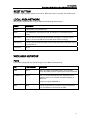
RESET BUTTON ....................................................................................... 3
LOCAL AREA NETWORK ............................................................................. 3
WIDE AREA NETWORK .............................................................................. 3
Ports.......................................................................................................................3
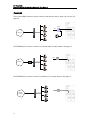
Examples .................................................................................................................4
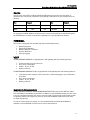
Routes ....................................................................................................................5
FIREWALL.............................................................................................. 5
VOIP................................................................................................... 5
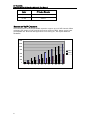
Bandwidth Requirements ............................................................................................5
Number of VoIP Channels............................................................................................6
QUICK SETUP ......................................................................................... 7
Connecting a PC to the LAN ........................................................................................7
Set up the PC to automatically obtain an IP address..........................................................7
Setting up the Browser ...............................................................................................9
Connecting to the programming interface ....................................................................10
Setting up ADSL......................................................................................................10
Setting up IP Trunks.................................................................................................12
Setting up IP Extensions............................................................................................12
Setting up UM Service ..............................................................................................15
Programming from BT Versatility Wizard.......................................................................................16
BASIC CONFIGURATION ............................................................................ 17
Setup Menu............................................................................................................17
LAN Gateway.....................................................................................................................................17
ADSL Modem .........................................................................................................19
(1) PPPoA.........................................................................................................................................19
(2) PPPoE ...........................................................................................................................................21
(3) DHCP............................................................................................................................................23
(4) Manual..........................................................................................................................................24
ETH/DMZ Port ........................................................................................................27
(1) PPPoE ...........................................................................................................................................27
(2) IP Gateway ...................................................................................................................................29
(3) DMZ..............................................................................................................................................31
VoIP......................................................................................................................33
Manually Configuring IP trunks .......................................................................................................33
Additional Endpoint Options ...........................................................................................................35
Advanced VoIP Settings ...................................................................................................................36
Unified Messaging Settings .............................................................................................................36
ISDN.....................................................................................................................37
WLAN ...................................................................................................................41
Quick Setup to WLAN without security..........................................................................................41
Connecting your PC to the Wireless Network ................................................................................43
Setting up WLAN with Security .......................................................................................................45
STATUS .............................................................................................. 55
SYSTEM BACKUP/RESTORE ........................................................................ 56
SYSTEM RESTART .................................................................................. 58
ADVANCED CONFIGURATION ..................................................................... 59
Admin Accounts ......................................................................................................59
Firewall & Security ...................................................................................................62
Security State ....................................................................................................................................62
Security Level ....................................................................................................................................63
Security Interfaces ............................................................................................................................64