1
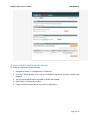
Magento Extension for Taxamo USER MANUAL Module Overview This Module for Taxamo is built to work with Magento Ecommerce platform; it connects with Taxamo’s server for calculating the Tax Price which is applied on each transaction that will be carried out through the store. In order for the Tax price (VAT) to be calculated this module has to do the connectivity through available API scripts. By posting the necessary information (Parameters) into Taxamo’s server through API, the system paves way for Taxamo’s server to calculate the VAT price (Tax amount ) and receives back the same which is presented on the store as the Tax amount and added to the transaction. Module Installation 5a. How to Install the Taxamo Module? The Taxamo Module can be installed into a Magento Store by following these guidelines. 1. Login to Magento Back office 2. Navigate through System => Magento Connect => Magento Connect Manager. 3. Before landing on Magento Connect Manager the system may prompt you to log in. Use the same login details that you use for Magento Back office to get in. 4. Once after you landed on Magento Connect Manager you will find two options i) Install New Module from Magento Connect, ii) Direct Package Upload. 5. You can choose Direct Package Upload since you will be provided with the files in hand. 6. After choosing the file and clicking on Upload will start the installation process. 7. On successful installation the system will display the message saying that the module is successfully installed. 8. Then click on the refresh button to see the Taxamo module installed and listed along with the other Modules that were already installed. Page 5 of 14