1
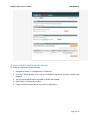
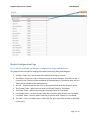
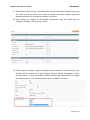
Magento Extension for Taxamo USER MANUAL Module Configuration Page 6a. Controls available on Module Configuration Page and their use. This page contains controls for making the module functioning along with Magento. 1. Enabled – Select Yes / No to make the module functioning or inactive. 2. Test Mode – Select Yes / No to allow the script to choose between Test and Live key. If chosen Yes the Test key will be considered for authentication. If chosen No then the Live Token will be considered for authentication. 3. API URL – Field that contains the url for making connectivity with the Taxamo’s server. 4. Test Private Token – Where you can enter the Private Token for Test Mode. 5. Test Public Token – Where you can enter the public Token for Live Mode. 6. Live Private Token – to enter Private Token key to connect with Taxamo in a Live Mode. 7. Live Public Token -‐ to enter Public Token key to connect with Taxamo in a Live Mode. 8. Tax Label – Enter the label name in which the Tax price should be printed or displayed on the store. Page 7 of 14