1
Operations Manual
USB Photo Relay Card
Operations Manual
SMARTLAB
USB 8 CHANNELS RELAY OUTPUT
8 CHANNELS PHOTO ISOLATOR
INPUT
USB Photo Relay Card
CHAPTERS
1. Introduction…………………………………..……
2. Hardware Configuration…………………..……....
3. Diagnostic under Windows/XP ………………..…
4. Software Programming under Windows/XP and
Linux……………………………………………..……
OPERATION MANUAL
1
5
12
13
APPENDICES
A. Warranty Information…………………………….. 14
B. Data Sheet…………..…………………………….. 17
Decision Computer Int’l. Co., Ltd.
DECISION Computer International
i
- i - ii DECISION Computer International
Operations Manual
USB Photo Relay Card
Operations Manual
CHAPTER 1
•
INTRODUCTION
•
The USB 8 channels relay output / photo isolator input card
provides photo couple digital input and relay output channels.
The photo isolator input part provides 8 photo couple digital
input channels, which allow the input signals to be completely
floated and prevent the ground loop. The relay output part
provides 8 relays to drive 8 different output channels. Each
relay channel can be used to control ON/OFF of external
devices, to drive external power relays, to activate alarms… etc.
•
•
The USB 8 channels relay output / photo isolator input card
also provide 16 digital input/output channels, which allows
connect to external devices for applications of digital I/O.
•
The USB 8 channels relay output / photo isolator input card
provides Plug and Play (PnP) features, it is a programmable I/O
interface card for PC/486, Pentium, or compatibles. The on
board high speed 8051 uC provides USB functions run at
12Mbps full speed or 1.5Mbps low speed.
•
•
•
•
•
•
•
The features of USB 8 channels relay output / photo
isolator input card are:
•
•
•
•
•
•
USB2.0 with Plug and Play (PnP) features.
High speed 8051 uC core.
Support USB ID selection to identify USB device.
By using PC817 photo couple chips.
Power supplied from external DC +5V.
Support 8 photo couple input channels and 8 relay
output channels.
DECISION Computer International
1
USB Photo Relay Card
Allow the photo input signals to be completely floated
and prevent the ground loops.
16 LED correspond to 16 input/output ports activation
status.
For photo couple input channel, the isolation voltage is
5000V, maximum load voltage is 30V, maximum input
current is 50mA forward.
Activation voltage of photo input:
When short jumpers (input range from 0 to 20V DC)
0 to 2.3V inactive
3 to 20V active
When open jumpers (input range from 0 to 30V DC)
0 to 16.9V inactive
17.6 to 30V active
For relay output channel, maximum contact rating is
120V/AC, 120V/DC 1AMP, minimum response time is
1ms, maximum contact resistance is 0.1 OHM.
Support 16 digital input/output channels.
Each digital I/O provides voltage range from 0V to
3.5V, where 0 to 0.4V is OFF and 2.8V to 3.4V is ON.
Suitable for Linux, MS/WINDOWS, ... etc.
Operating temperature range from 0 to 33C.
Relative humidity rage from 0 to 90%.
Dimension 250mm*120mm*55mm.
Weight 470Gram.
PACKAGE CONTENTS:
•
•
•
- 1 - 2
SMARTLAB USB 8 channels relay output / 8 channels
photo couple input card.
USB cable.
User’s manual.
DECISION Computer International
Operations Manual
•
•
USB Photo Relay Card
Operations Manual
USB Photo Relay Card
Decision Studio CD for USB Serial Product.
Warranty form.
DECISION Computer International
3
- 3 - 4
DECISION Computer International
Operations Manual
USB Photo Relay Card
Operations Manual
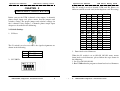
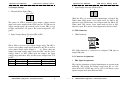
The S2 switch is used to identify USB card ID. Please set
different card ID to each card (do not duplicate card ID setting).
CHAPTER 2
HARDWARE CONFIGURATION
1
ON
OFF
ON
OFF
ON
OFF
ON
OFF
ON
OFF
ON
OFF
ON
OFF
ON
OFF
Before you use the USB 8 channels relay output / 8 channels
photo couple input card, please ensure that the jumpers and
switches setting. The proper jumper and switches settings for
the 8 channels relay output / 8 channels photo couple input
adapter are described in the following.
2.1 Switch Settings
1. S1 Reset
The S1 switch is used to reset 8051, the signal assignments are
shown in the following.
Pin
3,4
1,2
Signals
Reset SW+
Reset SW-
2
ON
ON
OFF
OFF
ON
ON
OFF
OFF
ON
ON
OFF
OFF
ON
ON
OFF
OFF
3
ON
ON
ON
ON
OFF
OFF
OFF
OFF
ON
ON
ON
ON
OFF
OFF
OFF
OFF
4
ON
ON
ON
ON
ON
ON
ON
ON
OFF
OFF
OFF
OFF
OFF
OFF
OFF
OFF
Card ID
-14
13
12
11
10
9
8
7
6
5
4
3
2
1
0
3. Down load revised firmware
When the S2 switch is set to ON ON ON ON status, means
down load revised firmware. please follow the steps shown in
the following:
1. Set S2 to ON ON ON ON.
2. Run USBBootloader program to down load revised firmware.
2. S2 USB ID
DECISION Computer International
USB Photo Relay Card
5
- 5 - 6
DECISION Computer International
Operations Manual
USB Photo Relay Card
Operations Manual
USB Photo Relay Card
3. Input/Output Selection (JP10 to JP11)
1 2
2.2 Jumper Settings
1. External Power Input (TB1)
SGND +5V
. .
. .
The power of USB 8 channels relay output / photo isolator
input card can be supplied from USB, however, if USB can not
supply enough power, the external power is need. TB1 is used
to input external DC +5V power. Be careful to input DC +5V
power.
2. Input Voltage Range Selection (JP2 to JP9)
1 2
JP10 and JP11 are used to select input/output of digital I/O.
When short JP10 means select input mode for D0 to D7,
otherwise open JP10 means select output mode for D0 to D7.
When short JP11 means select input mode for D8 to D15,
otherwise open JP11 means select output mode for D8 to D15.
2.3 USB Connector
1. USB Connector
. .
JP2 to JP9 are used to select input voltage range. The JP2 is
used to select photo couple input channel 0, and JP3 is used to
select photo couple input channel 1 … etc. When short the
jumper, the input voltage range from 0 to 20V, and the active
voltage form 3 to 20V. When open the jumper, the input
voltage range from 0 to 30V, and the active voltage from 17.6
to 30V.
Jumper Input Voltage Inactive Voltage Active Voltage
open
0 to 30V
0 to 16.9V
17.6 to 30V
short
0 to 20V
0 to 2.3V
3 to 20V
DECISION Computer International
7
The USB connector is connected to computer USB port by
using USB cable.
2.4 Connector Assignments
1. TB1 Signal Assignments
The signal assignments of digital input/output are shown in the
following. The digital I/O voltage range from 0V to 3.5V,
where 0 to 0.4V is OFF and 2.8V to 3.4V is ON. Please select
input or output mode from JP10 and JP11.
- 7 - 8
DECISION Computer International
Operations Manual
USB Photo Relay Card
Operations Manual
TB1
Pin
1
2
3
4
5
6
7
8
9
10
11
12
13
14
15
16
Signal
DIO15
DIO14
DIO13
DIO12
DIO11
DIO10
DIO09
DIO08
DIO07
DIO06
DIO05
DIO04
DIO03
DIO02
DIO01
DIO00
10
11
12
13
14
15
16
Description
Digital I/O Channel 15
Digital I/O Channel 14
Digital I/O Channel 13
Digital I/O Channel 12
Digital I/O Channel 11
Digital I/O Channel 10
Digital I/O Channel 09
Digital I/O Channel 08
Digital I/O Channel 07
Digital I/O Channel 06
Digital I/O Channel 05
Digital I/O Channel 04
Digital I/O Channel 03
Digital I/O Channel 02
Digital I/O Channel 01
Digital I/O Channel 00
Opto-isolator Ch. 03 + Input
Opto-isolator Ch. 02 - Input
Opto-isolator Ch. 02 + Input
Opto-isolator Ch. 01 - Input
Opto-isolator Ch. 01 + Input
Opto-isolator Ch. 00 - Input
Opto-isolator Ch. 00 + Input
3. TB3 and TB4 Output Signal Assignments
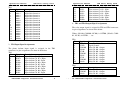
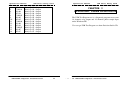
The relay output signal is assigned in TB3 and TB4 connector,
its pin assignments are show in the below.
Where (NO-00, COM-00, NC-00) is OUT00, (NO-01, COM01, NC-01) is OUT01, … etc.
2. TB2 Input Signal Assignments
The photo isolator input signal is assigned in the TB2
connector, its pin assignments are show in the below.
TB2
Pin
Signal
Description
1
IN-07Opto-isolator Ch. 07 - Input
2
IN-07+
Opto-isolator Ch. 07 + Input
3
IN-06Opto-isolator Ch. 06 - Input
4
IN-06+
Opto-isolator Ch. 06 + Input
5
IN-05Opto-isolator Ch. 05 - Input
6
IN-05+
Opto-isolator Ch. 05 + Input
7
IN-04Opto-isolator Ch. 04 - Input
8
IN-04+
Opto-isolator Ch. 04 + Input
9
IN-03Opto-isolator Ch. 03 - Input
DECISION Computer International
IN-03+
IN-02IN-02+
IN-01IN-01+
IN-00IN-00+
USB Photo Relay Card
9
TB3
Pin
1
2
3
4
5
6
7
8
9
10
Signal
EXT+V
SGND
COM-00
NO-00
NC-00
COM-01
NO-01
NC-01
COM-02
NO-02
Description
External +5V 3A Power
Signal Ground
Relay Ch. 00 - Output
Relay Ch. 00 - Output
Relay Ch. 00 - Output
Relay Ch. 01 - Output
Relay Ch. 01 - Output
Relay Ch. 01 - Output
Relay Ch. 02 - Output
Relay Ch. 02 – Output
TB4
Pin
1
2
3
Signal
NC-02
COM-03
NO-03
Description
Relay Ch. 02 - Output
Relay Ch. 03 - Output
Relay Ch. 03 - Output
- 9 - 10 DECISION Computer International
Operations Manual
4
5
6
7
8
9
10
11
12
13
14
15
16
NC-03
COM-04
NO-04
NC-04
COM-05
NO-05
NC-05
COM-06
NO-06
NC-06
COM-07
NO-07
NC-07
USB Photo Relay Card
Relay Ch. 03 - Output
Relay Ch. 04 - Output
Relay Ch. 04 - Output
Relay Ch. 04 - Output
Relay Ch. 05 – Output
Relay Ch. 05 - Output
Relay Ch. 05 - Output
Relay Ch. 06 - Output
Relay Ch. 06 - Output
Relay Ch. 06 - Output
Relay Ch. 07 - Output
Relay Ch. 07 - Output
Relay Ch. 07 - Output
DECISION Computer International
Operations Manual
USB Photo Relay Card
CHAPTER 3
DIAGNOSTIC UNDER WINDOWS/XP
The USB Test Program.exe is a diagnostic program to test your
16 channels relay output and 16 channels photo couple input
under Windows/XP.
User can get USB Test Program.exe from Decision Studio CD.
11
- 11 - 12 DECISION Computer International
Operations Manual
USB Photo Relay Card
Operations Manual
USB Photo Relay Card
CHAPTER 4
APPENDIX A
SOFTWARE PROGRAMMING UNDER
WINDOWS/XP AND LINUX
WARRANTY INFORMATION
A.1 Copyright
To input data from photo couple channel or output data to relay
output channel, please use Hid API functions. User can get Hid
API functions from Decision Studio package.
Copyright DECISION COMPUTER INTERNATIONAL CO.,
LTD. All rights reserved. No part of SmartLab software and
manual may be produced, transmitted, transcribed, or translated
into any language or computer language, in any form or by any
means, electronic, mechanical, magnetic, optical, chemical,
manual, or otherwise, without the prior written permission of
DECISION COMPUTER INTERNATIONAL CO., LTD.
Each piece of SmartLab package permits user to use SmartLab
only on a single computer, a registered user may use he
program on a different computer, but may not use the program
on more than one computer at the same time.
Corporate licensing agreements allow duplication and
distribution of specific number of copies within the licensed
institution. Duplication of multiple copies is not allowed
except through execution of a licensing agreement. Welcome
call for details.
A.2 Warranty Information
SmartLab warrants that for a period of one year from the date
of purchase (unless otherwise specified in the warranty card)
that the goods supplied will perform according to the
specifications defined in the user manual. Furthermore that
DECISION Computer International
13
- 13 - 14 DECISION Computer International
Operations Manual
USB Photo Relay Card
the SmartLab product will be supplied free from defects in
materials and workmanship and be fully functional under
normal usage.
Operations Manual
USB Photo Relay Card
SmartLab. Goods returned without this authorization will not
be attended to.
In the event of the failure of a SmartLab product within
the specified warranty period, SmartLab will, at its option,
replace or repair the item at no additional charge. This
limited warranty does not cover damage resulting from
incorrect use, electrical interference, accident, or modification
of the product.
All goods returned for warranty repair must have the serial
number intact. Goods without serial numbers attached will not
be covered by the warranty.
The purchaser must pay transportation costs for goods returned.
Repaired goods will be dispatched at the expense of SmartLab.
To ensure that your SmartLab product is covered by the
warranty provisions, it is necessary that you return the
Warranty card.
Under this Limited Warranty, SmartLab's obligations will be
limited to repair or replacement only, of goods found to be
defective a specified above during the warranty period.
SmartLab is not liable to the purchaser for any damages or
losses of any kind, through the use of, or inability to use, the
SmartLab product.
SmartLab reserves the right to determine what
warranty repair or replacement.
constitutes
Return Authorization: It is necessary that any returned goods
are clearly marked with an RA number that has been issued by
DECISION Computer International
15
- 15 - 16 DECISION Computer International
Operations Manual
USB Photo Relay Card
Operations Manual
USB Photo Relay Card
APPENDIX B
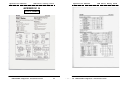
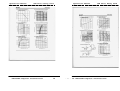
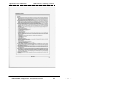
DATA SHEET
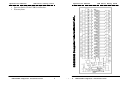
DECISION Computer International
17
- 17 - 18 DECISION Computer International
Operations Manual
USB Photo Relay Card
DECISION Computer International
19
Operations Manual
USB Photo Relay Card
- 19 - 20 DECISION Computer International
Operations Manual
USB Photo Relay Card
DECISION Computer International
21
- 21 -