1
CP62 – Operating Manual
4 Maintenance
Use the information in this section to properly maintain the operation of your CP62 AC/DC Current
Probe.
4.1 Battery and AC Power Adapter Operation:
The CP62 current probe uses a single 9 V battery. Only use alkaline batteries.
As the battery in the CP62 current probe is drained, significant gain errors may occur. The green LED
will continue to light until a low battery voltage of 6.5 V is reached. If probe gain errors are detected
before the LED extinguishes or becomes dim, replace the probes battery with a fresh one.
Alternatively, an AC power adapter can be used to avoid gain error due to the battery condition. Switch
to a square 9V battery only when there is no AC power supply available outdoors.
When using an AC power adapter for an extended time, we suggest you remove the battery from the
compartment. This is because overheating may cause battery leakage, which may damage circuitry.
It is safe to power the CP62 with the AC adapter while the battery is installed. Disconnecting the
external power supply will not produce waveform anomaly or any damage. However, when operating
the CP62 with the AC adapter for an extended time period (more than 1 week), removal of the battery is
recommended, to avoid battery leakage.
4.2 Battery Installation:
(1) Remove the probe from the circuit.
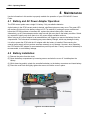
(2) Open the battery compartment by loosening screws and take the cover off. Install/replace the
battery.
(3) While observing polarity, attach the new alkaline battery to the battery connectors and insert battery
(4) Place the cover back and lightly tighten the screws to hold the cover in place.
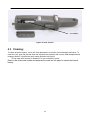
9V Battery
Figure 8: Pre 2014 version
16