1
5. Events
In the events section the user can receive and browse the events stored by the central
panel. It is recommended to download the events of the devices as frequently as
possible because the events memory of the devices is limited.
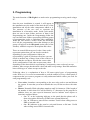
Figure 11 – Events Panel
There are some different options to list the events in some different ways. First of all,
the user can select which type of events wants to see in the list, filtering the others.
Selecting or unselecting the following checkboxes, the users selects the filters to apply.
The filtering options are:
•
•
•
•
•
•
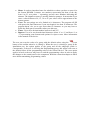
Show Alarms: list/filter alarms and restores events.
Show Failures: list/filter failures and restores events.
Show ON/OFF: list/filter armings, openings and disarmings and closings
events.
Show Supervisory: list/filter supervisory events.
Show Tests: list/filter tests events.
Show Bypasses: list/filter bypasses events and its restores.
In addition, there is the option of invert the order of the list. The events use to be listed
from the oldest to the newer but sometimes is interesting to see the newest first. In this
case the user can select the invert order checkbox.