1
Fuse Block Cover
1.0.2 Site Preparation
3.
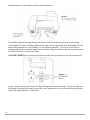
Figure 2: Fuse Block Access
Reverse the position of the fuse block so that the desired voltage will
appear in the fuse block cover.
Changing the
Fuse Configuration (continued):
Voltage shown “right -side3.
Fuse Block Cover
10 amp Fuse for 115V system
up” will show when the
5 amp Fuse for 230V system
fuse block cover is
on opposite
side
Figure
2:
Fuse so
Block
Access
Reverse the
position
of
the
fuse
block
that
the
desired
voltage
will appear in
replaced.
3. Reverse the position of the fuse block so that the desired voltage will
block cover.
the fuse
appear in the fuse block cover.
Voltage shown “right -side10 amp Fuse for 115V system
up” will show when the
5 amp Fuse for 230V system
Figure 3: Fuse Block
fuse block cover is
on opposite side
4. Close the fuse block cover and verify that the desired voltage is
replaced.
showing.
Risk of Electrical Fire
Figure
3: Fuse
Do not
change
theBlock
fuse location in the fuse block.
4. Close the fuse block cover and verify that the desired voltage is showing.
Risk of Electrical Fire - Do not change the fuse location in the fuse block. Do not put
a 10-amp fuse in place of a 5-amp fuse. Do not put a 5-amp fuse in place of a
10-amp fuse.
10