1
4-2
Amps Measurements
Measurement overview
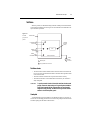
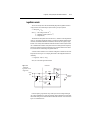
Amps measurements — Model 6514 can make amps measurements from 100aA to 21mA
using 10 measurement ranges; 20pA, 200pA, 2nA, 20nA, 200nA, 2µA, 20µA, 200µA, 2mA,
and 20mA.
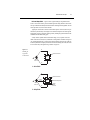
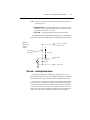
External feedback — The external feedback mode of Model 6514 can be used to measure
logarithmic currents, and re-configure the input to use non-decade current ranges. Measurements using the external feedback mode are covered in Section 11.
NOTE
Accuracy specifications for all measurement functions are provided in Appendix A.
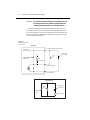
Amps measurement procedure
CAUTION
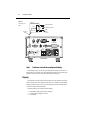
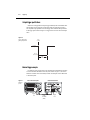
The maximum input voltage and current to Model 6514 is 250V peak and
21mA. Exceeding either of these values may cause damage to the instrument that is not covered by the warranty.
WARNING
The maximum common-mode input voltage, which is the voltage between
the input (HI or LO) and chassis ground, is 500V peak. Exceeding this value
may create a shock hazard.
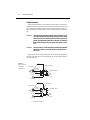
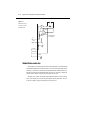
To achieve optimum precision for low-level current measurements, input bias current and
voltage burden can be minimized by performing the offset correction procedures in Section 19.
Information about these offsets are provided in “Current Measurement Considerations” (located
in this section).
NOTE
After measuring high voltage or high ohms, it may take several minutes for the input
current to drop to within specified limits. Input current can be verified by placing the
protection cap on the input triax connector, and then installing the ground link
between COMMON and CHASSIS ground. With the instrument on the 20pA range
and zero check disabled, allow the reading to settle until the input bias current is
within specifications. The specifications for input bias current are listed in
Appendix A.
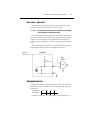
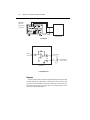
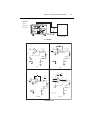
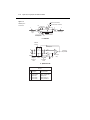
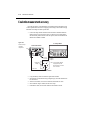
Perform the following steps to measure current:
Step 1
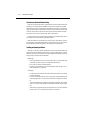
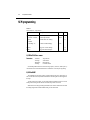
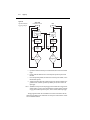
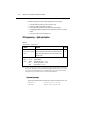
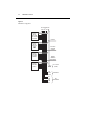
Enable zero check and select the amps (I) function
Zero check should always be enabled before making function or connection changes. The
ZCHK key toggles zero check on and off. When on, the “ZC” or “ZZ” message is displayed. See
Section 2 for details on zero check.
The amps function is selected by pressing the I key.