1
VB7007 User Manual
Navigating the BIOS Menus
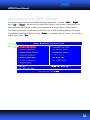
The main menu displays all the BIOS setup categories. Use the <Le
Left
Right>
Left>/<Right
ft
Right
and <Up
Up>/<Down
Down>
Up
Down arrow keys to select any item or sub-menu. Descriptions of
the selected/highlighted category are displayed at the bottom of the screen.
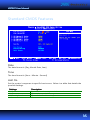
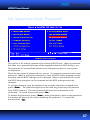
The small triangular arrowhead symbol next to a field indicates that a sub-menu
is available (see figure below). Press <Enter
Enter>
Enter to display the sub-menu. To exit the
sub-menu, press <Esc
Esc>.
Esc
31